
Voice Recording and Transcription
Most voice recording tools do half the job – they capture what you say, then leave you to fix the mess. WriteVoice does both: it transcribes your speech in under one second and rewrites it into polished, ready-to-send text, directly inside WhatsApp, Slack, Gmail, or wherever you’re already working. No copy-paste. No app switching. No editing raw rambles. Professionals who speak at 150 WPM no longer have to send messages at 30 WPM typing speed.

How WriteVoice Handles Voice Recording and Transcription
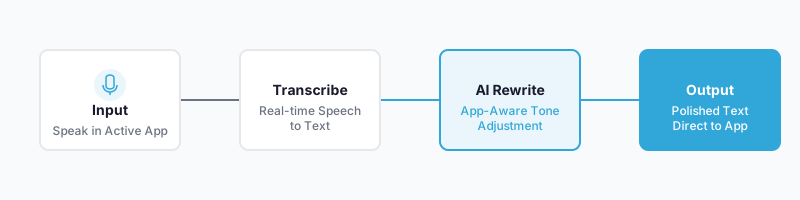
WriteVoice is built around a two-step pipeline that most dictation tools skip entirely. Step one: real-time transcription with sub-1-second latency. Step two: instant AI rewriting. Not just grammar cleanup – full tone transformation into 25+ styles including Professional, Email, Tweet, Casual, and more. The raw transcript never reaches the recipient. What gets sent is already polished.
The key differentiator is where this happens. WriteVoice is an iOS custom keyboard replacement, meaning the microphone lives inside every app on your phone – WhatsApp, iMessage, Slack, Gmail, Notion. Tap the mic, speak naturally (filler words, rambling, and pauses are all fine), and polished text appears directly in the message field. On Mac, a hotkey triggers the same pipeline from any application. No separate dictation app. No copy-paste step.
WriteVoice also detects which app you’re in and adjusts tone automatically. Dictating into LinkedIn produces thought-leadership copy. The same voice note into WhatsApp produces a casual, conversational message. Into Gmail, it defaults to formal. No competing tool does this – not Otter.ai, not Speechnotes, not Grammarly, whose Voice Composer feature for iOS was discontinued.
For longer sessions, WriteVoice’s web app supports hour-long meeting recordings. The full audio is transcribed, then structured into summaries, action items, and organized notes across 120+ languages. All dictations sync across iOS, Mac, and Web, with a history saved for later refinement.
Key Benefits
Most voice-to-text tools give you an unedited version of your ramble. WriteVoice’s AI removes filler words, fixes structure, and rewrites to the selected tone before anything is sent. Zero-to-minimal editing required.
As an iOS keyboard replacement, WriteVoice is available wherever your standard keyboard appears. One tap on the mic in WhatsApp or Slack starts dictation. Text appears directly in the message field – no copy-paste, no context switch.
The transcription and rewrite pipeline completes in under one second. You speak, you send. That speed is what makes voice-first workflows practical in real messaging environments, not just quiet office settings.
WriteVoice detects your active app and adjusts output tone automatically: professional for LinkedIn, casual for WhatsApp, formal for Gmail. No manual style selection needed unless you want it.
Audio is processed in real time and immediately discarded. Nothing is stored. Nothing is used to train the AI model. This zero-retention approach is designed for healthcare professionals, lawyers, and executives handling sensitive information, with HIPAA and GDPR workflows in mind.
WriteVoice offers a lifetime deal starting at €119, covering iOS, Mac, and Web, with all future updates included. Otter.ai’s Business plan runs $19.99/user/month ($240/year). Descript’s creator plan is $24/month ($288/year). WriteVoice’s $15/month Unlimited plan or the €119 one-time payment covers both transcription and rewriting at a fraction of running two separate tools.
How It Works
Step 1: Install the keyboard or app
On iOS, install WriteVoice as a custom keyboard replacement. It activates from within any app’s standard keyboard row – no new app to open mid-conversation. On Mac, download the native desktop app (Apple Silicon M1–M4 and Intel x86 both supported) and assign a hotkey. On web, open the app directly for meeting recording sessions.
Step 2: Speak naturally inside your active app
Tap the microphone button in the iOS keyboard (or press the Mac hotkey) and speak. No need to structure your thoughts, avoid filler words, or dictate slowly. The AI handles cleanup downstream.
Step 3: AI transcribes and rewrites in under one second
The pipeline removes filler words, fixes grammar, structures the content, and applies tone based on active app context. A two-minute rambling voice memo becomes a professional Slack message or a concise email reply. Instantly.
Step 4: Select a rewrite style if needed
25+ styles are available: Professional, Tweet, Email, Casual, Shorten, Expand, Fix Grammar, Emojify, and more. Apply additional AI commands to further refine. Custom vocabulary and tone learning adapts to your personal communication style over time.
Step 5: Send directly from the active app
The rewritten text sits in the message field of your current app. No copy-paste required. Tap send.
Who This Is For
Mobile-heavy professionals who live in messaging apps
If you send 50+ messages a day via WhatsApp, Slack, or iMessage – and you’re often doing it on the go, one-handed, between meetings – typing at 30 WPM on glass is a constant bottleneck. WriteVoice replaces your keyboard with a dictation-first workflow that produces polished text as fast as you can speak. As one software engineer put it: “This is crazy, I never expected I’d be using the mobile version, literally can send messages while walking.”
Founders and knowledge workers who generate content from voice
A founder who records voice memos on the commute and ends up with unusable audio files, or a manager who wants to turn a 90-second ramble into a LinkedIn post – these are the primary users. You dump your thoughts out loud, and WriteVoice structures them into a post, email, or document worth sending.
Privacy-sensitive professionals – lawyers, healthcare workers, executives
If you’re dictating confidential case notes, patient information, or board-level strategy, you need to know exactly where your audio goes. WriteVoice’s zero-retention policy (audio immediately deleted, never stored, never used for AI training) directly addresses GDPR and HIPAA concerns that most voice recording and transcription tools ignore.
Students and real-time note-takers
Fast, accurate transcription across 120+ languages means class notes captured as the lecture happens. No manual review required afterward. One law student called it “game changer for class notes” and specifically praised the microphone in the keyboard.
Common Use Cases
Sending a polished Slack reply while walking between meetings
You’re away from your desk, you need to respond to a detailed Slack thread, and typing on mobile is slow and error-prone. Open Slack, tap the WriteVoice mic, talk through your answer, and a structured, professional reply appears in the message field – without stopping or sitting down.
Turning a rambling voice memo into a LinkedIn post
You record a 90-second voice note with a business insight on the drive in. Instead of manually editing it into post format, you speak into WriteVoice, select the LinkedIn rewrite style, and get polished thought-leadership copy ready to publish. As one founder described it: “I hate writing, so I dump my thoughts & get LinkedIn posts. Chef’s kiss.”
Drafting a professional email from a voice note
You have a complex email to write where context, tone, and structure all matter. Speaking it is faster than typing. WriteVoice transcribes, applies the Email rewrite style, and inserts the result directly into Gmail. Sub-second turnaround, zero manual editing.
Transcribing and summarizing an hour-long meeting
Using the web app, record your meeting audio. WriteVoice transcribes the full session and generates a structured summary: key decisions, action items, and organized sections. Built-in translation into 30+ languages makes this practical for multilingual teams.
Dictating class notes in real time
A law student is in a lecture. Instead of typing notes or struggling with abbreviations, they dictate quietly into WriteVoice. The app captures, cleans, and structures the content as it’s spoken. Ready to review at the end of class, no additional editing needed.
What Is Voice Recording and Transcription?
Voice recording and transcription is the process of capturing spoken audio and converting it into written text. A microphone records the audio; machine-learning models trained on large speech datasets convert it to text. Modern tools hit above 95% accuracy across accents, languages, and ambient noise conditions.
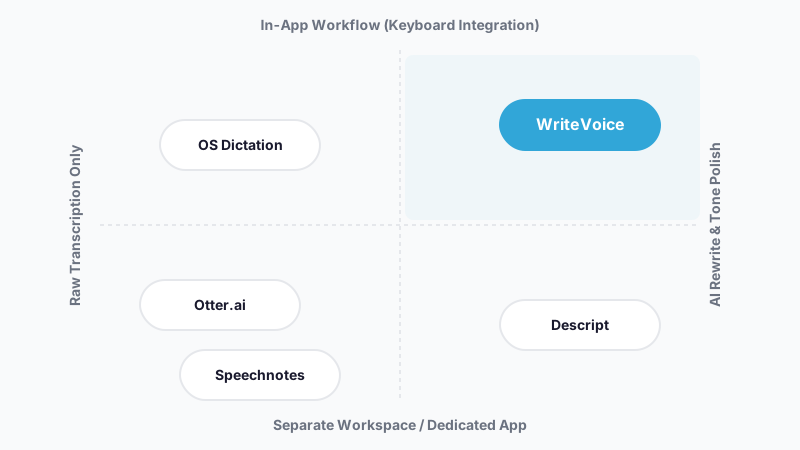
The market has split into two distinct product categories. Transcription-only tools – Otter.ai, Speechnotes, Descript, and Transcribe.com – convert speech to text and stop there. The user is responsible for editing the output into something readable and sendable. Transcription-plus-rewriting tools add an AI layer that transforms raw transcription into polished, context-aware content. Until recently, Grammarly’s Voice Composer handled this second step on iOS – but that feature has been discontinued, leaving WriteVoice as the primary keyboard-integrated option combining both transcription and rewriting in a single step.
The broader market is expanding fast. The global speech recognition segment was valued at $10–12 billion in 2023 and is growing at 14–23% CAGR through 2030. Meeting transcription specifically is projected to exceed $4 billion by 2028. The intersection of in-app keyboard dictation and AI rewriting is where WriteVoice sits – and no major player has moved into that specific gap yet.
Try WriteVoice
If you’re losing time to slow mobile typing, unedited voice rambles, or the copy-paste shuffle between apps, WriteVoice solves all three in a single keyboard install. Start free – 2,000 words your first month, no credit card required – and see how fast you move when speaking at 150 WPM actually makes it into your messages.
Frequently Asked Questions
What is an AI dictation app and how does it differ from regular voice to text?
An AI dictation app transcribes your speech into text and then uses machine learning to rewrite it into polished, context-aware content-removing filler words, fixing grammar, and adjusting tone automatically. Regular voice-to-text tools simply convert speech to text and stop; you’re left editing the raw output yourself. WriteVoice goes further by detecting which app you’re using (WhatsApp, LinkedIn, Gmail) and rewriting to match that context without manual intervention. This transforms dictation from a rough draft into ready-to-send messaging in under one second.
How does speech to text on iOS typically work with a custom keyboard?
An iOS custom keyboard replaces your standard keyboard and appears whenever you’d normally type-inside WhatsApp, Slack, Gmail, iMessage, or any app. WriteVoice installs as a custom keyboard, so tapping the microphone button in any messaging app starts transcription directly in that app’s message field. Most competing dictation tools require you to open a separate app, record, transcribe, then copy-paste the text back into your original conversation-breaking your focus and adding extra steps. WriteVoice eliminates the app-switching workflow entirely by living inside the keyboard itself.
What makes WriteVoice different from just using Otter or Speechnotes?
Otter and Speechnotes transcribe speech into text but leave you to edit the raw output; WriteVoice transcribes and rewrites simultaneously into polished, ready-to-send content using 25+ AI rewrite styles. Otter is designed primarily for meeting transcription with Zoom/Teams integrations; WriteVoice is built for mobile messaging and real-time communication where you’re already texting. WriteVoice also detects your active app and adjusts tone automatically (professional for LinkedIn, casual for WhatsApp, formal for Gmail), a feature neither Otter nor Speechnotes offers. Most importantly, WriteVoice works as an iOS keyboard replacement-no copy-pasting required.
Is voice to text secure and private with WriteVoice?
WriteVoice uses zero-retention audio processing: your voice is transcribed in real time and immediately deleted-nothing is stored on servers or used to train the AI model. This privacy-first architecture is specifically designed for healthcare professionals, lawyers, and executives handling sensitive information under HIPAA and GDPR compliance requirements. Unlike most voice recording and transcription tools, WriteVoice never builds a database of your voice data, eliminating the risk of inadvertent data leaks or training on confidential material. Your dictations are synced across your devices but never exposed to third parties.
How can I use a voice to text app to send professional messages quickly?
Open any messaging app (WhatsApp, Slack, Gmail, iMessage), tap the WriteVoice microphone in your keyboard, and speak naturally-rambling, pausing, and using filler words are all fine. The AI transcribes and rewrites your speech into polished, professional text in under one second, inserting it directly into the message field so you can send immediately. WriteVoice auto-detects the app you’re in and adjusts tone accordingly, so the same voice note becomes formal for email, casual for WhatsApp, or thought-leadership for LinkedIn without manual selection. A software engineer using WriteVoice described it as enabling her to “send messages while walking”-no desk required.
What does it cost to use a dictation app for professionals like WriteVoice?
WriteVoice offers a free Starter plan (2,000 words first month, no credit card required), an Unlimited subscription at $15/month with no per-device or per-minute limits, and a one-time lifetime deal starting at €119 covering iOS, Mac, and Web with all future updates. Comparable tools charge significantly more: Otter’s Business plan is $19.99/user/month ($240/year); Descript is $24/month ($288/year); most competitors charge separately per device or require multiple subscriptions. WriteVoice’s lifetime deal provides both transcription and rewriting-two separate capabilities most competitors sell as distinct tools-at a fraction of running them in parallel.
Can I use a voice note to text app to create social media content?
Yes-WriteVoice includes 25+ rewrite styles specifically for content creation, including Tweet, Email, Professional, Casual, Expand, and Shorten modes, plus specialized tools for YouTube descriptions, titles, hooks, and social threads. You can record a rambling voice memo about a business insight and apply the LinkedIn Professional style to turn it into ready-to-post thought-leadership copy in seconds. The web app supports hour-long recording sessions, perfect for capturing podcast ideas or long-form thoughts that you later transform into multiple social posts, blog snippets, or email newsletters. One founder reported: “I hate writing, so I dump my thoughts & get LinkedIn posts.”
What languages does a privacy-first voice to text app support?
WriteVoice supports dictation and transcription across 120+ languages and can translate meeting recordings into 30+ languages, making it practical for globally distributed teams or multilingual professionals. The app handles accents, technical jargon, and natural speech patterns across all supported languages with 98%+ transcription accuracy. This broad language coverage, combined with zero-retention audio processing (no training data collected), makes WriteVoice particularly valuable for international teams in regulated industries like healthcare and law where both privacy and language diversity are critical. Custom vocabulary and tone learning adapts to your personal communication style regardless of language.
Why would I choose a meeting transcription app like WriteVoice over basic voice memo recording?
Basic voice memo recording leaves you with unstructured rambles that are time-consuming to review or share; WriteVoice transcribes, summarizes, and automatically generates action items and organized notes from hour-long meetings. Unlike recording a voice memo, the output is immediately readable and shareable text-no playback required, no editing needed. WriteVoice’s web app also translates full meeting transcripts into 30+ languages on the fly, enabling async review across globally distributed teams without scheduling conflict. For solo professionals or small teams, this transforms meeting notes from a post-meeting editing burden into an immediate, structured record ready to share with stakeholders.
How does WriteVoice’s app-aware tone adjustment work for different apps?
WriteVoice detects which application you’re currently in (LinkedIn, WhatsApp, Gmail, Slack, etc.) and automatically applies a matching communication style to your transcribed speech without requiring manual input. A single voice note transcribed while you’re in Gmail will default to formal business tone; the same voice note in WhatsApp will produce casual, conversational text; in LinkedIn it becomes thought-leadership copy. This app-aware rewriting is unique to WriteVoice among iOS keyboard dictation tools and eliminates the need to manually select or adjust tone for each app you use. The system learns your personal communication patterns over time, refining the style match even further.
What happens if I need to edit a transcription after WriteVoice rewrites it?
You can apply any of WriteVoice’s 25+ additional rewrite styles (Shorten, Expand, Fix Grammar, Emojify, etc.) directly from the interface before sending, or you can manually edit the text as you would any message. Most users find that zero-to-minimal editing is needed because the AI already cleaned grammar, removed filler words, and matched the target app’s tone. If you need to revisit an earlier dictation, all transcriptions are saved to history across iOS, Mac, and Web, allowing you to refine or repurpose them later. The rewrite pipeline completes in under one second, so even if you select a different style or tweak the output, send time remains nearly instant.
Is WriteVoice available on Android, or only on iPhone?
WriteVoice is currently available as an iOS custom keyboard, Mac desktop app (Apple Silicon M1–M4 and Intel x86), and web app for meeting recording-no Android app or keyboard is mentioned in the product lineup. For iPhone users specifically, WriteVoice’s iOS keyboard integration is the core differentiator, embedding transcription and rewriting directly into the system keyboard across all apps. If you need Android support, Otter.ai and Speechnotes both offer Android apps, though neither combines transcription with automatic AI rewriting at the point of input. WriteVoice’s positioning focuses on the iOS ecosystem where custom keyboard APIs enable the seamless in-app workflow its competitors cannot replicate on Android.