
Transcribe Audio Recordings to Text
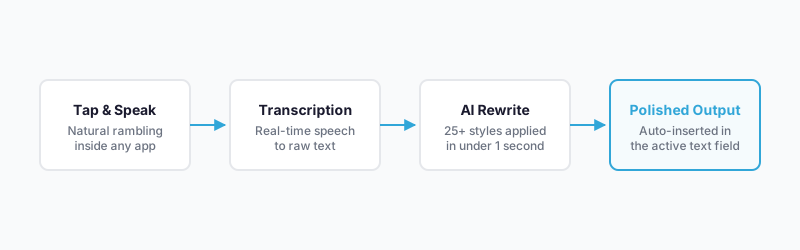
Uploading a file, waiting two minutes, then copy-pasting the transcript into wherever you actually needed it is the friction that kills productivity, yet that’s exactly how most transcription tools work. WriteVoice collapses that entire workflow into a single step: tap a mic button inside the app you’re already in, speak naturally, and get polished, structured text back in under a second. No app switching, no waiting, no editing. Dictating a WhatsApp reply or capturing a one-hour meeting works the same way – WriteVoice transcribes and rewrites in one pipeline.
How WriteVoice Transcribes and Rewrites Audio
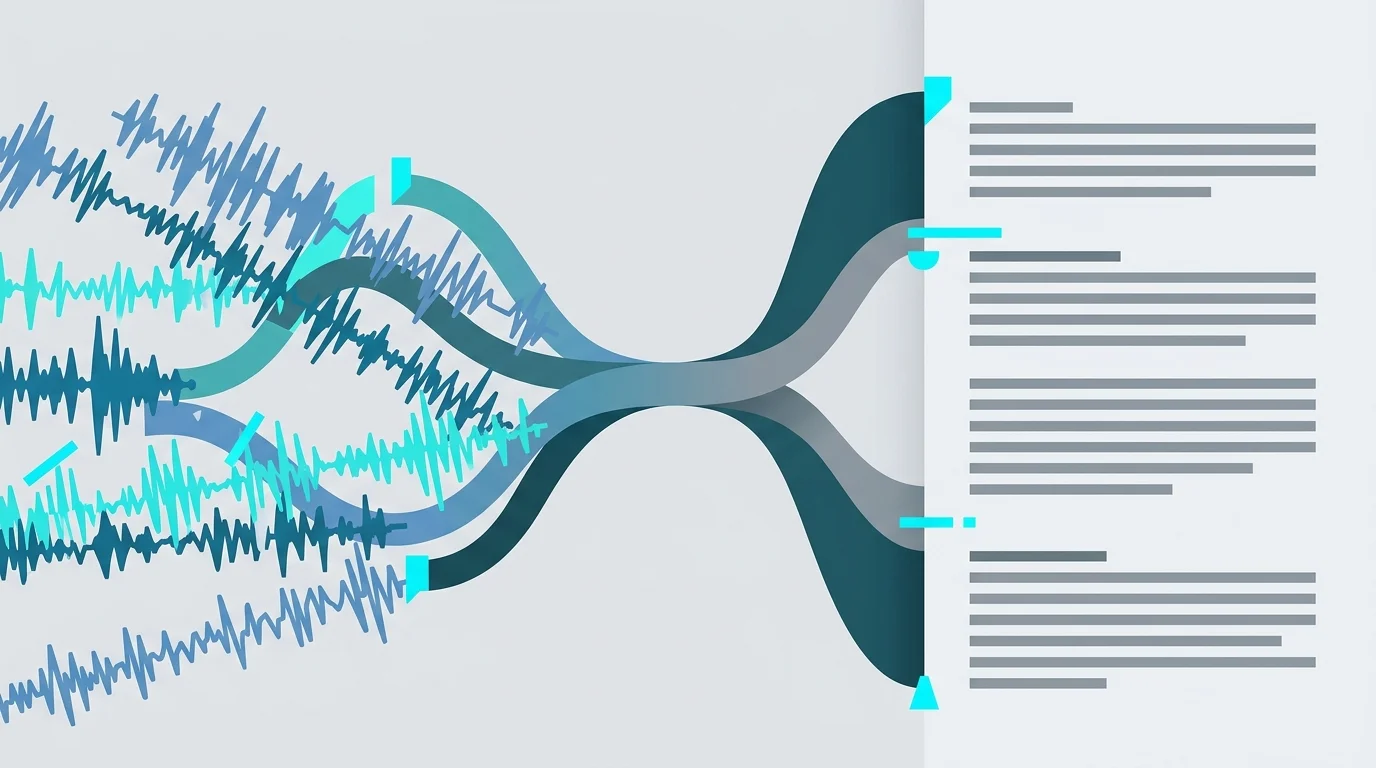
Most tools that transcribe audio recordings to text stop at the transcript. You get a wall of raw speech – filler words, run-on sentences, no punctuation – and the editing burden is entirely on you. WriteVoice is built on a two-step AI pipeline: (1) real-time speech-to-text transcription with sub-1-second latency, and (2) instant rewriting of that raw transcript into the format you actually need. That second step is what separates it from every file-upload transcription service on the market.
On iOS, WriteVoice installs as a custom keyboard replacement. That means the microphone button lives inside WhatsApp, Gmail, Slack, iMessage, Notion – any app you’re already using. You never open a separate app, paste anything, or break your workflow. On Mac, a hotkey triggers WriteVoice from anywhere. On the web app, you can record longer sessions like meetings and get a structured summary with action items.
The AI applies 25+ rewrite styles – Professional, Email, Tweet, Casual, Shorten, Expand, Fix Grammar, and more. WriteVoice also auto-detects the active app and adjusts tone automatically: your LinkedIn dictation gets thought-leader structure, your WhatsApp reply gets a casual, short format, your Gmail draft gets formal prose. You don’t have to select anything. The right style loads based on where you’re typing.
For long-form recordings, WriteVoice transcribes hour-long sessions and generates structured summaries, key decisions, and action items. The transcription engine supports 120+ languages, handles accents and technical jargon, and claims 98%+ accuracy (self-reported). All dictations sync across iOS, Mac, and Web and are saved to history for later refinement.
Key Benefits
Sub-1-second turnaround – faster than any file-based competitor
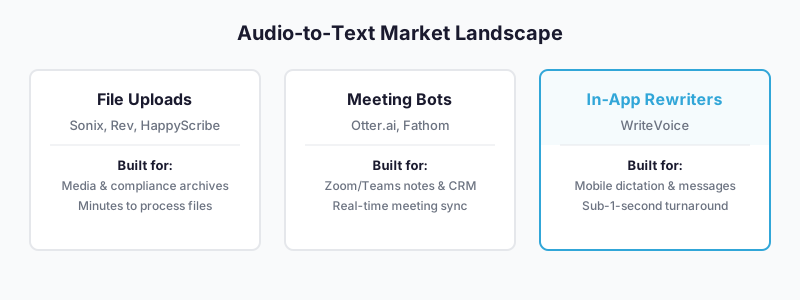
Sonix, Rev, and HappyScribe process uploaded audio files in minutes. WriteVoice claims sub-1-second transcribe and rewrite, meaning you’re not waiting – you’re already sending. For quick message dictation, that speed gap is the entire product.
In-app transcription – no copy-pasting between tools
Every file-upload transcription service requires you to leave your current app, upload, wait, copy, and return. WriteVoice is your iOS keyboard, so the transcript appears directly in the text field you’re composing in. The switching tax is zero.
25+ AI rewrite styles applied instantly
Raw transcripts are hard to read and awkward to send. WriteVoice cleans up filler words and restructures your speech into emails, tweets, professional posts, or casual replies, depending on what you select. Dictate a rambling two-minute idea dump and get a polished LinkedIn post in return.
Zero audio storage – built for privacy-sensitive use cases
Audio is processed in real-time and immediately discarded. Nothing is stored. Nothing is used to train AI models. For healthcare professionals, lawyers, and executives who cannot have recordings sitting on a third-party server, this architecture matters.
Lifetime deal – no monthly subscription required
Every competitor – Otter.ai, Sonix, Rev, Riverside – uses a subscription model starting at $8.33/month and scaling to $30+/month. WriteVoice offers a one-time lifetime deal starting at €119, covering iOS, Mac, and Web, with all future updates included. For individuals, that’s cheaper than two months of Otter at the Pro tier.
How It Works
Step 1: Install WriteVoice as your keyboard
On iPhone, install WriteVoice from the App Store and set it as your keyboard in Settings. It replaces your standard keyboard and adds a mic button that’s always visible. On Mac, download the desktop app (compatible with Apple Silicon M1–M4 and Intel x86) and set a hotkey. On Web, open the app directly – this is where meeting recording lives.
Step 2: Open the app you want to type in
Open WhatsApp, Gmail, Slack, LinkedIn, iMessage, Notion – whatever you’re composing in. WriteVoice is already there in the keyboard. You don’t switch apps. You don’t open a recording tool.
Step 3: Tap the mic and speak naturally
No structure required. Ramble, pause, use filler words. Speak at 150 WPM instead of typing at 30 WPM. WriteVoice captures everything in real-time and removes fillers, fixes grammar, and structures the content automatically.
Step 4: Select a rewrite style or let the app auto-detect
WriteVoice detects whether you’re in LinkedIn, WhatsApp, Gmail, or another app and loads an appropriate default style. If you want a different format – Shorten, Email, Tweet, Expand – tap the style you need. The AI rewrites the transcript in under a second.
Step 5: The text appears in the active field – ready to send
No copy-paste. No opening another app. The polished text is already in your WhatsApp message box, your Gmail draft, your LinkedIn post. Tap send.
Who This Is For
WriteVoice is built for professionals who communicate primarily via messaging apps and spend more of their day dictating quick messages than running structured meetings. If your phone has 40 unread WhatsApp messages and you draft LinkedIn posts on the subway, the in-app keyboard workflow was designed for your day. You already know that typing on glass at 30 WPM while managing a business is a productivity tax – WriteVoice removes it.
Founders and knowledge workers who capture ideas in voice notes but never do anything with them will find the rewriting workflow most valuable. The pattern is common: 10 voice memos sitting in your Notes app that will never become LinkedIn posts because editing rambles into coherent writing takes 20 minutes you don’t have. WriteVoice does that rewriting for you, automatically, the moment you finish speaking.
Lawyers, healthcare professionals, and executives who dictate sensitive content and cannot afford recordings sitting on third-party servers have a specific need WriteVoice’s zero-storage architecture directly addresses. If you’ve stayed away from AI dictation tools because of GDPR or HIPAA concerns, the immediate audio deletion is a meaningful architectural difference – not just a marketing claim.
WriteVoice is less suited for sales teams running 20 client calls per day who need Zoom integration, speaker ID, and CRM sync. Otter.ai is purpose-built for that meeting-transcription workflow. WriteVoice’s meeting recording exists, but the core product is mobile dictation – microbursts throughout the day, not hour-long structured call workflows.
Common Use Cases
Dictating professional messages on the go
You’re walking between meetings, you have five Slack messages and three WhatsApp threads to respond to, and typing while moving is producing autocorrect disasters. Open Slack, tap the WriteVoice mic, speak the reply naturally, select “Professional” or let it auto-detect, and send – without breaking stride. The reply arrives punctuated and coherent without a second of editing.
Turning rambling voice memos into LinkedIn posts
You have an idea during your commute and record a two-minute stream of consciousness. Normally it sits in your Notes app forever. With WriteVoice, paste or dictate that memo directly, select the Tweet or LinkedIn style, and the AI structures it into a post with a hook, body, and call-to-action. The founder testimonial from the product site captures this exactly: “I hate writing, so I dump my thoughts & get LinkedIn posts. Chef’s kiss.”
Drafting emails without typing
Describing a complex situation by speaking takes 30 seconds. Typing it takes three minutes. Dictate the context into Gmail using WriteVoice’s keyboard, and the AI formats it as a professional email – subject line, salutation, clear body, sign-off – before you’ve unlocked your car.
Transcribing and summarizing meetings
Record a one-hour strategy session, board meeting, or client call via the WriteVoice web app. The tool transcribes the full session, identifies key discussion points, flags decisions made, and generates a list of action items. The result is a structured document you can share immediately – no note-taker required, no 45-minute review of the recording.
Student note-taking during lectures
Record a lecture or seminar directly, and WriteVoice transcribes it in real-time. The keyboard-based capture means notes appear in Notion or your notes app without copy-pasting. One law student testimonial from the product site: “Game changer for class notes + LOVE the microphone in my keyboard.”
Repurposing long-form content for social
Podcast hosts and creators can use WriteVoice to extract clips, generate thread scripts, draft YouTube descriptions, and create short-form hooks from long-form recordings – all via the dedicated content creator workflow available through the platform.
What Is Audio-to-Text Transcription?
Audio-to-text transcription is the automated or manual conversion of spoken language – captured via microphone, audio file, or meeting recording – into readable, editable text. Modern AI transcription tools use speech recognition models trained on large audio datasets to identify words, apply punctuation, and format output into usable documents. At the basic level, you upload a file or record audio and receive a raw transcript.
The technology has matured. Otter.ai, Sonix, and HappyScribe compete on accuracy claims (typically 99% in marketing, 85–92% in independent audits on realistic audio), language coverage, and workflow integrations. Free tiers are now standard: Canva offers audio-to-text for free, Otter provides 300 minutes per month at no cost, and Microsoft includes basic transcription for M365 subscribers.
Where things are shifting is the step after transcription. Raw transcripts are difficult to use without editing. The real differentiation now is in rewriting – using AI not just to capture speech but to restructure it into something you can actually send. WriteVoice sits at the intersection of transcription, rewriting, and in-app delivery. Rather than producing a document you then edit, the output is text you can send immediately.
The global speech recognition market was valued at approximately $10–12 billion in 2023 and is growing at 14–23% CAGR through 2030, driven by mobile adoption, remote work, and advancing AI capabilities. Meeting transcription alone is expected to exceed $4 billion by 2028 – but the fastest-growing adjacent use case is mobile dictation for everyday communication, which is the segment WriteVoice targets.
Try WriteVoice
If you’re spending time editing transcripts or copying between apps to get polished text, WriteVoice removes both steps. Start with the free tier – 2,000 words, no credit card required – and find out how many fewer taps it takes to send something worth reading.
Frequently Asked Questions
What is a voice to text app?
A voice to text app converts spoken language into written text using AI speech recognition, allowing users to dictate instead of type. Most tools transcribe audio and save the output as a document or file for later editing. WriteVoice goes further by pairing transcription with instant AI rewriting, so your dictation emerges as polished, ready-to-send text without manual editing. This makes it useful for messaging, email drafting, and quick content capture on mobile.
How does an AI dictation app work?
AI dictation apps capture your speech in real-time using the device microphone, process it through a speech recognition model to identify words and apply punctuation, then deliver text to your screen. Some apps stop there; WriteVoice adds a second step: instant rewriting that removes filler words, restructures your speech, and adjusts tone based on context. For example, dictating inside Gmail triggers a formal email format automatically, while the same words in WhatsApp become casual and concise.
What is the difference between transcription and rewriting?
Transcription converts speech to text word-for-word, preserving your original phrasing and structure, including filler words and pauses. Rewriting takes that raw transcript and restructures it – removing fillers, fixing grammar, reorganizing sentences – and applies a specific style (professional, casual, tweet-length, etc.) to match your intent. WriteVoice does both in one pipeline, so you skip the manual editing step that other transcription tools require.
Can I dictate directly inside messaging apps like WhatsApp and Slack?
Yes. WriteVoice installs as a custom iOS keyboard, so the mic button lives inside WhatsApp, Slack, Gmail, iMessage, LinkedIn, Notion, and any other app you use. You open the app you want to message in, tap the WriteVoice mic, speak, select a rewrite style, and the polished text appears directly in the message field – ready to send without leaving the app. This eliminates the app-switching and copy-pasting friction that other dictation tools require.
What does it mean that WriteVoice processes audio in under one second?
Sub-1-second turnaround means WriteVoice transcribes your speech and applies AI rewriting before you’ve finished editing your next thought. File-based competitors like Sonix and Rev process uploads in minutes; WriteVoice’s real-time pipeline completes transcription and rewriting in under a second because the processing happens locally on your device, not on a distant server. For quick message dictation, this speed is the entire advantage – you send faster than you could type.
Why is zero audio storage important for voice-to-text apps?
Audio recordings contain sensitive information – patient notes for healthcare providers, legal briefs for lawyers, strategic conversations for executives. Most transcription services store encrypted audio on their servers for quality assurance or model training, creating compliance and privacy risks under GDPR and HIPAA. WriteVoice processes audio in real-time and immediately deletes it, so no recording ever persists on any server. For privacy-sensitive professionals, this architectural choice is a meaningful differentiator, not just a marketing claim.
How does the AI rewrite your voice notes to different styles?
WriteVoice offers 25+ rewrite styles – Professional, Email, Tweet, Casual, Shorten, Expand, Fix Grammar, Emojify, and others – that restructure your raw dictation to match specific formats or tones. The app also auto-detects the active application and loads an appropriate default: LinkedIn gets thought-leader structure, WhatsApp gets casual and brief, Gmail gets formal prose. You can override the automatic style by tapping your preferred format, and the AI rewrites the transcript instantly.
Is WriteVoice better for meeting transcription or quick message dictation?
WriteVoice is optimized for quick message dictation throughout the day – the microbursts of communication in WhatsApp, Slack, and email. For structured meeting transcription with speaker ID, Zoom integration, and CRM sync, Otter.ai is purpose-built and more feature-rich. WriteVoice does support long-form recording and can summarize hour-long sessions, but its core strength is the mobile keyboard workflow for everyday professional communication. Choose WriteVoice if you dictate 20 messages daily; choose Otter if you record 20 client calls weekly.
How much does WriteVoice cost compared to other dictation apps?
WriteVoice offers a €119 one-time lifetime deal covering iOS, Mac, and Web with all future updates, or $15/month for the Unlimited subscription. Competitors like Otter.ai charge $8.33/month (annual), Sonix charges $20+/month, and Rev charges per minute. For an individual user, WriteVoice’s lifetime deal is cheaper than 8 months of Otter, and it covers three platforms instead of one. For teams, Otter’s $40–$150/month (depending on tier) is more economical than five WriteVoice subscriptions, but WriteVoice’s lifetime deal beats both for one-time, buy-forever simplicity.