
AI Powered Voice Recorder
Most voice recorders hand you a wall of raw audio and leave the editing to you. You still have to upload the file, wait for transcription, fix the filler words, rewrite for tone, and finally paste the result into Slack, Gmail, or WhatsApp – four steps where one should do.

WriteVoice skips every one of those steps. Its AI keyboard transcribes what you say, rewrites it in the right tone for the app you’re in, and inserts polished text directly – in under one second, without leaving the app. Speaking is five times faster than typing on glass (150 WPM vs. 30 WPM), and WriteVoice finally makes that speed usable.
How WriteVoice Works as an AI Powered Voice Recorder
WriteVoice is not a recorder you carry in your pocket. It’s the AI layer that makes dictation useful inside the apps where you already work – WhatsApp, Slack, Gmail, iMessage, Notion, LinkedIn – without switching apps or uploading a file.
The pipeline runs in under one second. Stage one: real-time speech-to-text transcription. Stage two: instant AI rewriting that removes filler words, fixes grammar, and turns your rambling into something you’d actually send. On iOS it lives inside your keyboard, so the mic button is available in any app. On Mac, a hotkey triggers the same pipeline from wherever you’re working.
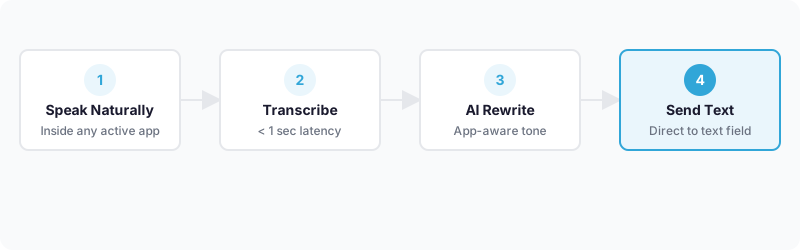
What sets WriteVoice apart from every hardware AI voice recorder on the market is app-aware tone adjustment. It detects the active app and adjusts the output accordingly: formal for a Gmail to a client, casual for a WhatsApp thread, structured for LinkedIn. Hardware recorders like Plaud Note transcribe accurately and generate summaries, but the output tone is neutral. You still have to tell the AI how to adjust. WriteVoice handles that automatically.
For longer recordings, the web app handles full transcriptions with structured summaries and action item extraction – hour-long meetings, extended brain dumps, whatever. All dictations sync across iOS, Mac, and web, with a history saved for later refinement. One tool covers the quick Slack reply and the 60-minute strategy session, with no file management in between.
Key Benefits
No upload, no app switch, no copy-paste
Hardware recorders like Plaud Note and TicNote require a record → sync → transcribe → copy workflow before you can send anything. WriteVoice inserts polished text directly into the active app field the moment you finish speaking. As PCMag noted in its Plaud review, the upload-transcribe cycle makes standalone recorders “unable to be as responsive and interactive” as real-time AI tools. WriteVoice skips the cycle.
25+ rewrite styles, automatically matched to context
Pick Professional, Casual, Email, Tweet, Shorten, Expand, Emojify, or 20+ more – or let WriteVoice auto-select based on where you’re typing. This is not a post-hoc edit; it happens in the same sub-1-second pass as transcription.
Lifetime access for a one-time payment
WriteVoice costs $15/month on the Unlimited plan, or a one-time payment of €119–€199 for lifetime access covering iOS, Mac, and web – including all future updates. Compare that to Plaud Note’s hardware purchase plus an annual plan running $200+ USD per year, or Otter.ai’s subscription tiers that have driven users to search for alternatives due to cost.
Privacy-first: audio is processed and immediately discarded
WriteVoice processes audio in real time and deletes it immediately. Nothing is stored, nothing is used to train models. Cloud-based recorders – Plaud uses GPT-4o backend, Otter.ai runs on cloud infrastructure – retain audio and transcript data. For lawyers, healthcare professionals, and executives handling sensitive conversations, that distinction matters.
120+ languages, no accuracy trade-off
WriteVoice supports 120+ languages at 98%+ transcription accuracy (self-reported), with Whisper Mode for quiet environments where you can barely speak above a breath. Custom vocabulary learning adapts to your terminology over time.
How It Works
Step 1: Install in 2 minutes
On iOS, install WriteVoice as a custom keyboard replacement – it becomes available inside every app that uses the keyboard. On Mac, download the native desktop app (Apple Silicon M1–M4 or Intel x86) and assign a hotkey. The web app is available in any browser with no install required.
Step 2: Tap the mic where you’re already working
Open WhatsApp, Gmail, Slack, or whatever app you’re using. Tap the microphone button on the WriteVoice keyboard. No switching apps. No opening a separate recorder. The mic is right where your text cursor is.
Step 3: Speak naturally
Ramble. Use filler words. Pause mid-thought. WriteVoice doesn’t need structured speech – it’s built for the way you actually talk, not a rehearsed dictation. Speak for 10 seconds or 10 minutes.
Step 4: AI transforms the audio
In under one second, the AI transcribes your words, strips filler words, fixes grammar, and rewrites for the active app’s context. A draft appears in the text field. Select from 25+ rewrite styles to adjust further – shorten, expand, switch tone – or send it as-is.
Step 5: Send or publish directly
The polished text is already in the text field of the app you’re using. Hit send. No copy-paste. No window switching. The whole sequence from tap to send takes under five seconds.
Who This Is For
WriteVoice is built for people who communicate primarily through text but have ideas faster than their fingers can type. If you send 40 Slack messages and 15 emails before lunch, the 30 WPM ceiling on mobile keyboards isn’t a minor inconvenience – it’s a real throughput problem.
Founders and executives who live in messaging apps. You’re walking between meetings, tapping out emails that need to sound considered, and dropping LinkedIn posts between calls. You’ve tried using your phone’s native dictation, but it dumps your stream-of-consciousness directly into the compose window, filler words and all. You want the speed of speaking with the polish of writing – without stopping to edit.
Knowledge workers drafting long-form content on the go. You’re a law student capturing lecture notes, a manager summarizing a 90-minute strategy session, or a content creator extracting a tweet thread from a podcast recording. You need structure and formatting, not just a transcript. WriteVoice’s AI takes a raw brain dump and outputs a document you’d actually send.
Privacy-conscious professionals. Healthcare professionals, lawyers, and executives handling sensitive material who can’t afford to have client conversations stored on cloud servers. WriteVoice’s zero-retention audio processing means nothing leaves your session. If that constraint is non-negotiable for your work, it eliminates most cloud-based transcription services in one step.
Common Use Cases
Replying to a long Slack thread while walking between meetings
You’ve read the thread, you know your response, but typing it out on your phone while moving means typos and autocorrect interference. Tap the WriteVoice mic inside Slack, speak your reply in 20 seconds, the AI tightens it to professional Slack tone, and you hit send before you reach the door. Nothing pasted, nothing switched.
Drafting LinkedIn posts from a voice memo
You have a sharp observation during a commute but no time to write. Open the WriteVoice keyboard in LinkedIn’s compose window, speak for a minute, select the Professional or Thought Leader rewrite style. The rambling voice note becomes a structured post with a headline, body paragraphs, and a call to action. As one WriteVoice founder user described it: “I hate writing, so I dump my thoughts & get LinkedIn posts. Chef’s kiss.”
Transcribing and summarizing a one-hour meeting
Record a strategy session through the WriteVoice web app. After the call, the AI outputs a structured summary – topics covered, decisions made, action items assigned. No manual note-taking during the call, no hour of editing afterward. The summary is ready to share the moment the call ends.
Writing emails that need to sound formal without taking 20 minutes
You need to respond to a vendor, a lawyer, or a board member. Speak your points casually into WriteVoice inside Gmail, select the Email rewrite style, and the AI produces a properly structured formal email – greeting, paragraphs, professional close. Users report “zero to super minimal editing needed” for this workflow.
Class notes in real time
A law student using WriteVoice as a keyboard replacement can dictate key points mid-lecture and have them auto-formatted as structured notes, tagged by topic, without disrupting the class. One WriteVoice law student user called it “a game changer for class notes.”
What Is an AI Powered Voice Recorder?
An AI powered voice recorder doesn’t just capture audio – it processes speech in real time to produce text you can actually use without manual editing. Traditional voice recorders store audio files you have to play back and transcribe yourself. AI-powered versions add a transcription layer that turns raw speech into structured, readable text.
The category splits into two distinct form factors: hardware devices (like Plaud Note, TicNote, and Soundcore Work) that you carry as separate gadgets for passive ambient recording, and software-first tools that process speech inside existing applications. Hardware devices excel at long passive recording – a 30-hour battery, a credit-card form factor that sits on a desk during a meeting. Software tools excel at active, in-context dictation, where the goal is to produce a message, email, or document without leaving the app you’re already in.
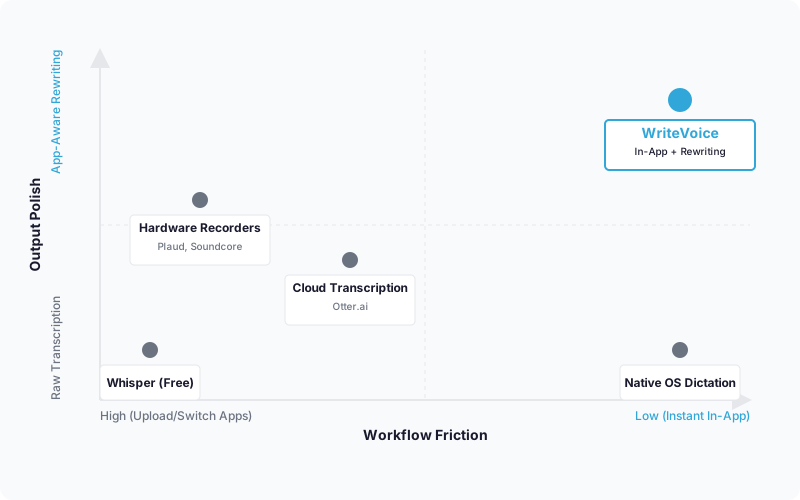
The speech recognition market was valued at $10–12 billion in 2023 and is projected to grow at 14–23% CAGR through 2030. The gap nobody had filled was in-app AI dictation with intelligent rewriting – going from spoken thought to context-appropriate text in one step rather than four. Hardware recorders, cloud transcription platforms like Otter.ai, and open-source models like OpenAI Whisper handle transcription well. None of them rewrite for the target app you’re in, in under a second, without a file upload.
Try WriteVoice
If the friction in your workflow is the gap between how fast you think and how fast you can type – or between a raw voice note and a polished message – WriteVoice closes it in one tap. The free tier includes 2,000 words your first month, no credit card required, so you can test the in-app keyboard experience on iOS or try the web app before committing to anything.
Frequently Asked Questions
What is an AI powered voice recorder?
An AI powered voice recorder transcribes speech to text in real time and processes it intelligently so you don’t have to manually edit raw audio afterward. Unlike traditional recorders that just capture files, AI-powered versions add a transcription layer that turns spoken words into structured, readable text. The best ones-like WriteVoice-go further and rewrite for tone and context, so your output is immediately usable in the app you’re already using.
How does voice dictation with AI rewriting work?
You tap a microphone button in your active app, speak naturally (ramble, use filler words, pause-structure doesn’t matter), and the AI transcribes and rewrites in under one second. WriteVoice auto-detects which app you’re in and adjusts the tone accordingly: formal for Gmail to a client, casual for WhatsApp, structured for LinkedIn. The polished text appears in your text field ready to send, no copy-pasting required.
Can I dictate inside Slack, WhatsApp, Gmail, and other apps?
Yes. WriteVoice is a custom iOS keyboard, so the microphone button appears in any app that uses the keyboard-Slack, WhatsApp, Gmail, iMessage, Notion, LinkedIn, everywhere. On Mac, you trigger the same pipeline with a hotkey from any application. You never leave the app you’re typing in; the polished text is inserted directly into the message or compose field.
What makes WriteVoice different from other voice to text apps?
WriteVoice combines transcription and AI rewriting in under one second, inside the active app, without uploading or switching between tools. Hardware recorders like Plaud require upload-transcribe workflows. Cloud transcription services like Otter.ai are browser-dependent and don’t auto-adjust tone. WriteVoice’s app-aware rewriting means your output automatically sounds appropriate for where you’re sending it-no manual tone adjustments needed.
Is speech to text with editing really 5x faster than typing?
Speaking averages 150 WPM while mobile typing averages 30 WPM-a 5x difference. WriteVoice eliminates the editing step by removing filler words, fixing grammar, and rewriting for context as part of the initial transcription, so you gain the full speed advantage without the rambling-voice-note problem. For founders and professionals sending dozens of messages daily, this throughput difference translates directly to reclaimed time.
How does WriteVoice handle privacy compared to cloud-based voice recorders?
WriteVoice processes audio in real time and deletes it immediately-nothing is stored, nothing is used to train models. Cloud-based competitors like Plaud and Otter.ai retain audio and transcript data on their servers. For lawyers, healthcare professionals, and executives handling sensitive conversations, WriteVoice’s zero-retention architecture means your dictation never leaves your session.
What does an AI transcription app cost compared to a lifetime deal?
WriteVoice offers a free tier (2,000 words first month), a subscription plan ($15/month unlimited), and lifetime access for a one-time €119–€199 payment covering iOS, Mac, and web plus all future updates. Plaud Note costs $200+ USD annually plus a hardware purchase. Otter.ai subscriptions have driven users to seek cheaper alternatives. WriteVoice’s lifetime option appeals to indie professionals and small teams who prefer one-time investment over recurring fees.
Is WriteVoice suitable for meeting transcription and AI summaries?
WriteVoice’s web app handles full meeting recordings with AI-generated summaries and action item extraction, making it useful for hour-long strategy sessions or extended brain dumps. However, enterprise meeting transcription platforms like Otter.ai and Fireflies.ai have more mature feature sets for team-based meeting management. WriteVoice excels at individual fast-moving professionals capturing ideas and quick notes, not large-scale team meeting infrastructure.