
AI Powered Note Taking App
Most voice notes die in your audio library. They’re too raw to forward, too long to summarize, and too easy to forget. WriteVoice is an AI powered note taking app that takes what you say and immediately rewrites it into polished, ready-to-send content, directly inside the app you’re already using – no copy-pasting, no context switch.
Speak a rambling thought into WhatsApp, Slack, or Gmail and get a clean, professionally worded message before you hit send. For longer sessions, record an hour-long meeting and get a structured summary with action items automatically.
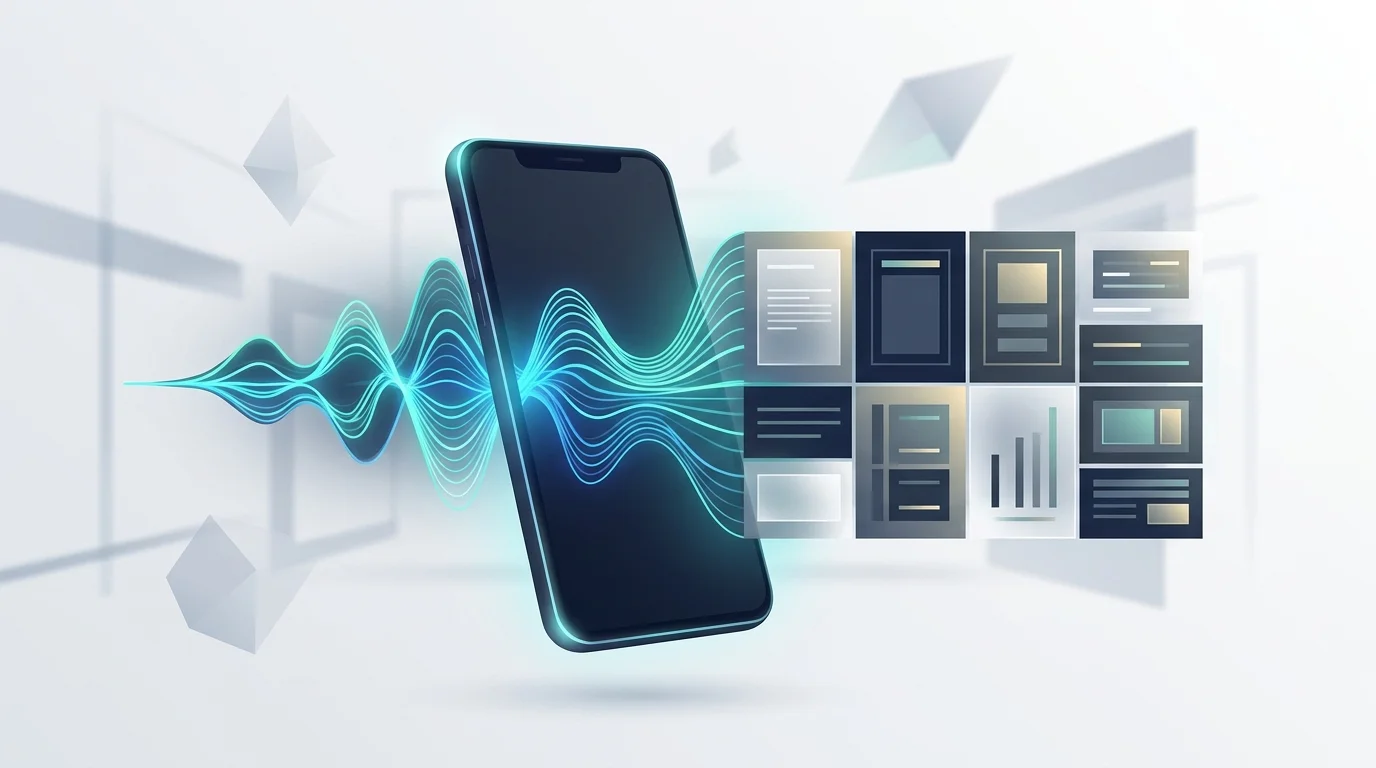
How WriteVoice does AI note taking
WriteVoice runs a two-step pipeline that most note-taking tools skip entirely. First: real-time transcription with sub-1-second latency and 98%+ self-reported accuracy, including accents, whispers, and technical jargon. Second: the raw transcription gets immediately rewritten into polished content using one of 25+ AI rewrite styles – Professional, Email, Tweet, Casual, Shorten, Expand, Fix Grammar, and more.
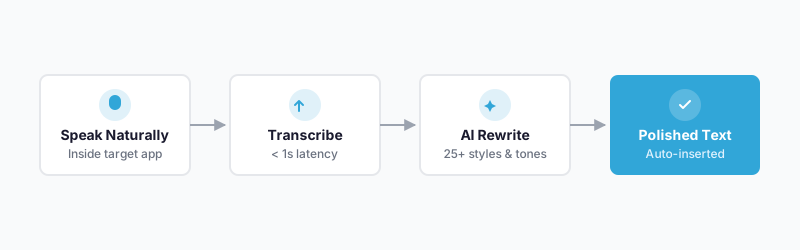
What separates WriteVoice from other AI note-taking apps is where the rewriting happens. On iOS, it installs as a custom keyboard replacement. You tap the microphone inside WhatsApp, Slack, Gmail, or iMessage and the rewritten text lands directly in the compose field – no switching apps, no copying. On Mac, a single hotkey triggers the same pipeline from inside any application.
The app detects which app you’re in and adjusts the rewrite tone automatically. Dictate the same thought in LinkedIn and the output reads like a thought-leader post. In WhatsApp it comes out short and conversational. No manual configuration.
For longer-form work, the web app handles meeting recording. Record up to an hour, and WriteVoice generates a structured summary, pulls out action items, and can translate the output into 30+ languages. All dictations sync across iOS, Mac, and Web, with every session saved to history.
Key benefits
Works inside every app you already use
WriteVoice is a custom iOS keyboard, so the microphone lives inside WhatsApp, Slack, Gmail, and iMessage. You never leave the app to dictate. The typical copy-paste workflow adds 3–5 context switches per voice note. WriteVoice cuts that to zero.
Speak naturally, send polished text
Filler words, run-on sentences, unstructured rambles – the AI cleans all of it up automatically. A 45-second spoken brain dump becomes a professional email or a concise Slack update. WriteVoice reports zero to minimal editing needed for typical messages.
25+ styles for every output format
Professional for emails. Casual for direct messages. Thought-leader voice for LinkedIn. Pick the style or let auto-detect handle it. One voice input, many output formats – and the AI applies the right one without you touching a setting.
Faster than typing, better than raw dictation
Average mobile typing speed is around 30 WPM; average speaking speed is around 150 WPM. Standard dictation apps bridge the speed gap but hand you an unedited transcript. WriteVoice bridges the gap and handles the editing pass in under one second.
Free to start, lifetime option available
No credit card to get started. The $15/month Unlimited plan covers iOS, Mac, and Web with unlimited dictation. For anyone paying separately for a dictation app, an AI writing tool, and a note-taker, there’s also a one-time €119 lifetime deal that covers all three.
How it works
Step 1: Install WriteVoice as your keyboard (iOS) or download the Mac app
On iPhone, add WriteVoice as a custom keyboard in Settings. It works inside every app with a text field – WhatsApp, Gmail, Notion, iMessage, Slack. On Mac, install the native desktop app (Apple Silicon M1–M4 or Intel supported) and set a hotkey.
Step 2: Tap the microphone and speak naturally
No structure required. Ramble, pause, use filler words. WriteVoice is built for natural, unscripted speech – accents, whispers, and technical vocabulary included. Dictation begins immediately, no loading screen.
Step 3: The AI transcribes and rewrites in under one second
The raw transcription passes through the rewrite engine automatically. Filler words disappear, grammar gets fixed, and the content restructures into coherent sentences. The active app is detected and the tone is set to match.
Step 4: Pick a style or issue an additional command
If the auto-detected style isn’t right, scroll through 25+ options and tap to apply. You can also adjust from there – shorten, formalize, add emojis, expand the idea – without re-dictating anything.
Step 5: The text inserts directly into the app field
No clipboard. No copy. No paste. The output lands in the active compose field, ready to send. For meeting recordings, the web app delivers a structured document with summary, action items, and optional translation into 30+ languages.
Who this is for
Mobile professionals who live in messaging apps. If your workday runs through WhatsApp, Slack, and iMessage and you’ve started typing a long reply, given up, and sent a voice note instead – WriteVoice is built for exactly that situation. One software engineer who uses it said: “I never expected I’d be using the mobile version, literally can send messages while walking.”
Founders, executives, and knowledge workers who capture ideas faster than they type. The founder use case fits in one sentence: “I hate writing, so I dump my thoughts and get LinkedIn posts.” If your ideas come in bursts – between calls, on a walk, in transit – and your current workflow is a graveyard of audio files you never revisit, WriteVoice closes that loop.
Students and researchers who take notes under pressure. A law student using WriteVoice called it a “game changer for class notes” because the microphone lives inside the keyboard. No app switching mid-lecture, no transcription lag. Dictate the key point as you hear it and get structured text in the same interface.
If you’re a team of 15 sharing live meeting transcripts and need real-time collaboration features, Otter.ai is the stronger fit – it’s built for that workflow. WriteVoice is for individuals who need speed, polish, and in-app delivery across daily communications.
Common use cases
Here’s where an AI powered note taking app like WriteVoice earns its place in daily workflow.
Replying to a long Slack thread while away from your desk
You’re walking between meetings and a 12-message Slack thread needs a real answer. Open Slack, tap the WriteVoice keyboard mic, speak your reply casually, apply the Professional style, and send – without stopping to type a single word.
Drafting a LinkedIn post from a voice dump
You have a take after a client call but no time to write it up. Open LinkedIn directly, dictate a loose 60-second stream of consciousness, select the Thought-Leader style, and get a ready-to-publish post. That’s the workflow the founder testimonial above describes.
Capturing meeting notes and action items from a long recording
Record a 45-minute product strategy session via the WriteVoice web app. When it ends, WriteVoice generates a structured summary – topics covered, decisions made, action items by owner – no pen required. Output can be translated into 30+ languages for distributed teams.
Responding to email on mobile without typo frustration
Instead of hunting-and-pecking a professional reply on a small screen, open Gmail on iPhone, activate the WriteVoice keyboard, speak naturally, and let the Email style handle the formatting. The result is indistinguishable from desktop-composed email.
Dictating sensitive client notes as a healthcare professional or lawyer
WriteVoice processes audio in real time and immediately discards it – no recordings stored, no training on user data. For professionals handling sensitive client or patient information, the zero-retention architecture means you can dictate case notes and summaries without your audio sitting on a third-party server. (Note: WriteVoice does not currently hold HIPAA or SOC 2 certifications; verify compliance requirements against your jurisdiction’s standards.)
Repurposing a podcast or YouTube recording into social content
Content creators using the /creators workflow paste in long-form recordings and use the YouTube Description Writer, Title & Hook Generator, and Social Thread Creator to extract short-form content at scale – work that typically requires three separate tools.
What is an AI powered note taking app?
An AI powered note taking app goes beyond storing what you say or type. Traditional note-takers save your words as-is. AI-powered versions transform them – removing filler words, restructuring ideas, generating summaries, adapting tone for different outputs. The gap between raw capture and finished content is exactly what these tools are built to close. Not every AI powered note taking app closes the full gap, and the difference matters in practice.
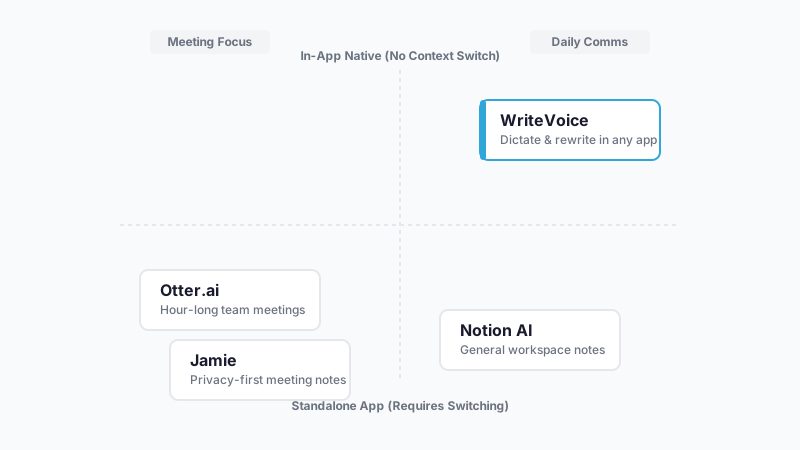
The category has split into two distinct tracks. Meeting transcription tools like Otter.ai and Fireflies.ai focus on hour-long recordings with team collaboration, calendar integrations, and shared workspaces – the meeting transcription segment alone is projected to exceed $4 billion by 2028. Tactical communication tools like WriteVoice focus on the 50-times-per-day use case: the quick message, the email reply, the social post. Latency and in-app delivery matter more here than team dashboards do.
Privacy is also a real differentiation axis. Tools like Jamie compete on HIPAA compliance and EU data residency for regulated industries. WriteVoice competes on architectural privacy – audio deleted immediately, never stored, never used for training – which works for privacy-conscious users outside formally regulated workflows. The broader speech recognition market was $10–12 billion in 2023 and is growing at 14–23% CAGR through 2030, meaning more entrants and faster feature evolution at every tier.
Try WriteVoice
If you’re looking for an AI powered note taking app that runs inside the apps you already use – not a separate recording tool you have to remember to open – WriteVoice starts free with no credit card and no time limit. Install the iOS keyboard or open the web app, speak your first message, and you’ll know in about 30 seconds whether it fits your workflow.
Frequently asked questions
What is an AI powered note taking app?
An AI powered note taking app transcribes your words and transforms them in real time – cleaning up filler, restructuring ideas, and adapting tone for different contexts. Unlike traditional note-takers that store words as-is, AI-powered versions handle the editing pass automatically. WriteVoice combines transcription and rewriting in under one second, delivering polished text directly inside the app you’re already using.
How does voice to text work with WriteVoice?
WriteVoice listens to your natural speech – rambles, pauses, filler words and all – and converts it to text with 98%+ accuracy in real time. The transcription then passes through an AI rewrite engine that removes filler, fixes grammar, and structures the output into coherent sentences. On iOS, this happens inside your keyboard, so the polished text lands directly in WhatsApp, Slack, Gmail, or iMessage without switching apps.
Can I use an AI dictation app inside any messaging app?
Yes. WriteVoice is a custom iOS keyboard, so the microphone lives inside WhatsApp, Slack, iMessage, Gmail, Notion, and any other app with a text field. You tap the mic, speak, and the rewritten text inserts directly into the compose field. The app-aware tone detection adjusts your output automatically: professional for email, casual for Slack, thought-leader voice for LinkedIn.
What makes voice to text any app different from a standard dictation keyboard?
Standard iOS dictation or keyboard apps transcribe your speech but hand you a raw transcript – you still fix filler words, reorder sentences, and adjust tone yourself. WriteVoice skips that editing step by transcribing and rewriting in under one second, applying one of 25+ AI rewrite styles automatically. The result is polished, ready-to-send content without you touching the text.
How does WriteVoice handle meeting transcription and notes?
The WriteVoice web app lets you record meetings up to an hour long, then automatically generates a structured summary with key topics, decisions made, and action items extracted and attributed to speakers. The transcript can be translated into 30+ languages for distributed teams. All recordings sync across iOS, Mac, and Web so you can access meeting notes from any device.
Is WriteVoice a privacy first voice to text solution?
WriteVoice processes audio in real time and immediately discards it – no recordings are stored, no data is used for training, and your audio never sits on a third-party server. This architecture suits privacy-conscious professionals including healthcare workers, lawyers, and executives handling sensitive information. WriteVoice does not currently hold HIPAA or SOC 2 certifications; verify compliance requirements against your jurisdiction’s standards if you work in a regulated industry.
How is WriteVoice priced compared to other dictation apps?
WriteVoice has two paid options: a $15/month Unlimited subscription covering iOS, Mac, and Web with unlimited dictation and all 25+ rewrite styles, or a one-time €119–€199 lifetime deal with the same features and no recurring bill. The Starter tier is free (2,000 words first month, no credit card required) so you can test the workflow before committing. For anyone paying separately for a dictation app, an AI writing tool, and a note-taker, a single WriteVoice plan covers all three.
Who should use an AI rewrite voice notes tool instead of typing?
Anyone who speaks faster than they type. Professionals dictating Slack replies, emails, and LinkedIn posts while mobile are the core users, but founders who capture ideas in bursts, students taking lecture notes under pressure, and content creators repurposing long-form recordings into social threads all fit the same pattern. If your workflow involves copy-pasting transcriptions between apps or manually editing voice notes, WriteVoice handles that automatically.
Generated by BlazeHive