
voice recording transcription
TL;DR
The best voice recording transcription tool depends entirely on your workflow. Otter.ai wins for structured meeting transcription with live captions and CRM sync. Fireflies.ai wins for multi-platform meeting setups where you want a free tier without a transcription count cap. WriteVoice wins for mobile professionals who need to turn speech into polished, ready-to-send text inside the app they’re already using – without a single copy-paste.
voice recording transcription
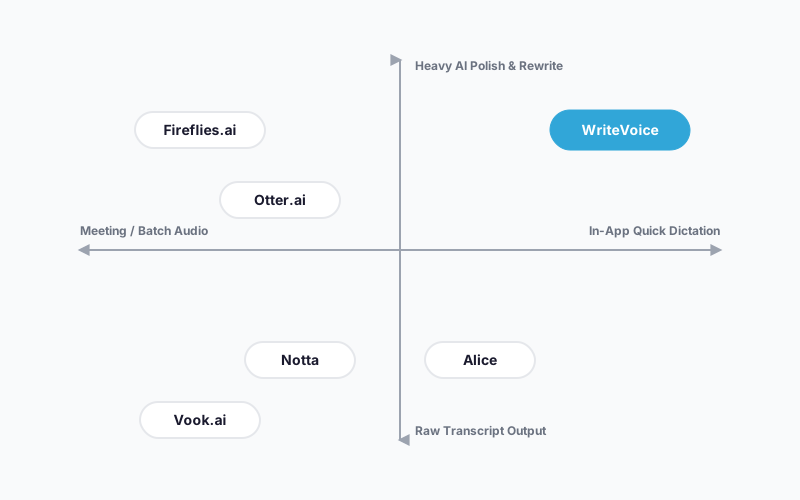
Voice recording transcription has split into two distinct categories: tools built for capturing what was said (meeting recorders, async transcription services) and tools built for creating polished text in real time (in-app dictation with AI rewriting). Most people start searching because their current setup – a phone’s built-in mic, a generic dictation app, or a meeting tool – gets the words down but leaves all the editing work to them. Here are the six strongest tools across both categories.
Why People Look for Better Voice Recording Transcription Tools
The biggest frustration isn’t accuracy – it’s the gap between raw audio and usable text. A recording full of filler words, false starts, and unstructured rambling doesn’t become a Slack message or an email without significant editing. Most built-in tools and basic transcription apps stop at transcription; they hand you a wall of words and walk away.
The second recurring pain point is workflow friction. If you’re dictating a message on your phone, opening a dictation app, recording, copying the transcript, switching back to WhatsApp, and pasting – you’ve taken five steps to do what should take one. At 50 messages a day, that friction compounds into a genuine time sink. Reddit threads are full of users describing exactly this pattern as the reason they keep switching tools.
The third issue is cost structure. Otter.ai charges $16.99/month for its Pro plan; Fireflies runs $10/month. Users who transcribe sporadically – a weekly meeting, the occasional voice note – find monthly subscriptions hard to justify. They’re either paying for unused capacity or hunting for a one-time-payment alternative. Price sensitivity is real – Reddit and Hacker News threads regularly feature people building DIY transcription pipelines just to avoid monthly fees.
What to Look for in a Voice Recording Transcription Tool
Transcription accuracy on real-world audio. Lab claims of 95%+ accuracy rarely survive background noise, accents, or technical jargon. Look for tools that specify how they handle these conditions – and ideally tools with third-party benchmarks, not just self-reported figures. For high-stakes use (legal dictation, medical notes), the difference between 95% and 99% accuracy is the difference between minor cleanup and a liability.
Post-transcription editing and rewriting. A raw transcript is a starting point, not a finished product. The best tools either produce clean, punctuated output automatically or let you apply AI rewrite styles (formal, casual, email, summary) without switching to a separate app. If you’re evaluating tools purely on transcription speed without considering the editing step, you’re measuring the wrong thing.
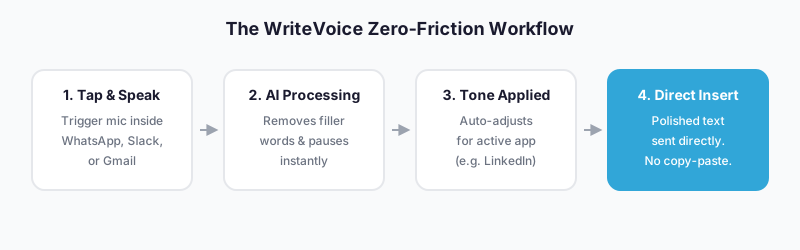
In-app vs. copy-paste workflow. Some tools require you to record, transcribe, and then manually move text into your target app. Others embed into the keyboard or use hotkeys to insert text directly into whatever field is active. For mobile heavy users, the embedded approach eliminates a 3-step workflow detour every single time.
Meeting integration depth. If your primary use case is recurring video meetings on Zoom, Teams, or Google Meet, you need a tool with native bot integration that joins automatically. Manual recording on a web app works for occasional meetings but breaks down at scale. Check which conferencing platforms each tool supports before committing.
Privacy and data retention. Audio of professional conversations – legal calls, client meetings, medical consultations – carries real exposure if stored on third-party servers indefinitely. Check each tool’s data retention policy explicitly: does audio get deleted after transcription? Is the transcript stored? Is your data used to train models? Zero-retention architecture is rare; treat it as a meaningful differentiator for sensitive workloads.
Pricing model fit. Monthly subscriptions make sense if you use the tool daily and value ongoing feature development. Pay-per-use fits sporadic needs. Lifetime deals offer cost certainty upfront but carry the risk of reduced investment in future development. Match the pricing model to your actual usage pattern, not the most attractive headline price.
The Best Voice Recording Transcription Tools
1. WriteVoice
WriteVoice is an AI-powered voice dictation tool that combines real-time transcription with instant AI rewriting inside whatever app you’re already using – as an iOS custom keyboard, a Mac desktop hotkey trigger, or a web app for longer recordings.
Best for: Mobile professionals who dictate messages, emails, and LinkedIn posts while on the go and need polished output without leaving the app.
Strengths
- Custom iOS keyboard embeds the mic directly inside WhatsApp, Slack, Gmail, iMessage, and Notion – no app-switching required
- 25+ AI rewrite styles (Professional, Email, Tweet, Casual, Shorten, Expand) apply in under a second, turning raw speech into send-ready text
- App-aware tone detection automatically adjusts output – formal for Gmail, casual for WhatsApp, thought-leader for LinkedIn – without manual selection
- 120+ language support with cross-device sync across iOS, Mac, and Web
- Privacy-first: audio processed in real time and immediately discarded, no recordings stored, no training on user data
- Lifetime deal available at €119–€199 one-time (as of mid-2025) – no recurring subscription required
Where it’s not the right fit
- Not designed for enterprise meeting workflows requiring live captions visible to all attendees or CRM integration (Salesforce, HubSpot)
- No confirmed Android support – iOS and Mac only for mobile/desktop
- Meeting recording is confirmed only on the web app; mobile meeting recording is not documented
- Accuracy claims (98%+) are self-reported and not independently benchmarked
Pricing: Free Starter plan includes 2,000 words in the first month. Unlimited plan: $15/month (as of mid-2025). Lifetime deal: €119–€199 one-time. 30-day money-back guarantee. Free tier: Yes.
When to choose it: If you spend most of your day on your phone sending messages and producing short-to-medium written content, and you’ve been frustrated by copying from a dictation app into your messaging apps, WriteVoice is built specifically for that workflow.
2. Otter.ai
Otter.ai is the most widely adopted meeting transcription platform, built around live, searchable transcripts synced across Zoom, Microsoft Teams, and Google Meet.
Best for: Teams holding video meetings who need live captions, searchable archives, and CRM integration with meeting notes.
Strengths
- Native bot joins Zoom, Teams, and Google Meet automatically and transcribes in real time, visible to all attendees
- Searchable transcript library with video replay and timestamp markers across all past meetings
- AI Chat within and across meetings to answer questions about past conversation content
- CRM sync (Salesforce, HubSpot) and ATS integration for sales and recruiting workflows
- Business plan includes HIPAA-eligible and SOC 2 compliance pathways for regulated industries
Where it’s not the right fit
- Not designed for in-app message dictation – it’s an async, meeting-first tool, not a keyboard replacement
- Free plan caps transcription at 300 minutes per month; Pro plan is $16.99/month ($203.88/year minimum)
- Stores transcripts on its servers indefinitely (user-deletable); privacy model is less transparent than zero-retention alternatives
- No AI rewrite styles for transforming speech into different tonal registers
Pricing: Free (300 min/month). Pro: $16.99/month or $8.33/month annually. Business: $30/user/month annually. Enterprise: custom. (As of mid-2025.) Free tier: Yes.
When to choose it: If you’re managing a team that runs structured video meetings on Zoom or Teams and needs searchable transcripts, live captions, and CRM-integrated notes, Otter.ai is the mature, well-integrated choice.
3. Fireflies.ai
Fireflies.ai is a meeting transcription and AI note-taking tool with a free tier that doesn’t cap total transcription count, and one of the broadest platform integration sets in the category – covering 10+ conferencing platforms.
Best for: Users with multi-platform meeting setups (Zoom, Teams, Google Meet, Riverside, and others) who want AI-generated action items and a free tier with no monthly minute cap.
Strengths
- Unlimited transcriptions on the free plan (300 monthly minutes, same cap as Otter’s free tier – but no total transcription count limit)
- “AskFred” AI chat combs every past meeting and returns answers in plain language – deeper than Otter’s meeting search
- 10+ platform integrations, including less common conferencing tools beyond the big three
- AI-generated summaries and action items produced automatically after each meeting
Where it’s not the right fit
- Not built for in-app mobile dictation or quick message composition
- Privacy policy is less explicit about training data and audio retention compared to zero-retention alternatives
- Speaker identification accuracy can vary in large group settings
- No AI rewrite styles for non-meeting content (emails, social posts, etc.)
Pricing: Free (unlimited transcriptions, 300 min/month). Pro: $10/month. Business and Enterprise: higher tiers available. (As of mid-2025.) Free tier: Yes.
When to choose it: If you’re recording meetings across multiple platforms and want a free tier with no transcription count cap, plus the ability to query your entire meeting history by asking plain-language questions, Fireflies.ai covers that better than anything else here.
4. Notta
Notta is a multilingual voice transcription app with built-in translation support and a transcript interface that’s easier to read than most competitors’.
Best for: Non-English speakers who need transcription and translation in a single step, without stitching together separate tools.
Strengths
- Multilingual transcription with integrated translation – a more direct translation workflow than most competitors offer
- Readable transcript interface that makes post-transcription review faster than the cluttered layouts common in this category
- Accepts audio and video file uploads for file-based transcription workflows
- Premium plans start at $8.25/month – lower cost than Otter’s Pro tier
Where it’s not the right fit
- Not designed for in-app mobile dictation or keyboard-embedded recording
- Speaker identification is less reliable in group settings with multiple overlapping voices
- Free plan is limited; ongoing free use is not a viable long-term option for heavy users
- No AI rewrite styles for transforming transcripts into tonal outputs (email, social post, etc.)
Pricing: Free (limited). Premium: from $8.25/month. (As of mid-2025.) Free tier: Yes, with limits.
When to choose it: If you’re regularly transcribing content in a language other than English and need the transcript translated as part of the same workflow, Notta handles both steps in one place – you don’t need a separate translation tool.
5. Alice
Alice is a pay-as-you-go transcription app built around accuracy and privacy, targeting journalists, lawyers, and healthcare professionals who need high-fidelity output without a subscription commitment.
Best for: Sporadic, high-stakes transcription – legal depositions, medical dictation, investigative interviews – where accuracy matters more than speed and a recurring monthly fee is hard to justify.
Strengths
- Pay-as-you-go pricing ($2.99/hour on the 100-hour plan) – no subscription required
- AI chat lets you discuss and query the transcript after it’s generated
- Built-in voice recorder; auto-delete option for sensitive audio after transcription
- Built specifically for journalism and privacy-sensitive use cases, with accuracy as the primary design constraint
Where it’s not the right fit
- Not designed for daily, high-volume use – per-hour costs compound quickly for power users
- No in-app keyboard integration or hotkey trigger for real-time dictation
- No AI rewrite styles; outputs a clean transcript but doesn’t transform it into an email or social post
- Less suited for team or meeting workflows requiring live captions or shared notes
Pricing: $9.99/hour (1-hour plan), $4.99/hour (20-hour plan), $2.99/hour (100-hour plan). (As of mid-2025.) Free tier: No.
When to choose it: If you transcribe occasional high-stakes recordings – a legal interview, a medical consultation – and don’t want to commit to a monthly fee, Alice’s pay-per-use model means you pay only for what you use. That’s it.
6. Vook.ai
Vook.ai is an AI-powered transcription service built for speed and low cost, completing transcripts in less time than the audio duration and outputting speaker labels and timestamps.
Best for: Users who need fast, affordable AI transcription of audio or video files and want speaker-labeled output without paying Otter or Fireflies pricing.
Strengths
- Average $0.05 per minute – among the lowest per-minute prices for AI transcription
- Finishes transcription faster than real-time (completes before the audio finishes playing)
- Speaker labels and timestamps included automatically
- Recognized by Wirecutter as “Best for fast AI transcriptions”
Where it’s not the right fit
- Not a real-time dictation tool – processes pre-recorded files, not live speech
- No AI rewrite styles, app-aware tone adjustment, or in-app keyboard embedding
- Not built for meeting bot integration (Zoom, Teams) or live captions
- Pay-per-minute costs can accumulate for high-volume users versus a flat-rate subscription
Pricing: ~$0.05/minute of audio. (As of mid-2025.) Free tier: Not documented.
When to choose it: If you have a backlog of recorded audio or video files you need transcribed quickly at low cost – podcasts, interviews, lectures – Vook.ai gets it done faster than real-time at $0.05/minute.
Quick Comparison
| Tool | Best For | Starting Price | Free Tier | Standout Feature |
|---|---|---|---|---|
| WriteVoice | In-app mobile dictation + AI rewriting | $15/mo (€119 LTD) | Yes | Mic embedded in iOS keyboard; rewrites inside any app |
| Otter.ai | Live meeting transcription + CRM sync | $16.99/mo | Yes | Real-time captions visible to all attendees |
| Fireflies.ai | Multi-platform meetings + free tier | $10/mo | Yes | AskFred queries your entire meeting history |
| Notta | Multilingual transcription + translation | $8.25/mo | Yes (limited) | Transcription and translation in one step |
| Alice | High-stakes pay-as-you-go transcription | $2.99/hr | No | Per-hour pricing with auto-delete for sensitive audio |
| Vook.ai | Fast, cheap batch file transcription | ~$0.05/min | Not documented | Completes transcript faster than real-time audio |
Pricing as of mid-2025. Check each tool’s pricing page for current rates.
Which Alternative Should You Choose?
If you send dozens of messages on mobile every day…
WriteVoice is the only tool on this list built specifically for that workflow. The iOS keyboard puts a mic directly inside WhatsApp, Slack, iMessage, and Gmail – you speak, pick a rewrite style, and send without switching apps.
If you run structured team meetings on Zoom or Microsoft Teams…
Otter.ai is the right fit. Its bot joins the call automatically, transcribes in real time so every attendee sees captions, and syncs notes to Salesforce or HubSpot afterward. WriteVoice’s meeting features can’t match that depth.
If you use multiple conferencing platforms and want AI-generated summaries…
Fireflies.ai covers 10+ platforms (including less common tools beyond Zoom and Teams), offers a free tier without a total transcription cap, and its AskFred feature lets you search across every meeting you’ve ever recorded by asking plain questions.
If you regularly work across multiple languages…
Notta combines transcription and translation in a single step at $8.25/month. If you’re transcribing content in French, Spanish, Mandarin, or another language and need it translated as part of the same job, Notta handles that more explicitly than the other tools here.
If you transcribe occasional high-stakes recordings and hate subscriptions…
Alice’s pay-per-hour model means you pay $2.99–$9.99 only when you actually use it. For a lawyer transcribing one deposition a month or a journalist with an occasional interview, that’s meaningfully cheaper than a $15–$17 monthly fee.
If you have a backlog of audio files to process cheaply and fast…
Vook.ai at ~$0.05/minute is the most cost-efficient tool for batch transcription of pre-recorded files. It won’t help you dictate in real time, but it’s the right tool if cost-per-minute is your primary constraint.
Ready to Try WriteVoice?
If you’re a mobile-first professional who types slowly, talks faster, and is tired of bouncing between a dictation app and your messaging apps, WriteVoice is built for exactly that. The iOS keyboard puts transcription and AI rewriting inside every app you already use. Start free – no credit card required, and a 30-day money-back guarantee covers all paid plans.
Frequently Asked Questions
What should I look for in a voice recording transcription tool?
Prioritize transcription accuracy on real-world audio with background noise and accents, post-transcription editing or AI rewrite capabilities, and whether the tool integrates into your workflow (in-app vs. copy-paste). For sensitive use cases like legal or medical dictation, check data retention policies explicitly-zero-retention architecture means audio is deleted immediately after processing, not stored indefinitely. Pricing model matters too: monthly subscriptions suit daily users, pay-per-use fits sporadic needs, and lifetime deals offer upfront cost certainty but carry ongoing development risk.
How does WriteVoice differ from a standard voice-to-text app?
WriteVoice combines transcription with instant AI rewriting and embeds both inside the active app as an iOS keyboard-no copy-pasting required. Standard voice-to-text apps like Apple’s built-in dictation stop at transcription, leaving you to manually edit filler words, fix grammar, and move the text to your target app. WriteVoice applies 25+ rewrite styles (Professional, Email, Tweet, Casual) automatically, detects whether you’re in WhatsApp or LinkedIn and adjusts tone accordingly, and inserts the polished result directly into the message field.
Is Otter.ai or WriteVoice better for daily message dictation?
WriteVoice is built specifically for message dictation on mobile; Otter.ai is built for meeting transcription and isn’t designed for in-app keyboard embedding. If you send 30+ messages daily and want to speak inside WhatsApp or Slack without app-switching, WriteVoice eliminates the friction Otter requires (record separately, copy transcript, paste into message). Otter.ai excels at structured team meetings with live captions and CRM sync-a completely different use case where WriteVoice’s mobile-first workflow doesn’t apply.
What makes a good voice transcription tool for lawyers and healthcare professionals?
Privacy is the defining requirement: audio must be deleted immediately after transcription, not stored on third-party servers indefinitely, and the tool should not train on your data. Alice and WriteVoice both emphasize zero-retention architecture and are explicitly positioned for sensitive workflows. Accuracy matters secondarily-99% beats 95% in legal or medical transcription where errors compound into liability-so look for tools with third-party benchmarks, not just self-reported claims, and test on your actual content before committing.
Why is Fireflies.ai’s free tier more generous than Otter.ai’s?
Fireflies offers unlimited transcriptions on its free plan (300 monthly minutes, same cap as Otter), whereas Otter caps the total number of transcriptions you can store. For trial users or those recording sporadically, Fireflies’ approach means you never hit a hard limit-you can record as many meetings as you want until you exceed the monthly minute cap. Fireflies covers 10+ conferencing platforms while Otter focuses on the big three (Zoom, Teams, Google Meet), making Fireflies the better choice if your team uses diverse meeting tools and wants a low-friction free tier.
When is Notta a better choice than Otter.ai or WriteVoice?
Notta is the clear winner if you regularly transcribe content in languages other than English and need translation as part of the same workflow. Unlike Otter.ai and WriteVoice, which are English-first, Notta integrates transcription and translation in a single step-you record in Spanish or Mandarin and get both the transcript and English translation without stitching together separate tools. At $8.25/month, it’s also cheaper than Otter’s Pro tier ($16.99/month), making it cost-effective for multilingual teams or individuals working across language boundaries.
Should I choose Alice’s pay-per-use model or a monthly subscription like WriteVoice?
Choose Alice ($2.99–$9.99/hour) if you transcribe sporadically-one legal deposition, a few medical notes, occasional interviews-and don’t want to pay for unused capacity. Choose WriteVoice ($15/month) or Otter ($16.99/month) if you dictate daily and will use the tool consistently; the monthly cost amortizes to pennies per use. Alice’s model works against power users: transcribing 10 hours of audio monthly at $2.99/hour costs $29.90 versus WriteVoice’s flat $15, so high-volume users pay more with pay-per-use.
What is the best voice transcription tool for content creators?
WriteVoice is strongest for creators who produce short-form social media content, LinkedIn posts, and email newsletters-its 25+ rewrite styles include Tweet, Email, and Shorten modes that repurpose raw speech into platform-optimized text in seconds. For long-form podcast or YouTube creators, Vook.ai is more cost-efficient ($0.05/minute) for batch transcription of pre-recorded episodes, though it lacks the AI rewrite styles WriteVoice offers. Otter.ai works for creators recording structured interviews or roundtables who need searchable archives, but it’s overkill if you’re primarily repurposing your own voice into different formats.
Why do some people build DIY transcription pipelines instead of using these tools?
Cost sensitivity drives the DIY approach: Otter charges $203.88/year minimum, and users frustrated by recurring fees will build alternatives using Whisper API ($0.006/minute), n8n automation, and local processing to avoid monthly costs entirely. WriteVoice’s €119 lifetime deal and Alice’s pay-per-use model address this price objection more directly than subscription-only tools. For power users processing 100+ hours annually, the math strongly favors self-hosting despite the engineering effort-but for average users, a $15/month subscription is cheaper and faster than the time cost of maintaining a pipeline.
Does WriteVoice work on Android, or is it iOS-only?
WriteVoice is iOS and Mac only; there is no confirmed Android app or keyboard on the roadmap in public documentation. Android users looking for similar in-app dictation workflows can use Google’s Gboard voice typing built into most Android keyboards, but it lacks WriteVoice’s AI rewrite styles and app-aware tone adjustment. For Android users wanting AI rewrite capabilities, Otter.ai and Fireflies.ai are better choices, though they’re meeting-focused rather than message-dictation-focused.
How accurate is WriteVoice’s transcription compared to competitors?
WriteVoice claims 98%+ accuracy on its FAQ, but this figure is self-reported and not independently verified by third parties. Alice explicitly positions itself on accuracy and has published benchmarks against competitors; Otter.ai doesn’t emphasize accuracy claims as loudly, suggesting real-world performance varies by use case and audio quality. For high-stakes transcription (legal, medical), request trial results on your actual content before committing-lab accuracy claims rarely survive real-world background noise, accents, or technical jargon.
Is WriteVoice’s lifetime deal worth buying, or should I start with the monthly plan?
The €119–€199 lifetime deal is worth buying if you plan to use WriteVoice for years and want cost certainty upfront, but it carries implicit risk: if the company stops developing or shuts down, you’re stuck with whatever version you purchased. The $15/month plan ($180/year) is safer for users uncertain about long-term fit-you can cancel anytime and support ongoing development. Note that WriteVoice’s LTD pricing increases after the first 100 buyers, creating artificial urgency that can lead to hasty decisions; try the free tier first to confirm it fits your workflow.
What’s the difference between Vook.ai and other transcription tools on this list?
Vook.ai is a batch file transcription service (processes pre-recorded audio or video files) at ~$0.05/minute, not a real-time dictation or meeting recording tool. It’s best for transcribing podcasts, interviews, lectures, or video files in bulk cheaply and fast, but it offers no keyboard embedding, no AI rewrite styles, no live meeting captions, and no app integration. If you need real-time dictation inside WhatsApp or a meeting bot for Zoom, Vook.ai won’t help-it’s laser-focused on one use case: cheap, fast batch transcription.
Why is app-aware tone adjustment unique to WriteVoice?
WriteVoice automatically detects whether you’re typing into LinkedIn, WhatsApp, Gmail, or Slack and adjusts the output tone without your input-formal and thought-leader for LinkedIn, casual and brief for WhatsApp, structured for email. Competitors like Otter.ai and Fireflies.ai don’t offer this because they’re designed for meeting transcription (one-off recordings), not real-time message composition where context switching between apps is the norm. This feature saves one step per message: instead of manually selecting “Email Professional” every time you switch apps, WriteVoice handles it invisibly, making the tool feel context-aware rather than generic.
Why is Otter.ai still worth using despite newer alternatives like WriteVoice?
Otter.ai remains the standard for structured team meeting workflows because it offers live captions visible to all attendees, searchable transcript archives across past meetings, speaker identification, and CRM integration (Salesforce, HubSpot) that WriteVoice and most competitors can’t match. Otter’s maturity in compliance (HIPAA, SOC 2) also makes it the default for healthcare and regulated industries. WriteVoice solves a different problem: mobile message dictation without app-switching-not meeting transcription-so they’re complementary, not substitutes, for most users.
What makes a voice transcription tool good for professionals working on sensitive information?
Zero-retention audio processing is the key differentiator: the tool must delete audio immediately after transcription, not store it indefinitely, and must not train on your data to improve its AI models. WriteVoice and Alice both emphasize this, making them suitable for lawyers, healthcare professionals, and executives handling confidential information. Check the privacy policy explicitly-vague language about “secure servers” or “encrypted storage” doesn’t guarantee your audio won’t be used for model training or retained longer than necessary, so treat zero-retention claims as the gold standard for privacy-sensitive work.