
AI Writing Assistants
TL;DR
The best AI writing assistant depends entirely on where and how you write. Grammarly wins for polishing existing drafts and maintaining team style guides. Otter.ai wins for capturing and searching meeting transcripts. WriteVoice wins for professionals who dictate ideas on mobile and need polished, send-ready text inside any app – without ever switching windows.

AI Writing Assistants
Searching for the right AI writing assistant means you’ve already outgrown one tool – or you’re about to buy the wrong one. The category is crowded, with tools built for radically different jobs: correcting grammar, transcribing meetings, generating marketing copy, or turning voice into polished messages inside WhatsApp and Slack. This page maps each tool to the workflow it actually fits, with real pricing, honest tradeoffs, and a clear recommendation for each use case.
Why People Search for AI Writing Assistants
Most AI writing tools solve only half the problem.
Tool fragmentation is the biggest pain point. Someone on mobile needs to send a professional message in Slack, so they open a dictation app, wait for transcription, copy the raw text, switch to an AI rewriting app, paste and edit, then switch back to Slack and paste again. Four app switches for one message. Tools like Grammarly are excellent at polishing text you’ve already written; they’re not built for capturing ideas that haven’t been typed yet.
Minute and word caps are the second source of frustration. Otter.ai’s free plan limits users to 300 minutes of transcription per month with a 30-minute cap per conversation. Professionals who record client calls, long meetings, or hour-long brainstorms hit this ceiling quickly and face $16.99/month recurring fees to go beyond it.
Context blindness is the third problem that rarely gets named directly. Standard AI tools rewrite text the same way regardless of whether you’re drafting a LinkedIn thought-leadership post or a casual reply in a group chat. Users end up doing a manual tone pass after every generation – which defeats the speed benefit entirely.
The user who keeps searching after trying three or four tools typically dictates often, communicates across multiple channels, and needs results that are ready to send, not ready to edit.
What to Look for in an AI Writing Assistant
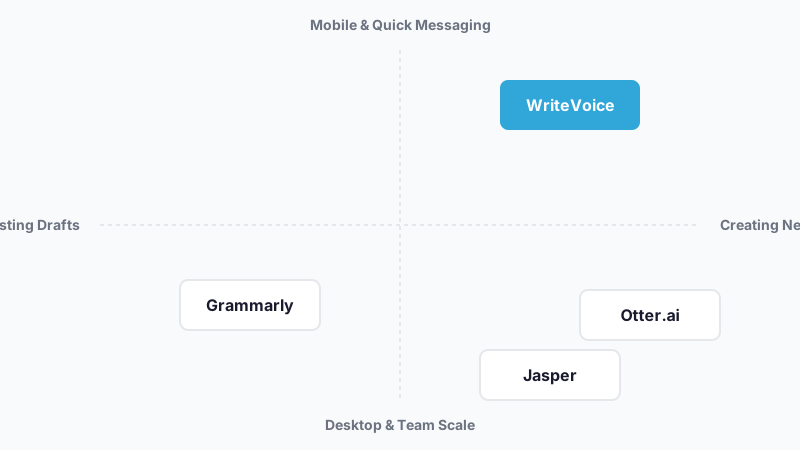
Workflow fit – creation vs. correction. Some tools are built to improve text you’ve already written (Grammarly, Wordtune). Others are built to generate text from scratch – either from a prompt (Jasper, ChatGPT) or from your voice (WriteVoice). Choosing a correction tool when your bottleneck is creation means you’re still doing the hard work. Clarify whether your problem is a blank page or a messy first draft.
In-app availability. A tool you have to switch to is a tool that slows you down. Check whether it runs as a keyboard replacement, a browser extension, or a standalone app. The difference matters most on mobile – a keyboard-level integration means you never leave WhatsApp or iMessage, while a standalone app requires four manual steps per use.
Language and accuracy. If you work in a language other than English, or with technical jargon and proper nouns, accuracy varies significantly across tools. Look for documented language support counts and, where available, independent accuracy benchmarks rather than self-reported figures.
Privacy and data retention. Tools that store your transcriptions and documents to improve their models are not appropriate for healthcare, legal, or executive workflows. Zero-retention audio processing (audio deleted immediately, not stored or trained on) is a non-negotiable for HIPAA and GDPR contexts. Many tools store data by default; check the privacy policy before onboarding sensitive content.
Pricing model – subscription vs. lifetime. Monthly AI subscriptions compound fast: Grammarly Pro at $12/month is $144/year; Otter Pro at $16.99/month is $204/year. If you’re an individual professional or freelancer, a one-time lifetime deal (where available) can recover its cost in under a year. Enterprise teams with compliance requirements typically need subscription billing anyway.
Meeting vs. quick-message use case. Meeting transcription tools (Otter.ai) are optimized for long-form recordings with speaker identification and searchable archives. Quick-message dictation tools (WriteVoice) are optimized for sub-5-second turnaround on mobile. Most professionals need one or the other, rarely both – knowing which matters before you buy.
The Best AI Writing Assistants
1. WriteVoice
WriteVoice is a voice-to-polished-text tool that combines real-time transcription with instant AI rewriting inside a custom iOS keyboard, Mac desktop app, and web app – without requiring any copy-pasting between applications.
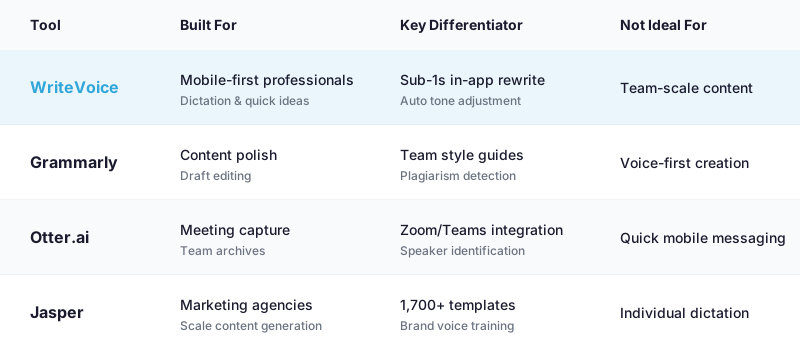
Best for: Mobile-first professionals who dictate messages, emails, and ideas directly inside WhatsApp, Slack, iMessage, Gmail, or Notion.
Strengths
- Auto-detects whether you’re in LinkedIn (professional tone), WhatsApp (casual, short), or Gmail (formal) and adjusts output without manual selection
- Sub-1-second transcribe-and-rewrite cycle: speak naturally, get send-ready text before you’ve lowered your phone
- 25+ AI rewrite styles (Professional, Tweet, Email, Casual, Shorten, Expand, Emojify, Fix Grammar, and more) applied in one tap
- Audio is deleted immediately upon transcription – nothing stored, nothing trained on user data – appropriate for healthcare and legal professionals
- 120+ language support for non-English speakers dictating in their native language
- Hour-long meeting recordings with automatic summary and action item extraction (via web app)
- Lifetime deal at €119–€199 one-time, covering iOS + Mac + Web with all future updates
Where it’s not the right fit
- Not built for team-scale content production (no multi-user workspace or brand library)
- Meeting recording lacks native Zoom/Teams/Google Meet integration – Otter.ai is more capable for meeting-heavy teams
- Android support is not currently listed (iOS, Mac, and Web only)
Pricing: Free plan with 2,000 words first month (no credit card required). Unlimited plan at $15/month covering iOS + Mac + Web. Lifetime deal at €119–€199 one-time. 30-day money-back guarantee on all paid plans. As of mid-2025.
When to choose it: If you’re on mobile most of the day, communicate heavily over messaging apps, and are tired of the dictate-copy-paste-edit loop, WriteVoice eliminates every step between having an idea and sending a polished message.
2. Grammarly
Grammarly is a writing assistance platform focused on correcting and improving text you’ve already written, across browsers, email clients, Google Docs, and mobile keyboards.
Best for: Content writers, marketers, students, and enterprise teams who need grammar correction, plagiarism detection, and brand tone consistency across collaborative documents.
Strengths
- Rated 4.8/5 on both G2 (1,700+ reviews) and Trustpilot (4,000+ reviews), with more independent reviews than any other tool in this list
- Integrates across browsers, Gmail, Google Docs, Word, and iOS/Android keyboards
- Tone detection, clarity suggestions, and a plagiarism checker in one platform
- Enterprise plan supports team governance, compliance controls, and brand style guides
- AI generative features including Paraphraser and Humanizer in Pro plan
Where it’s not the right fit
- Not designed for voice-first creation – it corrects drafts but doesn’t transcribe speech
- No sub-second dictation workflow; requires a text input before it can assist
- Users have reported frustration with auto-renewal policies and price sensitivity at the Pro tier
Pricing: Free plan includes basic grammar and spelling checks with 100 AI prompts/month. Pro plan starts at $12/month (billed annually). Enterprise pricing is custom. As of mid-2025.
When to choose it: If your workflow is write-first, edit-second, producing blog posts, emails, academic papers, or marketing copy that needs iterative polish before publishing, Grammarly is the right tool.
3. Otter.ai
Otter.ai is a real-time meeting transcription platform that captures, summarizes, and makes searchable the content of Zoom, Google Meet, Microsoft Teams, and in-person conversations.
Best for: Teams that need structured, searchable archives of meetings, client calls, and internal reviews – especially when multiple speakers need attribution.
Strengths
- Native integration with Zoom, Google Meet, and Microsoft Teams for automated meeting capture
- Real-time transcription with speaker identification and timestamped highlights
- AI meeting summaries and action item detection from long recordings
- Searchable transcript archive for compliance, async review, and project documentation
- Scores well for real-time transcription accuracy in third-party reviews
Where it’s not the right fit
- Free plan limits users to 300 minutes/month with a 30-minute cap per conversation – not sufficient for frequent meeting-heavy users
- Limited language support beyond English compared to tools covering 120+ languages
- Not designed for quick in-app mobile dictation (messages, quick emails, social posts)
Pricing: Free plan with 300 minutes/month transcription and 30-minute conversation limit. Pro plan at $16.99/month with 1,200 minutes/month and 90-minute conversation limit. As of mid-2025.
When to choose it: If your primary use case is capturing and referencing what was said in meetings, especially with Zoom or Teams, Otter.ai is the right fit.
4. Jasper
Jasper is an enterprise-grade AI content generation platform used by marketing teams at HubSpot, Morningstar, and comparable organizations to produce blog posts, social copy, and sales content at scale.
Best for: Marketing agencies and in-house content teams producing 20–50+ pieces of content per month and needing brand voice consistency across multiple writers.
Strengths
- 1,700+ templates covering blogs, emails, social media, product descriptions, and niche formats
- Brand voice training so all generated content matches the organization’s tone and terminology
- Integrations with Grammarly, Surfer SEO, and Jasper’s own AI art generator
- Rated 4.8/5 on G2; has more templates and content type coverage than most competing tools
- Multi-user team workspace with permissions and collaboration workflows
Where it’s not the right fit
- Pricing is on the high end relative to comparable AI writing outputs from cheaper tools;
Frequently Asked Questions
What should I look for in an AI writing assistant?
The best AI writing assistant depends on whether your bottleneck is creation or correction. If you dictate ideas and need polished output fast, a voice-first tool like WriteVoice eliminates the copy-paste cycle. If you write drafts and need polish, Grammarly is stronger. If you need meeting transcripts with speaker identification, Otter.ai is purpose-built for that. Clarify your workflow first – correction, generation, or transcription – then match the tool to it.
Is Grammarly still worth using if I need an AI writing assistant?
Yes, Grammarly is the right choice for your specific use case: iterating on existing drafts with tone detection, plagiarism checking, and team style guides. Grammarly’s 4.8/5 rating across 1,700+ independent reviews reflects genuine product-market fit for writers whose bottleneck is polish, not creation. Where Grammarly is not the right fit is voice-first workflows – it doesn’t transcribe speech, so it won’t help you dictate a message into Slack and send it in under one second. For that, WriteVoice is the better fit because it combines transcription and rewriting in-app without copy-pasting.
What makes a good Otter.ai alternative for mobile professionals?
A good Otter.ai alternative for mobile needs sub-second turnaround, in-app dictation, and zero context-switching between your communication app and the tool. Otter.ai excels at meeting transcription with speaker ID and searchable archives, but it’s not optimized for quick messages on WhatsApp or Slack. WriteVoice is built specifically for this – it runs as an iOS keyboard, auto-detects your active app (LinkedIn, Gmail, WhatsApp), adjusts tone automatically, and delivers send-ready text in under one second. For meeting transcription specifically, Otter remains stronger because it integrates natively with Zoom and Teams.
Why choose WriteVoice over a standard dictation app plus manual editing?
Standard dictation apps (Apple’s native voice typing, Google Recorder) transcribe speech but leave you with raw, rambling text full of filler words and poor structure – requiring manual editing before it’s ready to send. WriteVoice combines transcription and AI rewriting in one step: you speak naturally, and 25+ rewrite styles (Professional, Tweet, Email, Casual, Shorten, Emojify) are applied instantly inside any app. The sub-1-second cycle means dictation becomes as fast as typing – 150 WPM speaking speed versus 30 WPM mobile typing. No copy-pasting, no separate editing app, no focus-breaking.
Which AI writing assistant is best for healthcare and legal professionals?
WriteVoice is the only tool in this category that explicitly offers zero-retention audio processing – your speech is transcribed, the audio is deleted immediately, and nothing is stored or trained on your data. This meets HIPAA and GDPR requirements where competitors like Grammarly (integrates with third-party platforms) and Otter.ai (stores transcripts by default as a searchable archive) do not. If you handle sensitive client information, patient data, or privileged communications, WriteVoice’s privacy-first architecture makes it the appropriate choice. For general editing of sensitive documents, Grammarly offers HIPAA compliance as an add-on, but dictation-focused professionals are better served by WriteVoice.
What is the best AI writing assistant for non-native English speakers?
WriteVoice and Wordtune are both strong choices for different reasons. WriteVoice supports 120+ languages, so you can dictate in your native language and get English output with 25+ tone options – useful if you think faster in your first language. Wordtune focuses on paraphrasing and multi-source fact-checking, helping you refine sentences you’ve already drafted in English. If your bottleneck is speaking your thoughts aloud without worrying about English grammar or filler words, WriteVoice is the faster workflow. If your bottleneck is finding the right English phrasing after you’ve written a draft, Wordtune is more specialized.
Why is WriteVoice on this list of AI writing assistants?
WriteVoice solves a specific, underserved problem: mobile-first professionals who dictate frequently and are tired of copy-pasting between a dictation app, an AI rewriter, and their actual communication tool (Slack, WhatsApp, iMessage). It’s the only tool that combines transcription and polishing inside the active app, with sub-1-second turnaround and app-aware tone adjustment. Most alternatives (Grammarly, Jasper) are designed for team-scale or existing-draft workflows, not for individuals creating send-ready messages on mobile. WriteVoice is included because it represents a different category of solution – voice-to-text-in-context – not because it replaces Grammarly or Otter.ai, but because it fills a gap they don’t.
What is the difference between a meeting transcription app and a mobile dictation app?
Meeting transcription apps like Otter.ai are optimized for long-form recordings (30 minutes to 2+ hours) with speaker identification, searchable archives, and compliance-ready storage. Mobile dictation apps like WriteVoice are optimized for short, frequent captures (5–60 seconds) that need to be send-ready immediately, often without needing to be stored or searched later. Otter integrates with Zoom and Teams to auto-capture; WriteVoice runs as a keyboard to capture ideas mid-conversation. If you need searchable meeting records for your team, use Otter. If you need to send a polished message while walking, use WriteVoice.
Is there a lifetime deal for an AI writing assistant?
Yes, WriteVoice offers a lifetime deal at €119–€199 one-time payment, covering iOS, Mac, and Web with all future updates and a 30-day money-back guarantee. Most competing tools (Grammarly $12/month, Otter Pro $16.99/month, Jasper custom) operate on recurring subscription models, which compound to $144–$204+ annually. WriteVoice’s lifetime deal recovers its cost in 8–17 months of equivalent subscription spending, making it a strong value option for freelancers and indie professionals. The creator of WriteVoice built Unifire, which was 3x AppSumo Select, indicating expertise in lifetime-deal positioning for prosumer audiences.
What language support do AI writing assistants offer?
WriteVoice supports 120+ languages for dictation and transcription, making it the strongest choice for non-English speakers or multilingual professionals. Grammarly supports 11 languages with varying feature completeness. Otter.ai is primarily English-focused with limited language support. Jasper’s language coverage is similar to Grammarly’s. If you work in or with languages outside English, Arabic, French, or Spanish, WriteVoice’s 120+ language library is significantly broader. For editing and correction workflows in major languages, Grammarly is adequate; for creation via voice across global languages, WriteVoice is the clearer fit.
Which AI writing assistant has the fastest turnaround for creating text?
WriteVoice claims sub-1-second turnaround for transcription and AI rewriting combined – you speak, the tool processes and rewrites, and text appears in the app field ready to send. This speed advantage comes from in-app processing and app-aware tone pre-selection, eliminating context-switching and manual tone selection. Grammarly applies suggestions to existing text but doesn’t generate from voice. Otter.ai’s real-time transcription is fast but requires export and manual editing before text is send-ready. For raw speed from voice-to-send, WriteVoice’s sub-1-second cycle is unmatched in this category.
Do AI writing assistants work on Android?
Grammarly and Otter.ai both offer Android apps with feature parity to their iOS versions. WriteVoice’s Android availability is not currently listed – the tool is available on iOS, Mac, and Web. If you’re an Android-first user, Grammarly is your most flexible option, covering phones, tablets, and desktops. Otter.ai also supports Android with meeting transcription and quick voice notes. For Android users seeking in-app dictation without context-switching, alternatives like Google Recorder or Otter.ai are currently more suitable than WriteVoice.
How much does it cost to use multiple AI writing assistants together?
Stacking tools adds up quickly: Grammarly Pro ($12/month) + Otter Pro ($16.99/month) + a separate dictation app equals $180+ annually. Many professionals find themselves paying for overlapping features because one tool doesn’t cover their full workflow – correction, transcription, and creation. WriteVoice’s unified approach (dictation + rewriting for $15/month or €119 lifetime) is designed to replace multiple tools, reducing total spend. If your workflow spans all three categories (creation, transcription, correction), you’ll need multiple tools; WriteVoice eliminates the creation-plus-correction stack for mobile professionals.
What privacy features should I look for in an AI writing assistant?
Zero-retention audio processing is the critical feature for sensitive workflows: audio is deleted immediately upon transcription, never stored, and never used to train AI models. WriteVoice explicitly offers this. Grammarly and Otter.ai store your data by default (searchable archives are Otter’s core feature); they offer HIPAA/GDPR compliance add-ons but are not zero-retention by design. If you handle patient records, legal documents, or executive communications, zero-retention is non-negotiable – WriteVoice is the clear fit. For less sensitive content, Grammarly’s encryption and Otter’s security controls are adequate, but they don’t meet the privacy bar for regulated industries.
Can AI writing assistants help with brainstorming and ideation?
Jasper and generalist AI tools like ChatGPT are built for brainstorming and generating multiple content ideas from prompts. WriteVoice is built for capturing ideas you already have and polishing them for send. Grammarly is built for improving existing drafts, not generating new ideas. If your bottleneck is blank-page ideation and you need multiple angles on a topic, Jasper’s 1,700+ templates or ChatGPT are stronger fits. If your bottleneck is having ideas faster than you can articulate them, WriteVoice’s dictation-to-polished-text pipeline is the better match. Different tools for different phases of creative work.
What is the best AI writing assistant overall?
There is no single “best” overall – the right tool depends on your specific workflow. Grammarly is the strongest for polishing existing drafts with team style guides (4.8/5 rating across 1,700+ independent reviews). Otter.ai is the strongest for meeting transcription and searchable archives with speaker ID. Jasper is the strongest for content teams generating 20+ pieces monthly at scale. WriteVoice is the strongest for mobile-first professionals dictating quick messages that need to be send-ready in under one second without leaving the app. Choose based on your actual bottleneck, not on feature counts.