
ai powered writing assistants
TL;DR
The best AI powered writing assistant depends on where you actually write. Grammarly is the clear choice for editing documents and long-form prose. WriteVoice wins for mobile-heavy professionals who want to speak into WhatsApp, Gmail, or Slack and get polished text without leaving the app. Otter.ai is the right pick if your primary workflow is recording and transcribing team meetings.
ai powered writing assistants
There are now strong tools for document editing, for meeting transcription, and for voice dictation. The problem is that most of them solve one piece. Very few capture your raw thought and deliver polished, send-ready text in a single motion – which is usually the actual frustration: writing takes too long, the output needs endless editing, or the tool only does half the job. This page maps out who’s best at what, so you can pick the right one for how you actually work.
Why People Look for AI Writing Assistants
Mobile typing is the most common breaking point. The average person types 30 words per minute on a smartphone keyboard, but speaks at 150 WPM. That gap compounds across dozens of messages, emails, and Slack threads per day – and it’s why “speak it instead of type it” is such an appealing idea. The frustrating part is that raw voice dictation solves the input problem but creates an editing problem: the output is filled with filler words, run-on sentences, and missing structure that you then have to fix manually before sending.
A second recurring pain point is context-switching. Many voice-to-text and AI writing tools require you to capture in one app, polish in another, and paste into the destination app. That three-step workflow kills most of the time savings. Reddit threads on mobile productivity are full of the same complaint: “I tried [dictation app] but I kept forgetting to switch back.” It’s a fundamental architecture problem with single-function tools.
For a different audience – knowledge workers who sit in meetings all day – the pain is different: the meeting happened, the ideas were there, but the notes didn’t get written. Dedicated meeting transcription tools solve this. And then there’s a third category: writers and professionals who type just fine but want AI to catch errors, adjust tone, or rewrite awkward sentences after the fact.
The user who searches “AI powered writing assistants” usually falls into one of these camps – and the right tool looks completely different depending on which one they’re in.
What to Look for in an AI Writing Tool
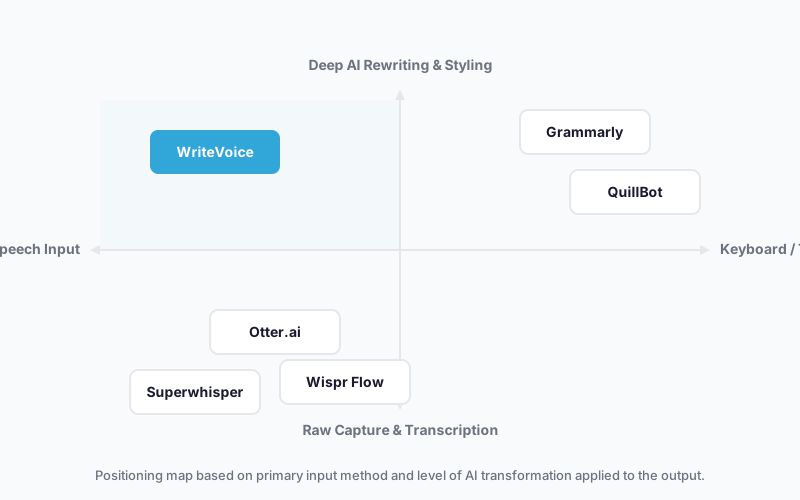
Input method. Some tools are text-in/text-out (you type, they improve). Others are voice-in/text-out (you speak, they transcribe and polish). These are fundamentally different workflows. If you’re mobile-heavy or prefer dictating, a text editor like Grammarly isn’t going to solve your speed problem. If you write at a desk, a voice keyboard might be overkill.
Rewriting depth vs. transcription only. Basic voice-to-text tools convert speech to raw text and stop there – leaving you to edit. Deeper AI writing tools apply style transformations: making text more professional, more casual, shorter, or formatted for a specific platform. Know which one you need, because you’ll pay for the rewriting layer whether you use it or not.
In-app integration vs. copy-paste workflow. A tool that works inside the app you’re already using (as a keyboard, a browser extension, or a native integration) is categorically different from one that requires you to leave, process, and come back. For messaging-heavy work, in-app tools are structurally faster – extra steps are the thing most people quietly stop doing after a week.
Privacy and data retention. If you’re dictating medical notes, legal communications, or executive strategy, who holds your audio matters. Some tools store transcripts for team sharing (useful for collaboration, risky for confidentiality). Others delete audio immediately after processing. Read the privacy policy before your first sensitive recording.
Pricing structure. Recurring subscriptions vs. one-time purchases produce very different total costs over 3–5 years. A $15/month subscription costs $540 over 3 years. A €119 one-time purchase doesn’t. For individuals and small teams, the math on lifetime deals is worth doing before you commit to a monthly plan.
Platform coverage. Check whether the tool runs on your primary devices: iOS keyboard, Mac desktop, Windows, Android, browser extension, or web app. Tools that sync across devices are more valuable for professionals who capture on the go and refine at a desk.
The Best AI Powered Writing Assistants
1. Grammarly
Grammarly is the dominant AI writing assistant for iterative document editing – you write first, Grammarly refines what’s already there.
Best for: Writers, professionals, and students editing documents, emails, reports, and academic work where quality matters across multiple drafts.
Strengths
- Real-time grammar, spelling, and tone feedback as you write, across Google Docs, Word, email, and web
- Full-sentence rewrites that preserve your intent while improving clarity and style
- Plagiarism detection and style-guide enforcement useful for academic and professional publishing
- Available on every major platform: iOS, Android, Mac, Windows, browser extension
Where it’s not the right fit
- Not built for voice input – if you want to speak and get polished output, Grammarly doesn’t have that capability
- Post-hoc editing workflow: you still have to type first, then refine – doesn’t remove the typing speed bottleneck
- Meeting transcription is outside its scope entirely
Pricing: Free plan (basic grammar and spelling). Pro starts at $12/month billed annually as of 2025. Free tier: Yes.
When to choose it: You write at a keyboard, produce documents or multi-paragraph communications, and want a reliable safety net for tone, clarity, and correctness across everything you write.
2. WriteVoice
WriteVoice is a voice dictation and AI rewriting tool built as an iOS custom keyboard, Mac desktop app, and web app – designed so you never have to leave the app you’re already using.
Best for: Mobile-heavy professionals who communicate constantly via WhatsApp, Slack, iMessage, and Gmail and want polished text from natural speech in under a second.
Strengths
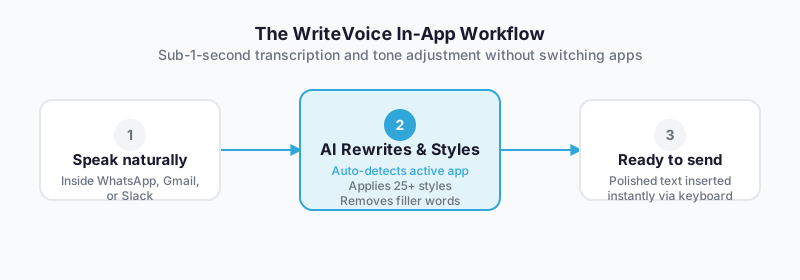
- Works as an iOS keyboard replacement – dictate directly inside any app (WhatsApp, Gmail, Notion, iMessage) without switching contexts
- Sub-1-second transcription + AI rewriting: speak naturally, receive polished text, and send – one motion, no editing step
- App-aware tone adjustment: automatically detects whether you’re in LinkedIn (thought-leader tone), WhatsApp (casual shorthand), or Gmail (formal) and adapts without manual selection
- 25+ AI rewrite styles (Professional, Tweet, Email, Casual, Shorten, Emojify, and more) plus hour-long meeting recording with auto-summary and action items on the web app
- Privacy-first: audio deleted immediately after transcription, no recordings stored, no training on user data – the site calls this out specifically for healthcare, legal, and executive users
- One-time lifetime deal option (€119–199 as of 2025) covering iOS, Mac, and Web – no recurring subscription required
Where it’s not the right fit
- Not built for multi-draft document editing – optimized for short-form messaging and quick communications, not 5,000-word essays or research papers
- iOS and Mac only; no confirmed Android app
- Free tier limited to 2,000 words in the first month; ongoing free access is minimal
Pricing: Free starter tier (2,000 words first month). Unlimited plan at $15/month. Lifetime deal at €119–199 one-time as of 2025. Free tier: Yes (limited).
When to choose it: You’re on your phone constantly, you dictate into messaging apps, and you’re spending real time either typing slowly or editing raw voice transcriptions before sending. The in-app keyboard approach removes that entire workflow.
3. Otter.ai
Otter.ai is a meeting transcription and note-taking tool purpose-built for recording, summarizing, and sharing conversations from Zoom, Google Meet, and Microsoft Teams.
Best for: Remote teams, managers, and sales professionals who need accurate records of meetings with speaker identification, shared summaries, and searchable archives.
Strengths
- Automatic meeting recording and real-time transcription with speaker labels
- Native integrations with Zoom, Google Meet, and Microsoft Teams for one-click capture
- Team-shareable transcripts with action-item extraction and meeting summaries
- Solid free tier for individuals with up to 300 minutes/month
Where it’s not the right fit
- Not designed for in-app messaging dictation – requires opening a separate app, making it a poor fit for quick Slack or WhatsApp communications
- Hard minute caps on all tiers: 300 min/month free, 1,200 on Pro, 6,000 on Business – heavy users hit these limits and must upgrade
- Subscription-only pricing; no lifetime deal option
- Stores transcripts and recordings on its servers – unsuitable for HIPAA or attorney-client confidentiality requirements without additional compliance review
Pricing: Free (300 min/month). Pro at $8.33–16.99/user/month as of 2025. Business at $20–30/user/month. Free tier: Yes.
When to choose it: Your primary need is recording and archiving team meetings, and your team actually uses shared, searchable transcripts – not just the person who called the meeting.
4. QuillBot
QuillBot is a text paraphrasing and rewriting tool – you paste text in, select a rewriting mode, and get a transformed version back.
Best for: Students, content writers, and professionals who have existing text they want to rephrase, simplify, expand, or reframe without rewriting from scratch.
Strengths
- Multiple paraphrasing modes (Standard, Formal, Simple, Creative, Expand, Shorten) give fine-grained control over output style
- Humanize-AI feature helps make AI-generated text sound more natural
- Grammar checker and summarizer built in alongside the paraphraser
- Web-based with browser extension; no separate download required
Where it’s not the right fit
- Text-in/text-out only – no voice input, no iOS keyboard, no in-app integration; requires copy-pasting
- Not built for voice capture workflows; you still need to type or paste your raw content first
- Meeting transcription is outside its scope
Pricing: Free plan with word limits and limited modes. Premium starts around $4.17–8.33/month billed annually as of 2025. Free tier: Yes.
When to choose it: You have text that already exists – an AI-generated paragraph, a draft email, a passage from a document – and you want to reword or restructure it quickly without starting over.
5. Superwhisper / Wispr Flow
Superwhisper and Wispr Flow are voice dictation tools focused on Mac and desktop use – they listen, transcribe accurately, and paste clean text wherever your cursor is.
Best for: Mac users who want accurate dictation into any desktop application – documents, code editors, emails – without a voice keyboard or AI rewriting layer.
Strengths
- High-accuracy transcription (powered by Whisper-based models) with solid filler-word removal
- Works system-wide on Mac – any app where your cursor sits becomes a dictation target
- Lightweight and fast; activated via hotkey
- Some plans include basic AI rewriting and formatting
Where it’s not the right fit
- Not designed for iOS mobile dictation inside messaging apps – primarily a Mac/desktop tool
- Transcription-first: AI rewriting capabilities are shallower than WriteVoice’s 25+ style library or app-aware tone adjustment
- No meeting recording or team features
- Subscription-based at $5–15/month depending on tier; no lifetime deal option
Pricing: Plans from approximately $5–15/month as of 2025. Free tier: Limited trial.
When to choose it: You work primarily on a Mac, dictate into documents or code editors, and want clean transcription without the full AI rewriting layer. The simpler, lighter toolset fits if you don’t need tone transformation.
Quick Comparison
| Tool | Best For | Starting Price | Free Tier | Standout Feature |
|---|---|---|---|---|
| Grammarly | Document editing & prose polish | $12/mo (annual) | Yes | Real-time tone and grammar across every platform |
| WriteVoice | In-app voice dictation for mobile messaging | $15/mo or €119 lifetime | Yes (limited) | Dictate inside any app – no copy-paste, app-aware tone |
| Otter.ai | Team meeting transcription | $8.33/mo (annual) | Yes | Speaker-labeled meeting notes with Zoom/Meet integration |
| QuillBot | Paraphrasing and text rewriting | ~$4.17/mo (annual) | Yes | 7+ rewriting modes for existing text |
| Superwhisper | Mac system-wide voice dictation | ~$5/mo | Limited trial | Whisper-powered accuracy across any desktop app |
Pricing as of 2025. Check each tool’s pricing page for current rates.
Which Alternative Should You Choose?
The most common search lands on Grammarly for a reason – most people write at a keyboard and need a reliable layer of grammar, tone, and clarity feedback. Start there if you spend most of your writing time in documents, emails, and long-form drafts.
If you write documents, reports, or multi-draft content…
Grammarly is the right fit. It works inside every major writing surface, handles iterative editing across drafts, and the Pro tier’s full-sentence rewrites do a solid job of tightening formal communication.
If you dictate constantly into WhatsApp, Slack, or Gmail on mobile…
WriteVoice is built for exactly this workflow. The iOS keyboard integration means you dictate from inside the app, the AI polishes the output automatically, and you send – without ever copy-pasting or switching contexts. The app-aware tone detection handles the LinkedIn-vs-WhatsApp register shift without any manual input from you.
If your primary pain point is recording and sharing team meetings…
Otter.ai is purpose-built for this. WriteVoice has meeting recording, but Otter’s Zoom, Google Meet, and Teams integrations, speaker labels, and team-shareable transcripts go deeper.
If you have existing text that needs rewriting or paraphrasing…
QuillBot handles this with more granularity than any other tool here. If you’re working with an existing draft – not capturing new content from speech – its multi-mode paraphraser is the right choice.
If you work primarily at a Mac and want accurate dictation without a full AI rewriting layer…
Superwhisper or Wispr Flow offer clean, lightweight transcription across the Mac desktop. Less feature overhead if all you need is accurate speech-to-text.
If you’re privacy-sensitive – healthcare, legal, executive – and hate paying monthly…
WriteVoice is the right answer. Audio is deleted immediately after transcription with no storage, no training on your data, and no subscription required if you take the lifetime deal. The combination of zero-retention architecture and one-time pricing is unique in this category.
Ready to Try WriteVoice?
If you dictate into messaging apps constantly and spend real time cleaning up your own voice notes before hitting send, WriteVoice is built for that specific friction. Install it as your iOS keyboard, speak naturally, and your message is ready to send – polished, correctly toned for the app you’re in, without switching windows. The free tier requires no credit card, and the lifetime deal comes with a 30-day money-back guarantee if it doesn’t fit your workflow.
Frequently Asked Questions
What should I look for in an AI powered writing assistant?
The right AI writing tool depends on your primary input method-text editing, voice dictation, or meeting transcription-and whether you need in-app integration or are comfortable with copy-paste workflows. Core evaluation points include transcription accuracy, rewriting depth, app-specific tone adjustment, privacy and data retention policies, pricing structure (subscription vs. one-time), and platform coverage across your devices. Understanding whether you’re mobile-heavy, document-focused, or meeting-centric will immediately narrow down which tool solves your actual bottleneck rather than solving all problems equally poorly.
What makes a good voice-to-text tool different from a general AI writing assistant?
Voice-to-text tools are input-method specific-they capture speech and convert it to text-while general writing assistants polish text you’ve already created. A voice-to-text tool that only transcribes leaves you editing raw speech full of filler words and run-on sentences, creating a second editing burden. The best voice-to-text tools add an AI rewriting layer so the output arrives polished and ready to send, eliminating that manual cleanup step that most people stop doing after a week.
Is Grammarly still the best AI writing assistant overall?
Grammarly is the strongest choice for iterative document editing, multi-draft refinement, and long-form writing across every platform-it’s the right default for desk-based writers and professionals building formal communications. For mobile-heavy professionals dictating into WhatsApp, Slack, or Gmail, or for teams transcribing meetings, Grammarly is overbuilt and doesn’t address the specific friction point; different tools solve those workflows better. The honest answer: Grammarly is the best general-purpose tool, but ‘best’ is workflow-specific, not universal.
Does voice dictation replace typing, or do you still need to edit voice notes?
Basic voice dictation produces raw transcription that requires editing-it removes the typing step but adds an editing step, so you don’t actually save time. The gap exists because raw speech contains filler words, poor punctuation, run-on sentences, and no structure. Tools like WriteVoice close that gap by automatically rewriting and polishing during transcription, so you speak naturally and receive send-ready text without a separate editing pass-that’s the real speed gain.
Why would I use WriteVoice instead of Otter.ai for dictation?
WriteVoice and Otter.ai serve different workflows-Otter is built for recording hour-long meetings with team-shareable transcripts and speaker identification, while WriteVoice is optimized for instant in-app messaging dictation where you speak into WhatsApp, Gmail, or Slack and get polished text in under a second without leaving the app. Otter requires context-switching to a separate app and focuses on post-meeting documentation; WriteVoice eliminates the context-switch entirely by functioning as an iOS keyboard. For mobile professionals dictating dozens of short messages daily, WriteVoice’s in-app integration and instant output are fundamentally faster than Otter’s meeting-centric workflow.
Is WriteVoice free, or do I need to pay for it?
WriteVoice has a free starter tier that includes 2,000 words in the first month with basic AI rewrite and works across iOS, Mac, and Web-no credit card required. After the first month, the free tier remains available but is minimal, so most users upgrade to the Unlimited plan at $15/month or purchase the lifetime deal at €119–€199 one-time, which covers all devices and future updates with no recurring subscription. The one-time payment option is unique in this category and a significant advantage for individuals and small teams that budget around capital expenditure rather than monthly subscriptions.
How does WriteVoice’s app-aware tone adjustment work?
WriteVoice automatically detects which app you’re dictating into-LinkedIn, WhatsApp, Gmail, Slack-and adjusts the output tone to match, so you get thought-leader voice for professional networks, casual shorthand for messaging, and formal register for email, all without manual selection on your part. This removes a cognitive friction point: you don’t have to remember to switch modes when moving between apps. Grammarly requires manual tone selection, and raw dictation produces uniform text regardless of destination, so WriteVoice’s auto-detection is a workflow advantage specific to multi-app communication.
What’s the difference between WriteVoice and native iOS dictation?
Apple’s built-in iOS dictation is free and privately processed on-device for much of the workload, but it produces raw transcription with filler words and poor structure that you still have to edit manually before sending. WriteVoice adds an AI layer that removes filler, fixes grammar, applies your chosen tone, and detects your destination app to adjust formality automatically-so output arrives polished and send-ready. If you’re content with free raw transcription and don’t mind editing, iOS Dictation suffices; if you’re spending time cleaning up transcriptions, WriteVoice eliminates that step.
Why would a lawyer or doctor prefer WriteVoice over other voice-to-text tools?
Healthcare providers, lawyers, and executives handling confidential communications require zero-retention audio processing-WriteVoice deletes audio immediately after transcription with no storage, no training on user data, and explicit HIPAA/GDPR compliance positioning. Otter.ai stores transcripts and recordings for team collaboration, which creates privacy and compliance risk for attorney-client communications or patient records; Grammarly sends text to the cloud for analysis, unsuitable for regulated data. WriteVoice’s privacy-first architecture is the differentiator for high-trust segments where confidentiality is non-negotiable.
Does WriteVoice handle long-form meeting recordings like Otter.ai does?
WriteVoice has a meeting recording feature on the web app that can handle hour-long recordings and automatically generates summaries, action items, and structured documents, but it’s a secondary capability rather than the core product focus. Otter.ai is purpose-built for meeting transcription with speaker identification, Zoom/Google Meet/Teams integrations, and team-shareable transcripts, making it the stronger choice if recording and archiving formal meetings is your primary workflow. WriteVoice’s meeting tool complements its messaging-dictation strength; Otter’s entire product is built around meeting capture.
What’s the total cost difference between WriteVoice’s lifetime deal and recurring subscriptions?
WriteVoice’s lifetime deal is €119–199 (~$130–220 USD) one-time, covering iOS, Mac, Web, and all future updates with no recurring charge. A $15/month subscription costs $540 over three years; Otter at $100+/year and Grammaly at $144/year each cost $300–600 over the same period. For individuals and small teams using one or two tools over 3+ years, the one-time purchase math is significantly better, and you never face the risk of price increases or subscription cancellation forcing you to find a replacement.
Why is copy-pasting between apps such a problem for mobile productivity?
Context-switching breaks focus and interrupts the natural rhythm of communication-the typical workflow is open dictation app, record, transcribe, copy, switch to messaging app, paste, send, which is five steps instead of one. Reddit threads on mobile productivity show this is the point where most people stop using separate dictation tools and default back to slow typing, because the mental overhead of switching outweighs the time saved. WriteVoice eliminates the problem by functioning as an iOS keyboard inside the app you’re already using, so dictation happens entirely within your workflow rather than breaking it.
Should I use a voice-to-text tool if I mostly write documents at a desk?
No-if your primary workflow is document creation and iterative editing, you’re not the audience for voice-to-text tools; Grammarly’s post-composition refinement approach is built for desk-based writers and removes more friction in that context. Voice-to-text tools solve the mobile speed problem (30 WPM typing vs. 150 WPM speaking) and in-app messaging friction; neither applies when you’re typing at a keyboard into Google Docs or Word. A voice dictation tool is overhead without payoff for document-centric work.
Which AI writing tool is best for privacy-sensitive professionals who hate subscriptions?
WriteVoice is the only tool combining both constraints: zero-retention architecture (audio deleted immediately, no storage, no training on user data), explicit HIPAA/GDPR positioning for lawyers and doctors, and a one-time lifetime deal option at €119–199 with no recurring subscription or credit card required after purchase. Grammarly and Otter both require subscriptions and involve cloud processing of sensitive data; competing voice tools don’t offer lifetime pricing. For a healthcare provider, attorney, or executive who values confidentiality and wants to avoid ongoing subscription complexity, WriteVoice is the match.
Is WriteVoice available on Android, or is it iOS only?
WriteVoice is iOS and Mac primary platforms based on all public positioning and feature documentation-no Android app or keyboard is confirmed in available materials, though this is a known gap in the product roadmap. If you’re an Android user, Otter.ai and Grammarly both offer full Android support, while QuillBot and Superwhisper have mobile web or lighter alternatives. The lack of Android support is a genuine limitation for users whose primary phone is not iPhone, and it’s worth confirming current status on the WriteVoice site before committing.