
TurboScribe vs Speechify
TL;DR
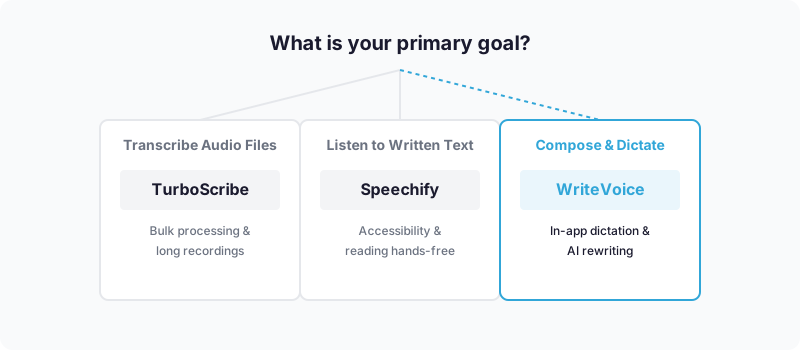
TurboScribe is a file-upload transcription tool built for bulk audio-to-text conversion – podcasters, journalists, and researchers uploading large recordings will find it purpose-built for their workflow. Speechify is primarily a text-to-speech platform built for accessible reading and content consumption, with a newer voice typing layer added recently. Choose TurboScribe if you need to process existing recordings at scale; choose Speechify if you want to listen to written content hands-free or need accessibility-focused TTS voices.
TurboScribe vs Speechify

TurboScribe is an AI-powered transcription tool that converts audio and video files into clean written text, powered by OpenAI’s Whisper engine. Speechify is the opposite direction: it converts written text into spoken audio, with accessibility at its core and a newer dictation layer added to its feature set. This page covers what each tool does well, where each falls short, and which one fits your specific workflow.
What is TurboScribe?
TurboScribe is a cloud-based transcription service with a narrow focus: take your audio or video files and turn them into accurate, structured text as fast as possible. It’s powered by OpenAI’s Whisper engine, which gives it recognized strength in handling accents, background noise, and technical terminology – areas where weaker transcription engines frequently stumble.
The product is aimed at professionals who regularly deal with large volumes of recorded content: podcasters turning episodes into show notes and blog posts, journalists transcribing interviews, researchers working through focus group recordings, and remote teams who need meeting recordings rendered into readable summaries. The file upload model fits their existing workflow – they already have the recording; they just need the transcript.
TurboScribe’s bulk processing capability is a genuine differentiator. Users can upload up to 50 files simultaneously, with each file running up to 10 hours long and 5 GB in size. Translation is included across 134+ languages. The editing interface is described by users on G2 and Trustpilot as clean and functional, with multiple transcription modes and speaker recognition for multi-person recordings. At $10/month for unlimited transcriptions, the pricing is hard to argue with. Reddit users and review sites consistently praise the accuracy: “Accuracy was spot-on and I got it back fast.”
What is Speechify?
Speechify approaches voice and text from the opposite direction. Where TurboScribe converts audio into text, Speechify converts text into audio – reading articles, PDFs, emails, and documents aloud with AI-generated human-like voices. Its primary audience has always been accessibility-focused: students with dyslexia or ADHD, professionals who prefer listening over reading, and anyone who wants to consume content while commuting, exercising, or multitasking.
Speechify markets itself as the #1 text-to-speech app in the world with over 100,000 five-star reviews, and its voice quality backs that claim – the voices are described as “incredibly human-like” in reviews, and the platform has expanded into novelty voices, including branded options like a Snoop Dogg voice. Core features include OCR for scanning physical documents, AI document summarization, a Q&A module, speed control, text highlighting synchronized to speech, and offline listening on premium tiers.
More recently, Speechify has pushed into voice typing and dictation, branding it as a “Voice AI Assistant” that allows users to dictate notes and interact with content via voice commands. That rebranding makes Speechify a unified “Voice AI platform” rather than a pure TTS tool – but the core user base remains students, educators, and accessibility-focused readers. Pricing starts at approximately $11.58/month, though promotional pricing (Reddit users have reported deals as low as $10/year) is occasionally available.
How TurboScribe and Speechify Compare
Core Features
TurboScribe’s feature set is focused and deep in one dimension: file-based transcription. You upload audio or video, select the language from 98+ supported options, and receive a structured transcript. Speaker recognition identifies different voices in multi-person recordings. Bulk processing handles up to 50 files simultaneously. The transcription modes offer varying levels of processing depth, and the editing interface lets you refine the output before exporting. TurboScribe does not add AI rewriting, voice cloning, TTS output, or document consumption features – it converts audio to text and does that well.
Speechify’s feature architecture is broader and layered. TTS remains the flagship: upload a document, paste a URL, or scan a physical page with OCR, and Speechify reads it aloud in a chosen voice. AI summarization can distill a long document into key points. The Q&A module lets you ask questions about the content. The Chrome extension brings TTS to any webpage. The newer voice typing module adds dictation, though reviews suggest it’s still maturing relative to Speechify’s TTS capabilities. For a user whose primary job is consuming written content – listening to research papers, reading email threads aloud, getting through lengthy reports – Speechify’s feature suite has no real competitor in this comparison.
Bottom line: TurboScribe wins for anyone with audio they need converted to text at scale. Speechify wins for anyone with text they want to hear, with accessibility needs, or who wants a unified reading-and-listening environment.
Pricing
| Tier | TurboScribe | Speechify |
|---|---|---|
| Free | Limited free tier available | Limited free tier (speed, voices, offline locked) |
| Starter/Paid | $10/mo – unlimited transcriptions, 134+ languages, bulk upload | ~$11.58/mo – premium voices, cross-device sync, offline listening |
| Enterprise | Custom | Custom |
Pricing as of July 2025. Check each product’s pricing page for current rates.
TurboScribe’s pricing is straightforward: one paid tier at $10/month, unlimited transcriptions, no per-file charges, no minute caps. For heavy users, this is predictable and cost-efficient. Speechify’s free tier is described by reviewers as heavily restricted – features like unlimited reading, advanced voices, speed control, offline listening, and cross-device sync all sit behind the paywall. Promotional pricing is occasionally available, and the base paid tier is close in cost to TurboScribe at roughly $11.58/month. Neither tool offers a lifetime purchase option, which means ongoing subscription costs for both.
Ease of Use & Onboarding
TurboScribe’s onboarding is about as minimal as it gets. Drag in an audio or video file, confirm the language, click transcribe. Users on G2 describe it as easy to implement for daily workflows, and the learning curve is close to zero for anyone who has used any web-based upload tool. The primary complexity is post-transcription – editing long transcripts and managing speaker labels – but the UI is designed around that editing experience. For someone processing their first podcast episode, TurboScribe is ready in under five minutes.
Speechify’s onboarding is similarly accessible for its primary TTS use case: install the app or Chrome extension, paste text or upload a file, press play. The complexity comes with the expanded feature set – OCR scanning, the AI Q&A module, voice typing setup, and managing different voice profiles across platforms. New users focused on accessibility features (dyslexia, ADHD accommodations) report a smooth onboarding experience. Users trying to use Speechify for dictation or note-taking find the newer features require more trial and error, as the voice typing module is still being built out and user documentation is thinner than the TTS core.
Integrations & Ecosystem
TurboScribe’s integrations are pragmatic and export-focused. It connects to Zapier for workflow automation, allowing transcripts to route to Notion, Google Docs, Slack, and hundreds of other tools automatically. Export formats include text, SRT (for subtitles), and structured document formats. For teams using TurboScribe in a production workflow – podcast editors auto-routing transcripts to their CMS, researchers feeding transcripts into analysis tools – the Zapier integration is the primary bridge. The overall integration depth is narrower than broad-platform tools, but sufficient for the transcription workflow it serves.
Speechify’s ecosystem is wider by design – it’s built to follow you across devices. The Chrome extension brings TTS to any webpage. Apps are available on iOS, Android, and web. OCR works via mobile camera. The platform connects to Dropbox and Google Drive for document import. The newer AI features are building out API access. For a student using Speechify across devices – reading a PDF on the laptop, switching to mobile for commuting, using the Chrome extension during web research – the cross-platform continuity is a genuine strength. Neither tool offers deep native integrations with calendar or video conferencing platforms like Zoom or Google Meet.
Accuracy & Output Quality
TurboScribe’s Whisper-powered accuracy is consistently praised in user reviews. The Whisper engine is widely regarded as one of the most reliable open-source transcription models, particularly for technical language, accents, and audio with background noise. One comparative review notes that Otter.ai’s quality dips compared to TurboScribe’s Whisper-powered engine – a meaningful benchmark given Otter’s market position. For a journalist transcribing an hour-long interview recorded in a noisy café, TurboScribe’s accuracy advantage over lighter transcription tools is real and verifiable.
Speechify’s output quality is measured on a different axis: how natural and intelligible the generated speech sounds. Reviews consistently describe the voices as “incredibly human-like,” and the range of voice options – including speed, tone, and language – gives users strong control over the listening experience. Voice quality for accessibility use cases is Speechify’s defining strength. Its newer voice typing output quality, however, produces raw transcribed text without the AI polishing layer that would clean up filler words and restructure content – users working with dictated notes will need to edit the output manually.
Which Should You Choose: TurboScribe or Speechify?
Choose TurboScribe if:
- You have existing audio or video files (interviews, meetings, podcasts, lectures) you need converted to accurate text
- You’re a podcaster, journalist, or researcher working through large volumes of recorded content regularly
- Bulk processing matters – uploading 10, 20, or 50 files at once saves hours of manual work
- You need reliable accuracy with accents, technical language, or noisy recordings
- Simple, transparent pricing ($10/month unlimited) is more important than a broad feature set
- Speaker identification across multi-person recordings is a core need
Choose Speechify if:
- Your primary need is listening to written content – articles, PDFs, books, emails – rather than transcribing audio
- You or someone on your team has dyslexia, ADHD, visual impairments, or other accessibility needs that benefit from high-quality TTS
- You want to consume long-form research or documents passively while multitasking
- Voice variety and naturalness matter to the listening experience
- You need cross-platform continuity across mobile, desktop, and browser
- AI document summarization and Q&A on uploaded content fits your reading workflow
A Third Option Worth Knowing About: WriteVoice
If neither TurboScribe nor Speechify quite fits, WriteVoice is worth a look. It’s an AI-powered voice dictation and content transformation tool – a custom iOS keyboard, Mac desktop app, and web app that takes your spoken input and instantly rewrites it into polished, context-aware text before you send it.
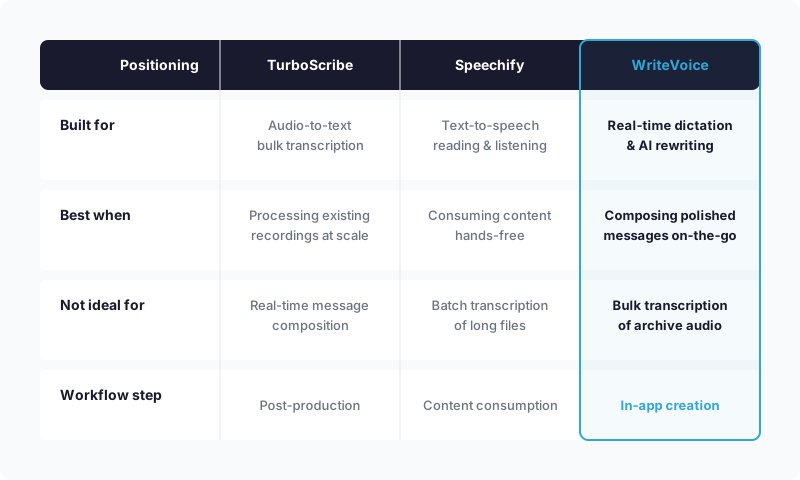
WriteVoice is built for a different problem than either competitor. TurboScribe converts audio files you already have into transcripts. Speechify reads written text back to you. WriteVoice handles real-time composition: you tap the microphone inside WhatsApp, Slack, Gmail, or any other app, speak naturally, and WriteVoice transcribes and rewrites the output in under one second – applying one of 25+ AI rewrite styles (Professional, Tweet, Email, Casual, and more) without you leaving the app or touching a keyboard. The app auto-detects which app you’re composing in and adjusts tone accordingly: LinkedIn gets thought-leadership polish, WhatsApp gets casual brevity, Gmail gets formal structure. No configuration required.
WriteVoice fits best if you’re a mobile professional – a founder, a manager, a lawyer – who spends real time composing messages on a phone and constantly loses time to slow typing, filler-word cleanup, and switching between apps. If your workflow involves dictating into one app and copy-pasting into another, WriteVoice eliminates that step. For healthcare professionals, lawyers, and executives who care about data handling: WriteVoice processes audio in real-time and immediately discards it – no recordings stored, no training on user data, built for GDPR and HIPAA-sensitive environments. WriteVoice also offers a one-time lifetime purchase (€119–€199) that neither TurboScribe nor Speechify match.
WriteVoice is not the right fit if you need to process an archive of existing recordings in bulk, or if accessibility TTS for reading is your core need. For those workflows, TurboScribe and Speechify are the right tools.
At-a-Glance: TurboScribe, Speechify, and WriteVoice
| TurboScribe | Speechify | WriteVoice | |
|---|---|---|---|
| Core purpose | File-upload audio-to-text transcription | Text-to-speech reading and accessibility | Real-time in-app dictation with AI rewriting |
| Pricing model | Subscription only | Subscription only | Subscription or one-time lifetime purchase |
| Starting price | $10/mo | ~$11.58/mo | $0 (free tier) / $15/mo unlimited |
| Free tier | Limited | Limited (features locked) | Yes – 2,000 words first month, no credit card |
| Key feature | Bulk file processing, 50 files at a time | Human-like TTS voices, OCR, AI summarization | Custom iOS keyboard, 25+ AI rewrite styles |
| AI features | Transcription accuracy via Whisper engine | Document Q&A, AI summarization, voice typing | App-aware tone adjustment, 25+ rewrite styles |
| Ease of use | Upload-and-wait, minimal learning curve | Easy for TTS; newer dictation features less polished | Tap mic in any app, no copy-paste required |
| Integration depth | Zapier, export to Notion/Google Docs/Slack | Chrome extension, Dropbox, Google Drive, mobile | iOS keyboard works in any app natively |
| Support | Standard | Standard | Priority support on paid tiers |
| Best for | Podcasters, journalists, researchers transcribing recordings | Accessibility users, students consuming written content | Mobile professionals composing polished messages on-the-go |
Pricing as of July 2025.
Next Steps
Most readers comparing TurboScribe and Speechify will find their answer in the “Which Should You Choose” section above – the decision usually comes down to whether you need to transcribe audio you already have (TurboScribe) or listen to written content more effectively (Speechify). If you’re in the narrower group – mobile-heavy, composing professional messages on the go, frustrated by context-switching between apps – WriteVoice offers a free tier with no credit card required so you can test the in-app dictation workflow before committing. Otherwise, TurboScribe’s pricing page and Speechify’s pricing page both offer free tiers to explore before upgrading.
Frequently Asked Questions
What is TurboScribe best used for?
TurboScribe is a file-upload transcription tool powered by OpenAI’s Whisper engine, designed for converting audio and video files into accurate written text at scale. It excels for podcasters, journalists, and researchers who regularly process large volumes of recordings-up to 50 files simultaneously, with each file up to 10 hours long. Users consistently praise its accuracy with accents, technical language, and background noise, making it the clear choice for anyone with an archive of existing recordings to transcribe.
How does Speechify differ from a traditional transcription tool?
Speechify converts text into spoken audio rather than audio into text-it’s a text-to-speech platform designed primarily for accessibility and content consumption. Where TurboScribe transcribes podcasts into readable notes, Speechify reads articles, PDFs, emails, and documents aloud with human-like AI voices while you commute or multitask. Its core audience is students with dyslexia or ADHD, professionals preferring listening over reading, and anyone wanting hands-free content consumption.
Can you use TurboScribe and Speechify together in one workflow?
Yes, they address different steps in a content pipeline. A podcaster could use TurboScribe to convert episodes into text transcripts, then use Speechify to read research materials or long documents aloud while editing those transcripts. The tools don’t conflict-they solve opposite problems: TurboScribe transforms audio you have into readable text, while Speechify transforms text into listenable audio. Choosing both makes sense if your workflow spans both transcription and accessible reading needs.
Which tool is better for accessibility needs?
Speechify is purpose-built for accessibility with over 100,000 five-star reviews from students and professionals with dyslexia, ADHD, and visual impairments. Its human-like voice quality, speed control, text highlighting synchronized to speech, and OCR scanning for physical documents create a polished accessibility experience. TurboScribe focuses on transcription accuracy and doesn’t position itself as an accessibility tool, so Speechify is the clear winner for users prioritizing accessible listening.
What’s the main accuracy difference between TurboScribe and Speechify?
TurboScribe’s accuracy is measured in transcription fidelity-how precisely it captures spoken words from audio files. Its Whisper engine is widely recognized as one of the most reliable transcription models, particularly for technical language and noisy environments, with user reviews confirming “spot-on” accuracy. Speechify’s output quality is measured differently: how natural and intelligible its generated speech sounds, not transcription accuracy. If you need audio converted to correct text, TurboScribe wins; if you need text read naturally aloud, Speechify wins.
How do TurboScribe and Speechify handle pricing?
TurboScribe offers a single paid tier at $10/month for unlimited transcriptions across 134+ languages with no per-file caps or minute limits. Speechify’s pricing starts at approximately $11.58/month but restricts its free tier heavily-unlimited reading, advanced voices, offline listening, and cross-device sync all require paid access. Neither offers a lifetime purchase option, so both require ongoing subscriptions; TurboScribe’s model is simpler and more predictable for heavy users.
Should I choose TurboScribe if I have a large podcast archive to transcribe?
Yes-TurboScribe is purpose-built for exactly this use case. Its bulk processing handles up to 50 files simultaneously with speaker recognition for multi-person recordings, making it ideal for processing an entire podcast back catalog efficiently. At $10/month unlimited, you can transcribe as many episodes as you need without worrying about minute caps or per-file charges. Speechify cannot handle this workflow; it’s designed for consuming written content, not transcribing audio archives.
Is Speechify’s voice typing feature a good replacement for TurboScribe?
Not for transcription needs. Speechify’s newer voice typing allows dictation and note-taking, but it produces raw transcribed text without AI polishing-you still need to manually edit filler words and restructure content afterward. TurboScribe, by contrast, handles file-based transcription with speaker recognition and outputs clean, structured transcripts ready for editing. Voice typing is Speechify’s minor feature addition; TurboScribe’s core strength remains unchanged.
Which tool integrates better with productivity apps?
TurboScribe connects via Zapier for workflow automation, allowing transcripts to route automatically to Notion, Google Docs, Slack, and hundreds of other tools-ideal for production workflows where transcripts feed into content management systems. Speechify integrates with Dropbox, Google Drive, and has a strong Chrome extension for bringing TTS to any webpage, plus cross-platform apps for seamless device switching. TurboScribe wins for transcript routing; Speechify wins for cross-platform reading continuity.
What happens if you need both transcription and text-to-speech features?
You’d need to use both tools since neither provides both directions effectively. TurboScribe transcribes audio files into text; Speechify reads that text back aloud with accessibility-friendly voices. A researcher might use TurboScribe to convert interview recordings into transcripts, then Speechify to listen to research papers while reviewing those transcripts. This two-tool approach is common among heavy users but adds subscription cost and platform switching compared to using a single unified tool.
How does WriteVoice fit if you’re deciding between TurboScribe and Speechify?
WriteVoice solves a different problem than either competitor and is worth considering if your workflow involves mobile composition rather than archive transcription or passive listening. It’s an in-app dictation tool that lets you speak naturally inside WhatsApp, Slack, or Gmail, then instantly rewrites your rambling thoughts into polished professional text-without leaving the app or touching a keyboard. WriteVoice is built for mobile professionals who compose messages frequently, not for podcasters needing bulk transcription or accessibility users wanting to listen to documents.
Who should choose WriteVoice over TurboScribe?
Choose WriteVoice if you’re a mobile professional-founder, manager, lawyer-who spends significant time composing messages on your phone and loses productivity to slow typing, filler-word cleanup, and app-switching friction. WriteVoice eliminates these by working as a custom keyboard in any app, transcribing and rewriting your speech into context-aware text in under one second. TurboScribe is for processing existing audio files; WriteVoice is for real-time in-app composition without manual editing steps.
Why would a privacy-sensitive professional prefer WriteVoice over Speechify?
WriteVoice processes audio in real-time and immediately discards recordings-no storage, no training on user data-making it built for GDPR and HIPAA-sensitive environments like legal, healthcare, and executive roles. Speechify and TurboScribe don’t emphasize privacy-first architecture in their marketing. If you’re a lawyer, therapist, or healthcare executive dictating sensitive information, WriteVoice’s explicit zero-retention guarantee is a meaningful differentiator.
Is WriteVoice’s lifetime purchase option available from TurboScribe or Speechify?
No-both TurboScribe and Speechify operate subscription-only models with no lifetime purchase option, meaning ongoing monthly or annual fees indefinitely. WriteVoice offers a one-time lifetime license (€119–€199) in addition to its $15/month subscription option, appealing to indie professionals and developers who want to avoid long-term subscription lock-in. This pricing flexibility is unique to WriteVoice among the three tools.