
TurboScribe vs Rev
TL;DR
TurboScribe is built for high-volume, flat-rate file transcription – upload audio or video, get accurate text fast at $10/month unlimited. Rev is built for professionals who need the option of human-verified transcription alongside AI, with per-minute pricing and a collaborative team workspace. Choose TurboScribe if you’re transcribing podcasts, videos, or recordings in volume. Choose Rev if accuracy is non-negotiable for compliance, legal, or professional work and you need human review as a fallback.

TurboScribe vs Rev
TurboScribe is an AI transcription service built around Whisper AI, with flat-rate unlimited file processing for content creators and high-volume teams. Rev combines AI transcription with access to human transcriptionists – the option that matters when accuracy has real consequences. This page compares both tools across pricing, accuracy, features, and use cases.
What is TurboScribe?
TurboScribe is an AI transcription tool powered by OpenAI’s Whisper model, designed to convert audio and video files into text quickly and affordably. Its core appeal is simplicity: upload a file in any major format (MP3, MP4, MOV, WAV, AAC, OGG, and more), and receive a transcript within seconds using GPU-accelerated processing. The free plan allows 3 files daily, each up to 30 minutes – enough to evaluate accuracy before committing.
TurboScribe is built for content creators, video editors, podcasters, and marketing teams who generate large volumes of audio and video content and need reliable, fast transcripts without paying per minute. Users report that it handles accents and background noise reasonably well, and its claimed 99.8% accuracy (via Whisper AI) on clean audio benchmarks makes it a credible choice for straightforward media content. Speaker recognition and multilingual support cover 134+ languages.
The platform has earned strong word-of-mouth for its price-to-accuracy ratio. As one Trustpilot reviewer put it: “It’s very simple to use and surprisingly affordable. I’ve been using the product for a few months now and have no complaints whatsoever.” For teams or solo creators who upload dozens of files per month, TurboScribe’s flat-rate model is genuinely hard to beat.
What is Rev?
Rev is a transcription and caption platform that offers both AI-automated and human-reviewed transcription from the same interface. Founded in 2010, Rev built its reputation on accuracy through a network of human transcriptionists, then added AI transcription and caption tools to cover different price points and use cases.
Rev serves professionals in legal, media, marketing, and enterprise settings who need transcripts that can be trusted for compliance, publication, or legal review. Its 96.7% AI accuracy is solid for automated workflows, and its human transcription service – priced at $1.43/minute and available with turnaround times as fast as 58 minutes – achieves 98%+ accuracy for content that requires a higher standard. The platform includes a collaborative web workspace where teams can review, edit, and share transcripts together.
PCMag calls Rev out for letting “you choose between automatic and human-based transcription services” and describes it as best for “professionals who want high-quality automated and human-based transcription from the same company.” If your workflow involves captions, subtitles, or multi-file team review, Rev handles all of it from one place. Billing is per-minute à la carte or subscription, so it fits irregular volume as well as steady use.
How TurboScribe and Rev Compare
Core Features
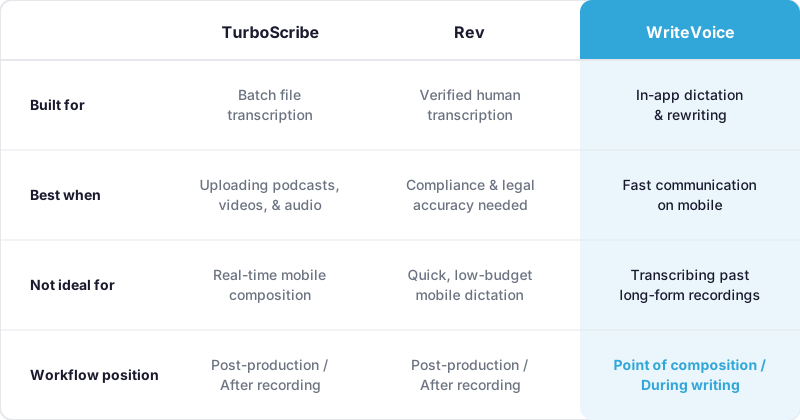
TurboScribe is purpose-built around one job: converting audio and video files to accurate text, fast. Upload files up to 10 hours long or 5GB in size, batch up to 50 files at once, and receive transcripts powered by Whisper AI within seconds. Speaker recognition is included, multilingual transcription covers 134+ languages (with direct-to-English translation), and export formats include Docs and PDF. What TurboScribe doesn’t offer is human review, team collaboration workflows, or captions/subtitle generation – its scope is intentionally narrow.
Rev covers significantly more ground. AI transcription handles speed-sensitive work; human transcription ($1.43/minute) handles accuracy-critical work. Beyond transcripts, Rev generates captions and subtitles for video, supports multi-file analysis, and provides a dedicated collaborative workspace for team review. Named entities (proper names, specialized terminology) have been flagged as a weakness for Rev’s AI model specifically – Wirecutter’s testing noted issues like “as large as” transcribed as “f / f” – making human review genuinely useful for professional submissions.
Bottom line: TurboScribe wins for high-volume, single-user file transcription with no frills. Rev wins when the workflow requires human verification, captioning, or team-based review. If your output is a podcast transcript or video caption, these tools overlap significantly – but Rev’s human fallback is the decisive differentiator for compliance-grade work.
Pricing
| Tier | TurboScribe | Rev |
|---|---|---|
| Free | 3 files/day, up to 30 min each | AI Transcription + AI Captions + Multi-File Analysis (limited) |
| Starter/Basic | $10/mo – unlimited files, up to 10 hours each | $9.99/mo (annual) – 1,200 minutes of AI transcripts/month |
| Human Transcription | Not available | $1.43/min (à la carte) |
| Enterprise | Not listed | Custom |
Pricing as of June 2025. Check TurboScribe’s pricing page and Rev’s pricing page for current rates.
The pricing models are structurally different, which matters for total cost. TurboScribe’s $10/month flat rate includes unlimited files – a genuine bargain for a creator uploading 20+ videos per month (effectively $0.50/file or less). There are no per-minute fees, no overage charges, no surprises.
Rev’s $9.99/month Basic plan caps at 1,200 minutes of AI transcription – roughly 20 hours. That’s sufficient for moderate use, but heavy users will hit the ceiling. The à la carte human transcription at $1.43/minute adds up quickly: a 60-minute interview costs $85.80 for human review. A team running 10 hours of compliance transcription monthly would pay $858 in human transcription alone. For high-volume needs, Rev’s costs escalate significantly compared to TurboScribe’s flat rate.
Ease of Use & Onboarding
TurboScribe is intentionally minimal. The interface is a file upload screen – drop in your audio or video, watch the processing bar, download your transcript. There’s essentially no learning curve. Users consistently praise how little friction stands between upload and output. The main onboarding task is understanding the free tier’s 30-minute file limit and then deciding whether the $10/month upgrade makes sense. Even negative reviews focus on customer support responsiveness, not on the tool being hard to use.
Rev is more feature-rich, which means slightly more to learn. New users choose between AI and human transcription paths, navigate the pricing calculator, and (if on a team) set up the collaborative workspace. For individual users doing straightforward transcription, Rev’s interface is clean and accessible. For teams needing to assign, review, and version-control transcripts, there’s more configuration involved. Rev’s onboarding is still approachable for non-technical users – PCMag notes a “great collaborative web space” – but the human transcription ordering flow (estimating turnaround, reviewing accuracy settings) requires more decision-making than TurboScribe’s single-click upload.
Integrations & Ecosystem
TurboScribe keeps its ecosystem deliberately lightweight. The focus is the web upload interface, with export options to Docs and PDF formats. It doesn’t advertise native integrations with video platforms, project management tools, or communication software. For most users, the workflow is upload → download transcript → paste into editing software. That simplicity is both a strength (nothing to break) and a limitation (no automation layer).
Rev offers a more developed integration surface. It supports captions and subtitles export in multiple formats for video publishing, and its collaborative workspace functions as a lightweight team hub. Rev has historically integrated with video platforms and media workflows more broadly than TurboScribe. For teams working inside media production pipelines, legal document systems, or enterprise CRM tools, that depth matters. And the human transcription tier effectively adds a quality-review step to the workflow – not a software hook, but a real check for compliance-driven work.
Accuracy & Reliability
TurboScribe claims 99.8% accuracy on clean audio, with independent benchmarking showing a 3.8–4.2% Word Error Rate (WER) on clean audio files. Accuracy drops 10–30% on real-world audio with background noise, heavy accents, or poor recording conditions. For studio-quality podcasts and clean video interviews, it performs well. For field recordings, customer calls, or noisy environments, results can be inconsistent.
Rev’s AI delivers 96.7% accuracy – slightly lower than TurboScribe on clean audio – but the human fallback changes the equation entirely. Rev Human achieves roughly 99%+ accuracy (~1% WER) on complex audio, including phone calls, accented speech, and multi-speaker recordings. If you need accurate output on imperfect audio, $1.43/minute for human review is hard to replicate elsewhere.
Bottom line: TurboScribe wins on AI accuracy for clean audio at $10/month flat. Rev wins when imperfect audio or compliance-grade accuracy requirements enter the picture – the human tier is genuinely in a different class.
Which Should You Choose: TurboScribe or Rev?
Choose TurboScribe if:
- You’re a podcaster, YouTuber, or video editor uploading multiple recordings per week and need fast, affordable transcripts in bulk
- You consistently record in controlled settings (studio, quiet office) where Whisper AI’s clean-audio accuracy holds up well
- You want simple, predictable flat-rate pricing – $10/month with no per-minute surprises
- You’re a solo creator or small content team with no need for shared review workflows or collaboration features
- You need 134+ language transcription or direct-to-English translation of multilingual recordings
Choose Rev if:
- Your transcripts are used in legal, HR, compliance, or medical contexts where 98%+ accuracy and human review is a requirement, not a preference
- You record in variable or imperfect audio conditions – phone calls, field interviews, multi-speaker conference rooms – where AI alone isn’t reliable enough
- You’re working in a team that needs to collaboratively review, edit, and version transcripts before final delivery
- You produce video content that requires professional captions or subtitles in addition to a transcript
- You need occasional one-off transcription without a monthly subscription – Rev’s per-minute à la carte model fits irregular volume better than a flat monthly fee
A Third Option Worth Knowing About: WriteVoice
If you’ve read this far and neither TurboScribe nor Rev quite fits, there’s a third tool worth knowing about. WriteVoice isn’t a file transcription service – it’s a real-time AI dictation keyboard for iOS, Mac, and web that transcribes and rewrites your speech into polished text while you’re still inside the app you’re writing in.
What sets WriteVoice apart from both TurboScribe and Rev is the workflow it replaces. Where TurboScribe and Rev require you to record, upload, wait, and copy – WriteVoice operates at the point of composition. On iOS, it replaces your keyboard entirely, so you can dictate a WhatsApp message, Slack reply, or LinkedIn post, select a rewrite style (Casual, Professional, Email, Tweet, and 22 more), and send – without ever switching apps. On Mac, a hotkey triggers dictation from any application. Turnaround is sub-1-second. It also auto-detects which app you’re in and adjusts tone accordingly – dictating into Gmail gets a different register than dictating into iMessage.
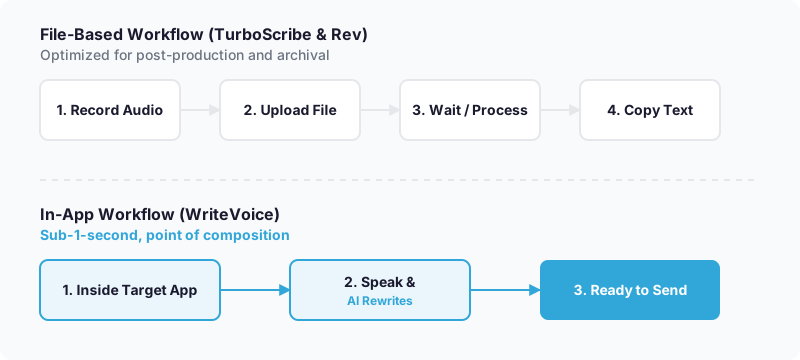
WriteVoice is worth a close look if your bottleneck is mobile communication speed rather than file transcription volume. If you’re a founder dictating LinkedIn posts, a knowledge worker composing Slack messages while commuting, or just tired of slowly tapping on a glass keyboard, it solves a different problem than TurboScribe or Rev do. Pricing is $15/month for unlimited dictation across iOS, Mac, and web, with a one-time lifetime deal option at €119–€199 – an option neither TurboScribe nor Rev offers.
Where WriteVoice is not the right fit: if you need to transcribe pre-recorded podcasts, video files, or hour-long compliance recordings for archival or human review, use TurboScribe or Rev. WriteVoice is optimized for real-time composition, not batch file processing.
At-a-Glance: TurboScribe, Rev, and WriteVoice
| TurboScribe | Rev | WriteVoice | |
|---|---|---|---|
| Core purpose | Batch audio/video file transcription | AI + human transcription for compliance and media | Real-time in-app dictation and AI rewriting |
| Pricing model | Flat-rate subscription | Per-minute à la carte + subscription | Flat subscription or one-time lifetime deal |
| Starting price | $10/mo (unlimited) | $9.99/mo (1,200 min AI cap) | $15/mo (unlimited) |
| Free tier | 3 files/day up to 30 min each | AI transcription + captions (limited) | Yes – 2,000 words first month |
| Key feature | Unlimited files up to 10 hours each | Human transcription fallback at $1.43/min | iOS keyboard replacement with 25+ AI rewrite styles |
| AI accuracy | 99.8% claimed on clean audio | 96.7% AI; 98%+ with human review | 98%+ on real-time mobile dictation (self-reported) |
| Ease of use | Upload and download – minimal learning curve | Moderate – more options to navigate | Tap mic, speak, select style – no file management |
| Integration depth | Export to Docs/PDF; no native app integrations | Video captions export; collaborative workspace | Native iOS keyboard; Mac hotkey; works in any app |
| Languages | 134+ languages | Not explicitly listed | 120+ languages |
| Support | Standard; some complaints about responsiveness | Standard + human transcription workflow support | Priority support on paid plans |
| Best for | Podcast and video creators needing cheap bulk transcription | Professionals needing human-verified or compliance-grade transcripts | Mobile-first professionals dictating messages and posts in real time |
Pricing as of June 2025.
Next Steps
Most readers will find the right fit between TurboScribe and Rev based on one question: do you need human verification? If you’re transcribing clean media files in volume, TurboScribe’s $10/month plan is the straightforward choice. If accuracy on imperfect audio or compliance requirements are in play, Rev’s hybrid model is worth the higher cost. If your bottleneck is how slowly you type on your phone – not how you transcribe recorded files – WriteVoice offers a free starter plan with no credit card required, so you can test the keyboard in the apps you already use today.
Frequently Asked Questions
Is TurboScribe more accurate than Rev?
TurboScribe claims 99.8% accuracy on clean audio using Whisper AI, while Rev’s AI model achieves 96.7% accuracy – TurboScribe wins on pure AI transcription. However, Rev offers human transcription at $1.43/minute that reaches 98%+ accuracy, making it the better choice when precision on imperfect audio matters more than cost. For studio-quality recordings, TurboScribe’s accuracy advantage holds; for field recordings or compliance work, Rev’s human fallback is genuinely in a different class.
What’s the difference between TurboScribe’s and Rev’s pricing models?
TurboScribe charges a flat $10/month for unlimited files up to 10 hours each, with no per-file or per-minute fees – ideal for high-volume creators. Rev’s Basic plan is $9.99/month but caps at 1,200 minutes of AI transcription per month, and human transcription adds $1.43/minute on top, scaling costs significantly for heavy users. For bulk transcription, TurboScribe’s flat rate wins; for occasional compliance work, Rev’s per-minute pricing avoids unused monthly capacity.
Can TurboScribe handle background noise and accented speech?
TurboScribe’s Whisper AI handles clean audio at 99.8% accuracy, but performance drops 10-30% on recordings with background noise, heavy accents, or poor recording conditions. If your content is consistently studio-quality or quiet, TurboScribe remains reliable; if you’re transcribing phone calls, field interviews, or multi-speaker meetings with variable audio, Rev’s human transcription option becomes worth the extra cost for accuracy you can trust.
Does Rev offer team collaboration features that TurboScribe doesn’t?
Yes, Rev provides a dedicated collaborative web workspace where teams can review, edit, version-control, and share transcripts together before final delivery. TurboScribe’s interface is intentionally minimal – upload, download, done – with no team features or shared workspaces. For solo creators, this difference is irrelevant; for compliance teams or media production groups needing multi-person review workflows, Rev’s collaboration layer is a material advantage.
What file sizes and formats do TurboScribe and Rev accept?
TurboScribe accepts files up to 5GB and 10 hours in length, supporting MP3, MP4, MOV, WAV, AAC, OGG, and more. Rev’s format support is equally broad but doesn’t advertise explicit file size or duration limits on its public pricing page. For creators with 5GB+ files or hour-long recordings, both tools should handle your content, but TurboScribe explicitly confirms the upper limits upfront.
How fast is turnaround time for transcripts on each platform?
TurboScribe uses GPU-accelerated processing and returns transcripts within seconds for typical audio files. Rev’s AI transcription is similarly fast, while human transcription ranges from 58 minutes to 2.5 hours depending on complexity and workload. If you need instant results for high-volume batch processing, TurboScribe’s guaranteed seconds-level speed is the differentiator; Rev’s speed advantage only applies to AI mode.
Can TurboScribe generate captions and subtitles like Rev does?
No, TurboScribe is narrowly focused on audio-to-text transcription and doesn’t offer caption or subtitle generation. Rev generates captions and subtitles for video in multiple export formats, making it the integrated choice for video producers who need both transcripts and formatted captions from one platform. If your workflow requires captions, you’d need to add a separate tool alongside TurboScribe.
What languages does each service support?
TurboScribe explicitly lists 134+ languages including direct-to-English translation of multilingual recordings. Rev doesn’t publicly specify its language count on its pricing page. For creators working in non-English languages or needing automatic translation, TurboScribe’s transparent 134+ language support is a concrete advantage.
How do TurboScribe and Rev handle named entities and technical terminology?
Wirecutter’s testing found that Rev’s AI model occasionally mishandles proper names and specialized terminology – one example cited was ‘as large as’ transcribed as ‘f / f.’ TurboScribe doesn’t explicitly address this, but Whisper AI generally performs better on technical vocabulary than older models. For transcripts containing heavy medical, legal, or technical jargon, human review through Rev becomes more valuable to catch AI errors.
Can you use TurboScribe or Rev for real-time transcription during live meetings?
Both TurboScribe and Rev are designed for file-based batch transcription, not live real-time transcription during active meetings. TurboScribe requires uploading a pre-recorded file; Rev can transcribe files quickly but isn’t built for live-meeting capture with instant output. If you need real-time transcription of a meeting as it’s happening, both tools require you to record first and process afterward.
What is WriteVoice and how does it differ from TurboScribe and Rev?
WriteVoice is an AI dictation keyboard for iOS, Mac, and web that transcribes and rewrites your speech into polished text in real-time while you compose messages inside apps like WhatsApp, Slack, or Gmail – without file uploads or waiting. TurboScribe and Rev require you to record, upload, and wait for processing; WriteVoice operates at composition time with sub-1-second turnaround. If your bottleneck is typing speed on mobile, WriteVoice solves a different problem than batch file transcription; if you’re transcribing podcasts or archived recordings, TurboScribe or Rev remain the correct tools.
Who should choose WriteVoice over TurboScribe or Rev?
WriteVoice is built for mobile-first professionals who need to compose faster – founders dictating LinkedIn posts, knowledge workers sending Slack messages while commuting, or anyone tired of hunting-and-pecking on a glass keyboard. It includes app-aware tone adjustment (detects whether you’re writing to LinkedIn or iMessage and adjusts register automatically) and 25+ AI rewrite styles. Choose WriteVoice if your workflow is real-time communication; choose TurboScribe or Rev if your workflow is archival or compliance-grade transcription of pre-recorded files.
Does WriteVoice offer a lifetime deal like some transcription services do?
Yes, WriteVoice offers a one-time lifetime deal at €119–€199 (depending on promotion timing), giving permanent access to unlimited dictation, 25+ rewrite styles, and all future updates. TurboScribe and Rev both use recurring subscription models with no lifetime option. For budget-conscious users comfortable with a larger upfront payment, WriteVoice’s lifetime deal eliminates recurring costs; for month-to-month flexibility, both TurboScribe and Rev offer lower barrier to entry.
How does WriteVoice’s pricing compare to TurboScribe and Rev?
WriteVoice charges $15/month for unlimited dictation or €119–€199 one-time; TurboScribe is $10/month flat-rate; Rev is $9.99/month (capped at 1,200 AI minutes) plus $1.43/minute for human transcription. WriteVoice’s monthly cost is slightly higher than TurboScribe’s, but WriteVoice’s one-time lifetime option has no recurring cost – a model neither competitor offers. For predictable monthly budgets, TurboScribe remains cheapest; for users wanting to eliminate recurring fees, WriteVoice’s LTD is worth comparing upfront.
Can WriteVoice transcribe hour-long meetings like Rev can?
Yes, WriteVoice supports recording and transcribing hour-long meetings on its web app and can generate summaries and action items automatically. Unlike Rev, which focuses on user-uploaded files, WriteVoice can capture live meeting audio in real-time and provide instant transcription with structured notes. However, WriteVoice’s core strength remains quick mobile dictation; for compliance-grade meeting transcription requiring human review, Rev’s human transcription tier is still the more legally defensible choice.