
TurboScribe vs Happy Scribe
TL;DR
TurboScribe is for volume. Upload 50 files at once, pay $10/month, get raw transcripts fast. Happy Scribe is for polish: verified 95% AI accuracy, a built-in editor, and an optional human review upgrade at $2/minute. The tradeoff is price – Happy Scribe costs nearly 5x more at $49/month. Choose TurboScribe if you have large volumes of audio to process on a budget. Choose Happy Scribe when the transcript itself is the deliverable.

TurboScribe vs Happy Scribe
If you’re comparing TurboScribe vs Happy Scribe, the two tools look similar on the surface – both do transcription, both have free tiers, both handle substantial audio volumes. The real difference shows up after you hit export. TurboScribe is built around throughput: upload fast, get a raw transcript, move on. Happy Scribe is built around accuracy and editorial depth: 95% verified accuracy, a built-in editor, custom glossaries, and optional human review. What you need depends on what happens after the transcript is generated.
What is TurboScribe?
TurboScribe is an AI-powered transcription platform with one core promise: fast, affordable transcripts at any volume. Upload audio or video files (up to 10 hours per file, 5 GB in size) and receive machine-generated transcripts within minutes. The free tier covers three files per day (30 minutes each), and the paid plan unlocks unlimited transcriptions for a single user at $10/month when billed annually.
It’s built for people who generate a lot of audio and need text quickly, without spending on enterprise tools. Podcast producers, researchers, journalists, and content marketers processing large recording libraries are common users. The batch upload (50 files at once) is what makes TurboScribe genuinely practical for backlog clearance – podcast archives, lecture series, interview libraries.
TurboScribe translates into 134+ languages, which helps for multilingual workflows. Its strength is throughput at low cost, not editorial depth. The interface is lean: upload, transcribe, export. Advanced editing, speaker labeling, and team collaboration are absent. That’s not an oversight – TurboScribe trades depth for simplicity and price.
What is Happy Scribe?
Happy Scribe is a transcription and translation platform built for professional and editorial workflows. Its AI transcription hits 95% accuracy, and an optional human review add-on gets to 99% – the right choice for compliance recordings, broadcast media, or legal proceedings where every word matters. Happy Scribe has a 4.5/5 Trustpilot score across 1,000+ reviews, about 10x more review coverage than TurboScribe.
The feature set goes well beyond raw transcription. Happy Scribe includes a built-in interactive editor where users can clean transcripts while audio plays back, speaker labeling, custom glossaries for terminology control, and style guides that enforce consistent output across a team. For content professionals (podcasters, documentary producers, journalists), this editorial depth is why Happy Scribe costs 5x more than TurboScribe. Whether that premium is worth it depends on how much time you currently spend correcting transcripts.
Happy Scribe’s free tier offers 120 minutes of AI transcription per month, plus unlimited meeting recordings (up to 90 minutes each). It supports 120+ languages for both transcription and translation. The Business plan at $49/month unlocks the full platform. Human transcription is available as an add-on at $2.00 per minute ($120 per hour) – a real line item if you work with long recordings. For teams that need polished transcripts with audit trails, Happy Scribe is the more mature platform.
How TurboScribe and Happy Scribe compare
Core features
TurboScribe’s feature set centers on volume throughput. Batch processing of 50 files simultaneously, support for files up to 10 hours long, and unlimited monthly transcriptions (on paid plans) make it the right tool for archival work: digitizing recording libraries, transcribing lecture series, clearing podcast backlogs. The output is a raw transcript you export and edit manually in your preferred tool. What TurboScribe doesn’t offer: speaker labeling with customization, custom glossaries, an integrated editor, meeting recording, or transcript summarization.
Happy Scribe treats the transcript as a starting point, not an endpoint. The interactive editor lets users make corrections while audio plays back (though editing while audio plays is cited as a limitation in some reviews). Custom glossaries ensure brand names, technical terms, and proper nouns are rendered consistently across all transcripts – critical for regulated industries and publishing workflows. Speaker labeling is automatic and editable. Meeting recording is built in. The platform is designed so a professional transcriptionist or content producer can deliver a finished, reviewable document, not just a raw text file.
If your workflow ends at export and you edit in a separate tool, TurboScribe is fine. If the transcript itself is the deliverable – something a client, editor, or compliance reviewer will read – Happy Scribe is the better fit.
Pricing
| Tier | TurboScribe | Happy Scribe |
|---|---|---|
| Free | 3 files/day, 30 min each | 120 min/month AI + unlimited meeting recording (90 min/recording) |
| Monthly paid | ~$12/month (billed monthly) | $49/month Business plan |
| Annual paid | $10/month (billed yearly) | Varies – check site |
| Human transcription | Not available | $2.00/min ($120/hr) add-on |
| Enterprise | Contact sales | Contact sales |
Pricing as of July 2025. Check each product’s pricing page for current rates: TurboScribe pricing and Happy Scribe pricing.
The price gap is real. TurboScribe at $10/month versus Happy Scribe’s $49/month means roughly $120/year versus $588/year for a solo user. For anyone deciding primarily on budget, TurboScribe is the obvious choice.
Happy Scribe’s free tier is more generous for casual users: 120 minutes of AI transcription per month covers a few podcast episodes or a handful of interviews without any payment. TurboScribe’s free tier (3 files/day, 30 min each) suits users with lightweight but regular daily volume.
The human transcription add-on at $2.00/minute is the most significant hidden cost in Happy Scribe’s model. A one-hour interview runs $120. Good value compared to traditional services, but it surprises users who assumed AI accuracy was sufficient for professional deliverables.
Ease of use and onboarding
TurboScribe’s onboarding is minimal by design. The workflow is three steps: create an account, upload a file, download the transcript. New users report being productive within minutes. The tradeoff is limited guidance on format, language settings, or accuracy optimization – users with accented speech or specialized vocabulary have to accept raw output as-is, since there are no glossary or customization tools. User feedback on Trustpilot describes TurboScribe as “intuitive, quick” for high-volume work. The 2.9/5 TrustScore across 137 reviews suggests the experience varies more than that description implies.
Happy Scribe’s onboarding takes longer because there’s more to configure: editor, speaker labeling, glossary settings, and style guides in addition to the core upload workflow. The learning curve is real but not steep. The 4.5/5 Trustpilot score across 1,000+ reviews suggests most users land on their feet. One real limitation worth knowing: editing while audio plays back doesn’t work smoothly in the editor, which is frustrating if you’re accustomed to that workflow.
Integrations and ecosystem
TurboScribe’s integration footprint is small. No native integrations with Zoom, Google Meet, or Microsoft Teams; no content management or project management connections. Exports are available in standard formats (text, SRT, VTT for subtitles), compatible with most downstream tools. The batch upload API works for developers who want to embed transcription in their own tools, but out-of-the-box it’s largely export-and-move-on.
Happy Scribe offers broader ecosystem connections. Meeting recording is built in with browser-based capture. Custom glossaries and style guides connect to team publishing workflows in a way that standalone exports can’t replicate. At this point, agencies and content studios use Happy Scribe as a hub, not just a transcription utility. For teams in media or localization workflows, it fits more naturally than a pure file-upload service.
Accuracy and quality
Happy Scribe publishes a verified 95% AI accuracy rate, with human-reviewed transcripts at 99%. Those numbers are backed by 1,000+ independent Trustpilot reviews. For interviews, legal recordings, or broadcast content where every word matters, that benchmark counts.
TurboScribe doesn’t publish a specific accuracy percentage. Third-party analysis has flagged this gap. Users with clear, standard English speech report solid results; users with accented speech, technical jargon, or multiple speakers in a single recording get more inconsistent output. There’s no custom glossary to teach TurboScribe domain-specific vocabulary, which amplifies the problem for specialized fields. For accuracy-sensitive workflows, this isn’t a product flaw – it’s a design choice. TurboScribe is built for speed and volume, not for the highest possible accuracy per transcript.
Which should you choose: TurboScribe or Happy Scribe?
Choose TurboScribe if:
- You need to transcribe large volumes of audio quickly and cheaply – hundreds of hours of content at $10/month
- Your workflow ends at the transcript export – you edit in a separate tool and don’t need a built-in editor
- File size is a concern – you regularly work with audio files up to 10 hours long or 5 GB
- You want to batch-upload 50 files at once without manual queue management
- Budget is the primary decision factor and advanced accuracy features aren’t required for your use case
Choose Happy Scribe if:
- You need verified 95% AI accuracy and the option for 99% human-reviewed transcripts for professional deliverables
- Your workflow includes transcript editing, speaker labeling, or custom terminology that must stay consistent across projects
- You need meeting recording built into the transcription platform without separate tooling
- You’re part of a team that needs style guides, shared glossaries, and consistent branded output
- Third-party review validation matters for your procurement or compliance process – Happy Scribe’s 4.5/5 Trustpilot score across 1,000+ reviews provides that assurance
A third option worth knowing about: WriteVoice
If neither tool quite fits, there’s a third option worth knowing about. WriteVoice is an AI voice dictation tool: an iOS custom keyboard, Mac app, and web app that transcribes your speech and rewrites it into polished, context-aware text without leaving whatever app you’re already in.
The core difference from both TurboScribe and Happy Scribe is the workflow. Neither competitor can detect that you’re typing in LinkedIn vs. WhatsApp and adjust tone automatically. Neither integrates as a keyboard replacement that lets you dictate directly inside Slack, Gmail, or iMessage. Both require an upload-wait-edit-export cycle; WriteVoice delivers a rewritten, send-ready message in under a second. It also offers 25+ AI rewrite styles (Professional, Email, Tweet, Casual, and more), removes filler words automatically, and supports 120+ languages, all without leaving the app you’re working in. For meeting recording, the web app transcribes long recordings and generates structured summaries with action items.
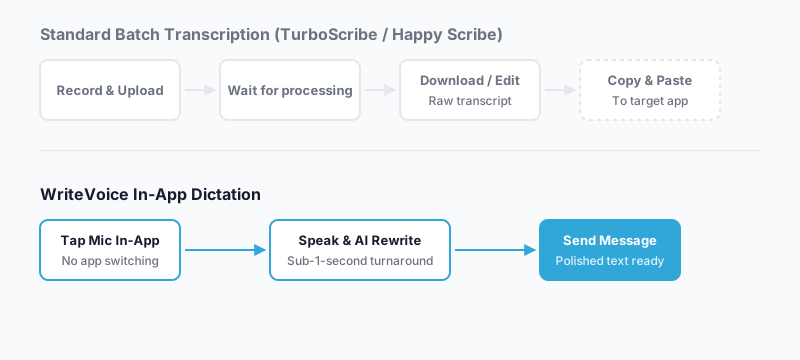
WriteVoice makes the most sense when you’re a founder, manager, or mobile professional whose bottleneck isn’t transcribing recorded files, but drafting polished messages fast while you’re already moving. If you dictate a rambling voice note today and then manually edit it before sending, WriteVoice handles that transformation instantly and eliminates the copy-paste step entirely. The lifetime deal option (€119–€199 one-time) also appeals to professionals who want to stop paying monthly subscriptions.
The honest limitation: WriteVoice is not the right tool for archival transcription, batch processing, or high-accuracy professional transcripts. If you need to process 50 audio files at once, produce 99%-accurate transcripts for legal review, or manage a shared transcription library, TurboScribe and Happy Scribe are the right tools for those workflows.
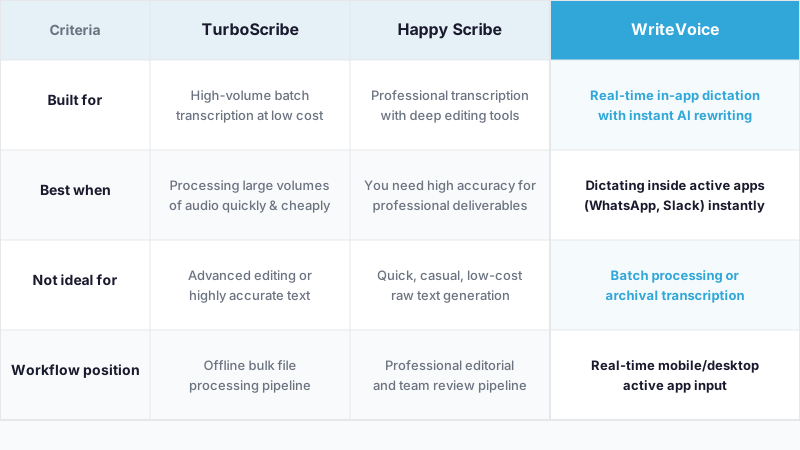
At-a-glance: TurboScribe, Happy Scribe, and WriteVoice
| TurboScribe | Happy Scribe | WriteVoice | |
|---|---|---|---|
| Core purpose | Batch file transcription at scale | Professional transcription with editing and human review | Real-time in-app dictation with AI rewriting |
| Pricing model | Subscription per user | Subscription + pay-per-minute human add-on | Subscription or one-time lifetime deal |
| Starting price | $10/month (annual) | $49/month Business plan | $15/month (free tier available) |
| Free tier | 3 files/day, 30 min each | 120 min AI/month + unlimited meeting recordings | 2,000 words first month, no credit card |
| Key feature | 50-file batch upload, 10-hr file limit | 95% AI accuracy, custom glossaries, human review option | iOS keyboard integration, 25+ AI rewrite styles |
| AI features | Raw transcription, 134+ language translation | 95% AI transcription, speaker labeling, style guides | Real-time rewriting, app-aware tone adjustment, 120+ languages |
| Ease of use | Minimal setup, upload-and-go | Moderate – editor and glossary configuration | iOS keyboard install, then dictate inside any app |
| Integration depth | Export-based (SRT, TXT, VTT) | Meeting recording, team workflows, style guides | iOS/Mac/Web keyboard-level integration with any app |
| Support | Standard | Priority support on Business | Priority support on paid plans |
| Best for | High-volume batch transcription on a budget | Professional editorial transcription with accuracy guarantees | Mobile-first professionals who need to send polished messages fast |
Pricing as of July 2025.
Next steps
Most readers will find the right fit between TurboScribe and Happy Scribe based on one question: do you need a raw, fast, cheap transcript, or a polished, accurate deliverable with editing tools? If the answer is the former, TurboScribe’s pricing page makes it easy to start free. If the latter, Happy Scribe’s free tier offers 120 minutes to test accuracy and the editor before committing. If your actual bottleneck is real-time mobile dictation (drafting messages, emails, and posts without typing), WriteVoice offers a free tier with no credit card required, or a one-time lifetime deal for professionals ready to commit.
Frequently asked questions
What is the main difference between TurboScribe and Happy Scribe?
The core difference is what happens after the transcript is generated. TurboScribe gives you a raw text file and steps back. Happy Scribe gives you an editor, custom glossaries, speaker labels, and the option to have the transcript reviewed by a human. TurboScribe costs $10/month; Happy Scribe costs $49/month. If you’ll clean up transcripts yourself in a separate tool, TurboScribe works fine. If the transcript needs to be polished enough to hand to a client or compliance reviewer, Happy Scribe is the better choice.
How do TurboScribe and Happy Scribe differ in pricing?
TurboScribe costs $10/month (annual billing) for unlimited transcriptions, while Happy Scribe’s Business plan is $49/month – roughly $120/year versus $588/year for a solo user. TurboScribe’s free tier allows 3 files per day (30 minutes each); Happy Scribe’s free tier offers 120 minutes of AI transcription monthly plus unlimited meeting recordings. Happy Scribe adds human transcription as a paid add-on at $2.00/minute ($120 per hour). That’s still cheaper than traditional transcription services, but it’s a real cost if you regularly need that level of accuracy.
What are the accuracy differences between TurboScribe and Happy Scribe?
Happy Scribe publishes a verified 95% AI accuracy rate, with 99% accuracy available through human review, backed by 1,000+ Trustpilot reviews. TurboScribe doesn’t publish a specific accuracy percentage and has no third-party verification. Users with clear speech in standard English report solid results; users with accented speech, technical terminology, or multiple speakers get more inconsistent output. TurboScribe also can’t be trained on domain-specific vocabulary, which widens the gap for specialized fields. For legal, medical, or compliance recordings, Happy Scribe’s verified benchmarks are meaningfully stronger.
Can you batch upload files to TurboScribe and Happy Scribe?
TurboScribe supports batch uploading of up to 50 files at once and handles files up to 10 hours long – its strongest selling point for archival and backlog work. Happy Scribe doesn’t emphasize batch upload; its strength is in the quality and editability of individual transcripts. If you need to clear a large queue of audio files quickly and cheaply, TurboScribe is the right fit. Happy Scribe is designed for smaller volumes of higher-stakes transcripts that need polishing and review.
Which tool has better editing features for transcripts?
Happy Scribe has a built-in interactive editor with custom glossaries, style guides, and automatic speaker labeling. Users can correct transcripts while audio plays back, though that playback-edit interaction has some reported rough edges. TurboScribe exports raw transcripts in text, SRT, and VTT formats – no integrated editor, no glossary support, no speaker labeling customization. If the transcript is your final deliverable, Happy Scribe lets you finish it on-platform. TurboScribe assumes you’ll take the export elsewhere.
Does TurboScribe or Happy Scribe have better team collaboration features?
Happy Scribe is the only one of the two built for team workflows. Shared style guides, custom glossaries, speaker labeling, and audit trails give teams the consistency and accountability needed for professional output. TurboScribe is single-user by design – no shared customization, no role management, no team governance. For teams that need consistent branded output or compliance tracking across multiple transcripts, Happy Scribe is the maturer option.
How do TurboScribe and Happy Scribe handle meeting recordings?
Happy Scribe has built-in meeting recording with browser-based capture and automatic transcription – you don’t need to export audio from your conferencing platform separately. TurboScribe doesn’t have native meeting recording; you’d need to export audio from Zoom or Meet and upload it as a file. For meeting-heavy workflows, Happy Scribe’s built-in recording is a genuine convenience advantage.
Does TurboScribe or Happy Scribe support multiple languages?
Both tools handle extensive language coverage – TurboScribe supports 134+ languages for translation, Happy Scribe supports 120+ for both transcription and translation. Language support isn’t a differentiator here. What differs is verified accuracy: Happy Scribe’s 95% accuracy applies across supported languages, while TurboScribe doesn’t publish language-specific accuracy figures. For non-English workflows where accuracy matters, Happy Scribe’s verified performance is more reliable.
What do independent reviews say about TurboScribe versus Happy Scribe?
Happy Scribe has a 4.5/5 TrustScore across 1,000+ Trustpilot reviews. TurboScribe has a 2.9/5 TrustScore across 137 reviews. That gap isn’t subtle – Happy Scribe has 10x more reviews and a rating nearly a full point higher. For procurement or compliance processes where independent validation matters, Happy Scribe’s review profile provides far stronger assurance. TurboScribe’s lower score doesn’t mean it fails at batch transcription, but it does mean the experience is inconsistent in ways users notice enough to write about.
Should you choose TurboScribe if you process hundreds of hours of audio?
Yes – TurboScribe is the better choice for high-volume audio processing. Batch uploading 50 files at once, handling 10-hour files, and paying $10/month for unlimited transcriptions makes it economical at scale in a way Happy Scribe’s $49/month can’t match on budget alone. TurboScribe’s value is throughput and cost, not polish. If your workflow ends at transcript export and you edit separately, TurboScribe delivers maximum value per dollar.
What makes Happy Scribe better for professional deliverables?
Happy Scribe’s 95% verified AI accuracy, optional 99% human-reviewed transcripts, interactive editor, custom glossaries, and style guides mean it can produce finished documents that clients, editors, or compliance reviewers can read directly. Built-in speaker labeling and meeting recording support professional workflows without manual export cycles. TurboScribe generates raw transcripts suited for personal archival or secondary processing, not direct client delivery. If your output represents your professional credibility, Happy Scribe’s verification and editorial tools justify the premium.
What is WriteVoice and how does it fit compared to TurboScribe and Happy Scribe?
WriteVoice is an AI voice dictation and content transformation tool available as an iOS custom keyboard, Mac app, and web app. It transcribes speech and instantly rewrites it into polished, context-aware text without leaving the active app. Unlike TurboScribe and Happy Scribe, which require uploading files and waiting for processing, WriteVoice delivers rewritten, send-ready messages in under one second inside apps like Slack, Gmail, WhatsApp, and LinkedIn. WriteVoice is built for mobile professionals who need to draft polished messages fast while moving, not for archival transcription or batch file processing. The scenario where WriteVoice wins is real-time in-app dictation with automatic tone adjustment; both competitors require copy-paste workflows that WriteVoice eliminates.
When should you choose WriteVoice over TurboScribe or Happy Scribe?
Choose WriteVoice if your bottleneck is drafting polished messages, emails, and posts fast on mobile, not transcribing recorded files or producing archival transcripts. WriteVoice detects whether you’re in LinkedIn versus WhatsApp and adjusts tone automatically, offers 25+ AI rewrite styles, removes filler words, and integrates directly into your iPhone keyboard so you never leave the app you’re using. The one-time lifetime deal option (€119–€199) also appeals to professionals who prefer owning software over paying monthly. WriteVoice is not the right tool if you need to batch-process 50 audio files, require 99% human-reviewed accuracy for legal review, or manage a team’s shared transcription library – those use cases belong to TurboScribe and Happy Scribe.
What are the honest limitations of WriteVoice compared to TurboScribe and Happy Scribe?
WriteVoice is not designed for archival transcription, batch processing of recorded files, or producing verified high-accuracy transcripts for professional archives or legal review. If you need to transcribe 100 hours of podcasts, process a backlog of interview recordings, or deliver 99%-accurate transcripts to clients, TurboScribe’s bulk throughput or Happy Scribe’s verified accuracy are the right tools. WriteVoice optimizes for real-time mobile dictation with instant rewriting, which is a different workflow entirely from batch file transcription. The three tools serve adjacent but non-overlapping use cases – pick based on whether your workflow is upload-based (TurboScribe/Happy Scribe) or dictation-based (WriteVoice).
What is the positioning grid comparing all three tools?
TurboScribe is built for high-volume batch file transcription: best when you need raw transcripts fast and cheap, not ideal for professional deliverables or accuracy-sensitive workflows. Happy Scribe is built for professional editorial transcription: best when you need verified accuracy, editing tools, and client-ready output, not ideal for high-volume processing on a tight budget. WriteVoice is built for real-time in-app voice dictation: best when you’re a mobile professional drafting messages, emails, and posts without typing, not ideal for archival transcription or batch file processing. Three tools, three distinct workflows – TurboScribe for archive, Happy Scribe for polish, WriteVoice for speed.
Generated by BlazeHive