
Otter.ai vs TurboScribe
TL;DR
Otter.ai is built for live meeting transcription with team collaboration features – it joins your Zoom calls, tags speakers, and syncs with your CRM. TurboScribe is built for asynchronous file transcription – upload audio or video files up to 10 hours long and get back accurate, translated text at $10/month unlimited. Choose Otter.ai if your work revolves around recorded team meetings. Choose TurboScribe if you’re processing large volumes of pre-recorded files with multilingual needs.
Otter.ai vs TurboScribe
Otter.ai is an AI meeting assistant that joins your video calls, transcribes in real time, and generates summaries and action items for teams. TurboScribe is a file-based transcription service powered by OpenAI’s Whisper engine, built for anyone who needs high-accuracy, large-volume transcriptions without a meeting workflow. This page compares both tools across pricing, features, accuracy, and use cases – so you can pick the one that fits how you actually work.

What is Otter.ai?
Otter.ai calls itself “the world’s leading AI meeting assistant,” and it’s hard to argue. It joins live video meetings on Zoom, Google Meet, and Microsoft Teams, transcribes in real time, identifies individual speakers, and delivers a structured summary with action items when the call ends.
The tool is built for teams. Business plan users ($30/month per seat) get centralized administration, enhanced security controls, and up to 6,000 transcription minutes per month. A sales manager running five discovery calls a day and needing searchable transcripts synced to a CRM is the canonical Otter customer. Otter also integrates with Slack for post-meeting distribution and includes an AI Chat tool that lets users query meeting content and generate custom outlines beyond the auto-generated summary.
Otter has real market traction: 4.0/5 on G2 with over 900 reviews and 541 reviews on Trustpilot. It works reliably in clean audio environments and integrates smoothly with the modern enterprise collaboration stack. It’s purpose-built for the meeting workflow – not for transcribing pre-recorded files or ad-hoc mobile dictation – and that focus is both its strength and its limit.
What is TurboScribe?
TurboScribe is an AI transcription service powered by OpenAI’s Whisper engine. It’s built for converting large volumes of audio and video files to text with high accuracy and no fuss. Where Otter is a live-meeting product, TurboScribe is fundamentally asynchronous: you upload files, it processes them, you get back a transcript.
For $10/month on an annual plan, you get unlimited transcriptions, support for files up to 10 hours long and 5 GB, batch uploading of 50 files at a time, and translation to 134+ languages. That’s a lot of coverage for the price. The Whisper engine’s noise reduction capabilities mean TurboScribe maintains accuracy in poor audio conditions – podcast recordings, field interviews, noisy environments – where Otter’s transcription can require significant manual cleanup.
TurboScribe targets podcasters, researchers, journalists, educators, and anyone handling large quantities of pre-recorded content. It does not offer a live meeting integration, mobile apps for on-the-go recording, or team collaboration features. That narrower scope is a deliberate trade-off: TurboScribe does one thing – file transcription – and does it well at a price that undercuts almost every named competitor.
How Otter.ai and TurboScribe Compare
Core Features
Otter.ai’s feature set centers on the live meeting experience. The OtterPilot bot joins scheduled calls autonomously, captures real-time transcription with speaker identification, and produces a post-meeting summary with flagged action items. The Otter AI Chat tool extends this: users can ask questions like “What did Sarah say about Q4 budget?” and get an answer sourced from the transcript. For teams running 10+ meetings per week, every call becomes searchable without anyone taking notes. Business plan users also get CRM sync for automatic follow-ups, and admin controls for managing user access across a company.
TurboScribe’s feature set centers on the file processing pipeline. Users upload audio or video files – MP3, MP4, WAV, and other common formats – and receive back a structured transcript with speaker diarization (speaker recognition). Built-in noise reduction handles difficult recordings that would trip up other engines. The translation layer, covering 134+ languages, makes TurboScribe a practical choice for multilingual teams processing interviews or focus group recordings. Batch upload (50 files simultaneously) is the standout workflow feature for heavy users.
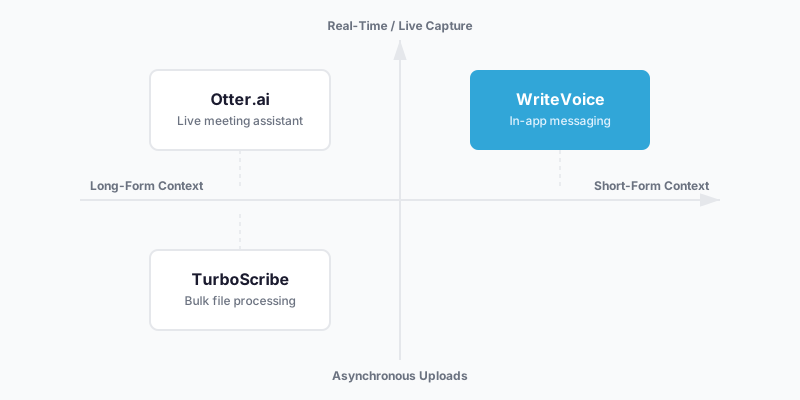
The fundamental difference: Otter is a meeting participant; TurboScribe is a processing engine. Otter is built around the calendar and the conference room. TurboScribe is built around the upload queue.
Pricing
| Tier | Otter.ai | TurboScribe |
|---|---|---|
| Free | 30 min/month transcription, 3 lifetime file imports | Limited minutes (exact cap undisclosed) |
| Starter/Paid | $16.99/month ($8.33/month annual) – 1,200 min/month | $10/month (annual) – unlimited transcriptions |
| Business | $30/month per seat ($20/month annual) – 6,000 min/month | No separate tier – same unlimited plan |
| Enterprise | Custom | Not offered |
Pricing as of June 2025. Check Otter.ai pricing and TurboScribe pricing for current rates.
Otter.ai’s tiered minute-cap model creates real cost risk for heavy users. If you’re running a team that burns through 6,000 minutes in three weeks, you face an upgrade decision with no mid-tier option. The free plan’s 30 minutes/month is practically a trial, not a working tier. TurboScribe’s flat unlimited model at $10/month is simpler and, for anyone processing more than a few hours of audio monthly, significantly cheaper. A small research team uploading 50 interview recordings per month would spend $30–$60/month on Otter’s Business tier and $10/month flat on TurboScribe. For solo users or small teams, TurboScribe’s pricing is hard to argue with.
Otter wins on pricing only if your usage is genuinely light – a few meetings per week comfortably within the Pro plan’s 1,200-minute cap – and you need the live integration features that TurboScribe doesn’t offer.
Ease of Use & Onboarding
Otter.ai’s onboarding is calendar-first. After connecting your Google or Microsoft calendar, OtterPilot can begin joining meetings automatically within minutes. The workflow requires no active user management once set up – it’s ambient. The interface is clean: a web dashboard with a transcript history, speaker-tagged playback, and an AI Chat sidebar. For meeting-focused use, it’s easy to pick up. The Business plan’s admin controls and CRM integration take more setup time, but they’re worth it if you need them. A CNET review describes the transcription output as generally useful but occasionally requiring manual editing, which is consistent with the platform’s own positioning as a meeting assistant rather than a precision transcription tool.
TurboScribe’s interface is deliberately minimal: upload a file, get a transcript. No meeting bot to configure, no calendar connection, no admin panel. If your workflow is upload-and-retrieve rather than live-capture-and-collaborate, that simplicity is exactly what you want. The web interface supports drag-and-drop batch uploads and shows processing status across queued files. For anyone already comfortable with cloud file tools, TurboScribe requires almost no onboarding. The trade-off: there is no mobile app, no real-time capture, and no collaborative editing environment.
Integrations & Ecosystem
Otter.ai’s integration depth is its most defensible moat. Native integrations with Zoom, Google Meet, Microsoft Teams, and Slack mean the tool slots directly into how most enterprise teams already work. Salesforce and HubSpot CRM sync extends value into sales workflows. The combination of meeting bot + CRM sync + Slack distribution creates a closed loop: meeting happens, notes are generated, action items are pushed to Slack, and the CRM is updated – without manual intervention. For teams already running on this stack, Otter fits into existing workflows without adding friction.
TurboScribe’s integrations are limited. The product’s strength is the quality and flexibility of its core transcription engine, not its ecosystem connectivity. There is no native Zoom or Teams integration, no CRM connector, and no Slack bot. TurboScribe connects through file-based workflows: upload from your desktop, download the transcript, import into your editing or documentation tool. For content creators, researchers, or journalists who work in a tool like Descript, Adobe Premiere, or a custom CMS, this file-in/file-out approach is perfectly adequate. For enterprise teams expecting system-to-system integration, TurboScribe’s ecosystem is thin.
Accuracy & Language Support
TurboScribe’s Whisper-powered engine performs consistently better in noisy or difficult audio conditions compared to Otter.ai, with advertised accuracy reaching 99% in controlled tests. For field recordings, podcast interviews, or content captured without professional microphones, this difference is material. TurboScribe also supports transcription in 80+ languages with translation extending to 134+ – a meaningful advantage for multilingual research or international content teams.
Otter.ai’s transcription quality in clean meeting audio is solid and battle-tested across millions of sessions, but multilingual support is noted as a relative weakness versus Whisper-based competitors. For a team running all-English meetings in a conference room with decent audio, Otter’s accuracy is more than adequate. For multilingual teams or anyone processing recordings from varied acoustic environments, TurboScribe’s Whisper foundation is the technically stronger choice.
Which Should You Choose: Otter.ai or TurboScribe?
Choose Otter.ai if:
- Your work is built around regular video meetings on Zoom, Google Meet, or Microsoft Teams
- You need speaker identification across multi-person calls with more than two participants
- Your team requires post-meeting summaries and action items distributed automatically to Slack or a CRM
- You manage a team and need admin controls, user management, and centralized billing
- Your transcription volume stays within the Pro plan’s 1,200 minutes/month or Business plan’s 6,000 minutes/month
- Your meetings are conducted primarily in English in reasonably clean audio environments
Choose TurboScribe if:
- You work with pre-recorded audio or video files rather than live meetings
- You regularly upload large batches of recordings – interviews, podcast episodes, research sessions – and need consistent high accuracy
- You need transcription or translation across multiple languages (80+ for transcription, 134+ for translation)
- You’re working with long recordings up to 10 hours and files up to 5 GB
- Your audio quality varies (field interviews, mobile recordings, ambient noise) and you need an engine that handles noise robustly
- You want the simplest possible pricing: one unlimited plan at $10/month with no minute caps to track
A Third Option Worth Knowing About: WriteVoice
If you’ve read this far and neither Otter.ai nor TurboScribe quite fits, there’s a third tool worth knowing about. WriteVoice is an AI-powered voice dictation tool – not a meeting transcriber or a file processor, but a real-time in-app dictation keyboard that transforms what you speak into polished, ready-to-send text.
The difference from both Otter and TurboScribe is architectural. WriteVoice operates as an iOS custom keyboard replacement and a Mac hotkey trigger, which means you dictate directly inside WhatsApp, Slack, Gmail, Notion, or any other app without switching context. There’s no file to upload and no meeting to record. You tap the mic, speak, pick a rewrite style from 25+ options (Professional, Email, Tweet, Casual, Shorten, and more), and the text is inserted into the app you’re already in – transcribed and rewritten in under a second. WriteVoice also detects which app you’re in and adjusts tone automatically: LinkedIn gets a thought-leadership voice, WhatsApp gets a casual short reply, Gmail gets a formal draft.
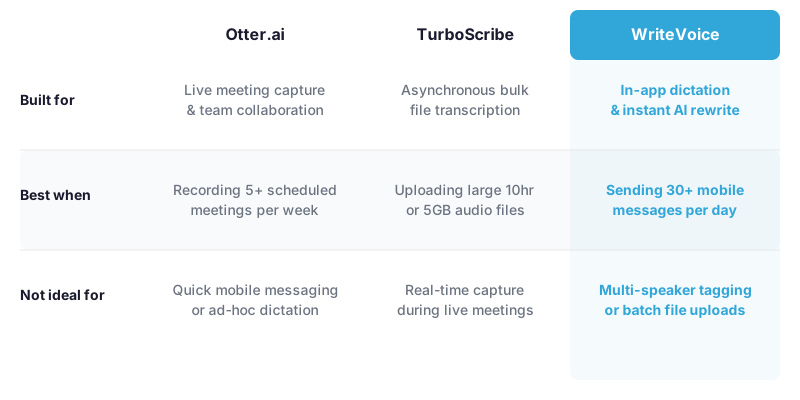
WriteVoice fits best when you’re sending 30–50 messages a day across messaging apps and email, mostly from your phone, and losing time to mobile typing, autocorrect, and the mental overhead of editing raw voice notes before sending. WriteVoice also handles meeting-length recordings with summaries and action items, but that’s not its core strength – its core strength is the 10-second polished message you send while walking.
One honest limitation: WriteVoice is not the right tool if you need live multi-speaker meeting transcription with speaker tagging, or if you’re batch-processing 50+ audio files per week. For those workflows, Otter and TurboScribe are specifically built for what you need. WriteVoice is also iOS and Mac only – there’s no Android app currently available.
At-a-Glance: Otter.ai, TurboScribe, and WriteVoice
| Otter.ai | TurboScribe | WriteVoice | |
|---|---|---|---|
| Core purpose | Live meeting transcription + team collaboration | Asynchronous file transcription + translation | In-app real-time dictation with AI rewriting |
| Pricing model | Tiered subscription with minute caps | Single unlimited subscription | Subscription or one-time lifetime deal |
| Starting price | $16.99/month (Pro, annual: $8.33/mo) | $10/month (annual billing) | Free tier; $15/month unlimited |
| Free tier | 30 min/month, 3 file imports | Limited minutes (exact cap undisclosed) | 2,000 words first month, no credit card |
| Key feature | OtterPilot meeting bot with CRM sync | 10-hour file support, 50-file batch upload | iOS keyboard + 25+ AI rewrite styles |
| AI features | Meeting summaries, action items, AI Chat | None beyond transcription | 25+ rewrite styles, app-aware tone detection |
| Ease of use | Calendar-connected, automated after setup | Minimal UI, upload and retrieve | In-keyboard, no app-switching required |
| Integration depth | Zoom, Teams, Meet, Slack, Salesforce, HubSpot | File-based; no native app integrations | Works in any app via keyboard on iOS |
| Support | Web, email; cancellation complaints noted on Trustpilot | Web-based | Priority support on paid plans |
| Best for | Teams recording 5+ meetings/week with CRM workflows | Bulk file transcription across languages | Mobile-first professionals dictating messages in real time |
Pricing as of June 2025.
Next Steps
Most people reading this will find their answer in the match: Otter.ai if your work is meeting-driven and team-coordinated, TurboScribe if you’re processing pre-recorded files at scale. If you’re in the narrower group who spends more time dictating messages, emails, and LinkedIn posts from your phone than you do transcribing meeting recordings, WriteVoice has a free tier with no credit card required – worth a five-minute test to see if in-app dictation changes how fast you work. Otherwise, start with Otter.ai’s free plan (30 min/month, no commitment) or TurboScribe’s free tier to confirm the workflow fits before paying.
Frequently Asked Questions
What is the main difference between Otter.ai, TurboScribe, and WriteVoice?
Otter.ai is a live meeting transcription platform that joins your Zoom or Teams calls in real-time and generates summaries with speaker identification. TurboScribe is a file-based asynchronous transcription service powered by Whisper, built for processing pre-recorded audio and video files in bulk. WriteVoice is an in-app real-time dictation keyboard that transcribes and rewrites your speech into polished text directly inside messaging apps like WhatsApp, Slack, or Gmail without switching context. Each tool serves a fundamentally different use case: meeting-centric workflows, batch file processing, and mobile message composition, respectively.
Which transcription tool is best for live team meetings?
Otter.ai is purpose-built for live team meetings, with its OtterPilot bot joining Zoom, Google Meet, and Microsoft Teams calls automatically to capture real-time transcription with speaker identification. The platform generates post-meeting summaries and action items automatically, and integrates with Slack and CRMs for seamless team workflows. If your work revolves around recurring video calls and you need structured meeting notes distributed to your team, Otter.ai has no rival among the three tools. TurboScribe and WriteVoice do not offer live meeting capture or multi-speaker speaker tagging.
Which tool is better for transcribing large batches of pre-recorded audio files?
TurboScribe is specifically optimized for batch file transcription, supporting files up to 10 hours long and 5 GB in size with the ability to upload 50 files simultaneously. The Whisper-powered engine maintains 99% accuracy even in noisy audio conditions-field recordings, podcasts, interviews-and translates into 134+ languages, making it ideal for multilingual research teams or content creators. At $10/month unlimited with no minute caps or tiered limits, TurboScribe also offers the most predictable pricing for heavy transcription workloads. Otter.ai and WriteVoice are not designed for bulk asynchronous file processing.
How does WriteVoice differ from Otter.ai and TurboScribe?
WriteVoice operates as an iOS keyboard and Mac hotkey that enables you to dictate directly inside any app-WhatsApp, Slack, Gmail, Notion-without uploading files or joining meetings, transcribing and rewriting your speech into polished text in under one second. Unlike Otter’s meeting-centric workflow and TurboScribe’s file-upload model, WriteVoice applies 25+ AI rewrite styles and auto-detects your active app to adjust tone automatically, so your message is ready to send immediately. WriteVoice is built for mobile professionals who send 30–50 messages daily and are frustrated by mobile typing speed and the friction of editing raw voice notes before sending. Neither Otter.ai nor TurboScribe offer in-app real-time dictation with AI rewriting or context-aware tone adjustment.
What are the pricing differences between Otter.ai, TurboScribe, and WriteVoice?
Otter.ai charges $16.99/month for its Pro plan (1,200 minutes/month) and $30/month per seat for Business (6,000 minutes/month), creating minute-cap tracking and upgrade risk for heavy users as of June 2025. TurboScribe offers a single unlimited plan at $10/month (annual billing) with no minute caps, making it significantly cheaper for anyone processing multiple hours of audio monthly. WriteVoice offers a free tier (2,000 words, no credit card), subscription at $15/month unlimited, or a one-time lifetime deal at €119–199. For light meeting users, Otter is competitive; for bulk transcription, TurboScribe is the most cost-effective; for mobile dictation, WriteVoice’s lifetime option appeals to users who prefer to avoid recurring billing.
Does TurboScribe or Otter.ai offer better accuracy?
TurboScribe’s Whisper-powered engine performs measurably better in difficult audio conditions-field recordings, podcasts, mobile recordings with background noise-with advertised accuracy reaching 99% in noisy environments where Otter’s transcription often requires manual cleanup. Otter.ai’s transcription is reliable and battle-tested across millions of clean conference-room meetings, but Otter’s strength is not accuracy-it’s the meeting workflow integration and speaker identification. Neither tool reports independently verified accuracy benchmarks; both claim high accuracy, but Whisper’s open-source credibility and documented noise-reduction capabilities give TurboScribe an edge for challenging audio. For clean, professional audio captured in conference rooms or studios, both perform adequately.
Which tool has the best language and translation support?
TurboScribe supports transcription in 80+ languages and translation to 134+ languages, making it the strongest choice for multilingual teams processing interviews, focus groups, or international content. Otter.ai’s multilingual support is noted as a relative weakness compared to Whisper-based competitors, though it is adequate for teams running meetings primarily in English. WriteVoice claims 120+ language support (with some inconsistency in documentation between 50+ and 120+ stated elsewhere), but is positioned primarily for English-speaking mobile professionals. For research teams or content creators working across multiple languages, TurboScribe is the only tool with comprehensive multilingual capabilities built in.
Can you integrate Otter.ai or TurboScribe with your existing tools like Slack or CRM?
Otter.ai has deep integrations with Slack, Salesforce, and HubSpot, creating a closed-loop workflow where meeting notes are automatically distributed to Slack channels and action items sync to your CRM-a major advantage for enterprise teams already running on this stack. TurboScribe’s integrations are limited; it is designed as a file-in, file-out service with no native connectors to popular business tools, though transcripts can be downloaded and imported manually into your CMS, editing software, or documentation platform. WriteVoice works inside any app via the iOS keyboard and Mac hotkey, so it does not require integrations-the text is inserted directly into WhatsApp, Gmail, Notion, etc. If you need CRM automation or Slack distribution, Otter.ai is the clear choice; if you prefer simplicity over ecosystem connectivity, TurboScribe and WriteVoice require more manual workflows but are simpler to operate.
What is the free tier or trial like for each tool?
Otter.ai offers 30 minutes of transcription per month on its free plan, which is practical as a trial but too limited for ongoing work unless your meeting volume is extremely light. TurboScribe’s free tier exists but the exact minute cap is not publicly disclosed, requiring signup to confirm. WriteVoice’s free tier is the most generous: 2,000 words in the first month with no credit card required, giving you enough runway to test in-app dictation in real messaging workflows. For a true working trial before committing to paid, WriteVoice’s no-credit-card free tier is the lowest friction entry; Otter.ai’s free tier is short-form but immediate to set up.
Which tool is best for solo professionals or small teams?
TurboScribe is the most economical for small teams processing multiple audio files weekly, at $10/month unlimited with no per-seat billing or minute tracking. WriteVoice appeals to solo professionals frustrated by mobile typing, with a $15/month subscription or one-time €119 lifetime deal that covers iOS, Mac, and Web-avoiding recurring billing. Otter.ai’s $16.99/month Pro plan is competitive for solo professionals with light meeting volume (a few calls per week), but becomes expensive fast if you add team members at $30/month per seat. For true solo professionals who dictate messages all day, WriteVoice’s lifetime deal offers permanent access; for small teams doing bulk transcription, TurboScribe is the value leader.
Can WriteVoice replace Otter.ai for meeting transcription?
WriteVoice can record hour-long meetings and generate summaries and action items, but it is not a replacement for Otter.ai if you need live multi-speaker meeting transcription with speaker tagging or team collaboration features. Otter.ai’s core strength is joining meetings automatically and tagging individual speakers across a multi-person call; WriteVoice’s core strength is in-app real-time dictation for messaging, not ambient meeting recording. WriteVoice is best suited for mobile professionals sending polished messages while walking, not for managing a sales team’s 10 Zoom calls per day with CRM sync. If your primary workflow is live team meetings, Otter.ai remains the purpose-built choice.
Does WriteVoice work on Android or only iOS?
WriteVoice is currently iOS and Mac only; there is no Android app available as of the current documentation. The iOS keyboard integration and Mac hotkey are the core distribution mechanisms, so Android users cannot access the product’s primary in-app dictation feature. If you work primarily on Android devices, neither WriteVoice nor the in-app keyboard workflow it offers will be available to you; Otter.ai and TurboScribe both have broader platform coverage. For iPhone and Mac users, WriteVoice’s keyboard integration is its primary value proposition; Android users are outside the current product scope.
What makes WriteVoice different from just using Apple’s native dictation or Google’s voice typing?
Apple’s native dictation is free and works as a keyboard, but it only transcribes-it does not rewrite or apply tone adjustment, leaving users to manually edit raw speech output before sending. WriteVoice adds 25+ AI rewrite styles (Professional, Email, Tweet, Casual, Expand, Shorten) and app-aware tone detection that automatically adjusts voice for LinkedIn, WhatsApp, or Gmail without user intervention-transforming raw rambling speech into polished, ready-to-send text in under one second. WriteVoice also learns custom vocabulary and personal tone over time, and offers privacy-first processing with audio deleted immediately after transcription, which appeals to healthcare professionals and executives. For users already on Apple Dictation, WriteVoice is an incremental upgrade to polish and rewriting; for users frustrated by the manual editing step, it eliminates that friction entirely.
Why would someone choose WriteVoice over Otter.ai or TurboScribe?
WriteVoice fits professionals who spend most of their time dictating messages, emails, and social posts from mobile devices and want to send polished text without the overhead of mobile typing, autocorrect battles, and post-recording editing. Otter.ai and TurboScribe are built for meeting transcription and file processing respectively; WriteVoice is built for the person sending 50 messages a day and frustrated by the speed and friction of mobile communication. WriteVoice also offers a one-time lifetime deal (€119) for users skeptical of recurring billing, and delivers privacy-first processing with zero audio retention-appealing to healthcare and legal professionals. If your workflow is live meetings or batch file uploads, Otter or TurboScribe are the right fit; if your workflow is real-time mobile messaging with a preference for polish, WriteVoice is the specialist designed specifically for that use case.