
TurboScribe Alternatives
TL;DR
The best TurboScribe alternative depends entirely on your workflow. Otter.ai wins for live Zoom and Google Meet transcription; WriteVoice wins for professionals who need to dictate polished emails, Slack messages, and LinkedIn posts directly inside their apps; and Scribie wins when accuracy on sensitive documents is non-negotiable.
TurboScribe Alternatives
TurboScribe built something genuinely useful: unlimited audio and video transcription at a flat $10/month with no per-minute caps. For anyone who has ever watched a transcription bill spiral after uploading one long podcast, that model is a relief. But batch file upload is only one way people use transcription, and if your friction point is drafting fast, polished text in real time, you may need a different tool. This page breaks down five alternatives so you can find the right fit for your actual workflow.
Why People Look for TurboScribe Alternatives
The most common reason TurboScribe users start searching for alternatives is that the product is file-upload-only. You record something, open a browser, drag in the file, wait, and get a transcript back. That flow works perfectly for podcasters and researchers, but it creates friction for anyone who wants to draft messages, take quick notes, or capture ideas on the go.
The second friction point is the lack of a native mobile app. TurboScribe is a web-based tool with no mention of an iOS or Android app. For professionals who spend the majority of their working hours on a phone – answering Slack messages in a taxi, firing off emails between meetings – uploading to a desktop browser is not a realistic workflow.
Third, TurboScribe transcribes but does not rewrite. You get accurate raw text, but filler words, rambling sentences, and unstructured speech all show up in the output. Users who need to send that transcript as a professional email or a polished LinkedIn post still have to edit manually – or copy-paste into a separate AI writing tool, adding yet another step. That gap is what keeps some TurboScribe users searching even after they are satisfied with transcription quality.
What to Look for in a Transcription Tool
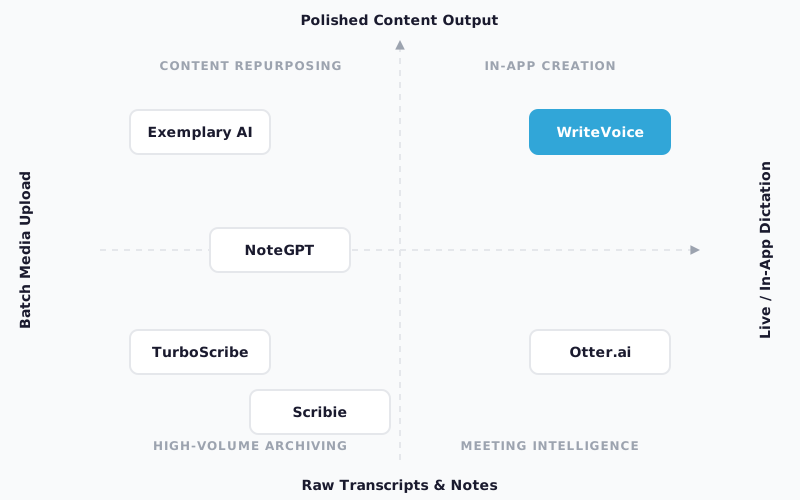
Real-time vs. batch processing. Some tools transcribe live audio as you speak; others accept uploaded media files. The right choice depends on whether your primary need is capturing voice in the moment (messages, quick notes, live meetings) or processing recordings after the fact (podcasts, archived interviews, lecture recordings).
AI rewriting vs. raw transcription. A raw transcript is useful for archival or manual editing, but if your goal is a polished, sendable output – an email, a social post, a meeting summary – you need a tool that transforms raw speech, not just transcribes it. Check whether rewriting is built into the core product or requires a manual step with a separate AI tool.
In-app integration. The biggest hidden cost of any transcription tool is context switching. If you have to open a new app, upload a file, copy the result, and paste it back into your active window, you are breaking focus. Tools that work inside the app where you already are – as a keyboard, a hotkey, or a browser extension – eliminate that friction.
Speaker diarization. For meeting and interview recordings where multiple people speak, you need a tool that identifies who said what. Not every transcription tool supports speaker diarization, and those that do vary significantly in accuracy when voices overlap or are recorded on a single microphone.
Language support. If you work across multiple languages or serve international teams, verify both input languages (what the tool can transcribe) and output languages (whether it can translate or generate summaries in a target language). These numbers vary widely – from 30 languages to 134+.
Privacy model. For healthcare professionals, lawyers, therapists, and executives, how a tool handles your audio data is a compliance matter, not just a preference. Know whether audio is stored, for how long, and whether it is used for model training.
Pricing model. Per-minute pricing creates budget anxiety at scale; flat monthly pricing removes it. For high-volume users, a flat-rate unlimited plan saves money fast. For low-volume users, a generous free tier may be all you need.
The Best TurboScribe Alternatives
1. Otter.ai
Otter.ai is a real-time meeting transcription platform built around live integration with Zoom, Google Meet, and Microsoft Teams.
Best for: Remote workers and teams who need live in-meeting transcription with speaker identification and automatic summaries.
Strengths
- Native integrations with Zoom, Google Meet, and Teams – transcription starts automatically when a meeting begins
- Real-time speaker diarization (labels who said what as the meeting happens)
- AI-generated meeting summaries and action items delivered immediately after calls
- Shared team workspaces where meeting notes are accessible to all attendees
Where it’s not the right fit
- Not designed for in-app message drafting or mobile voice-to-text on the go
- Raw transcription only – no AI rewriting for emails, social posts, or custom tone styles
- File upload for batch transcription is limited on lower-tier plans
Pricing: Starting at $8.33/month (Pro plan, billed annually). Free tier available with limited monthly transcription minutes as of mid-2025.
When to choose it: If your primary workflow involves Zoom or Google Meet calls and you need live transcription with speaker labels and instant summaries, Otter is the most integrated and battle-tested option in this list.
2. WriteVoice
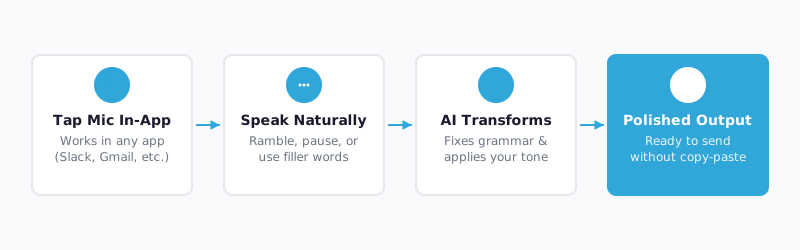
WriteVoice is an AI dictation keyboard that transcribes speech and rewrites it into polished, context-aware text – inside the app where you’re already working, without copy-pasting.
Best for: Mobile-first professionals who draft emails, Slack messages, WhatsApp messages, and LinkedIn posts throughout the day and need polished output without leaving their active app.
Strengths
- iOS custom keyboard integration – tap the mic inside Gmail, Slack, WhatsApp, or iMessage; polished text inserts directly into the field
- 25+ AI rewrite styles (Professional, Email, Tweet, Casual, Shorten, Expand, Fix Grammar, and more)
- App-aware tone adjustment – automatically detects whether you’re on LinkedIn vs. WhatsApp vs. Gmail and adjusts tone without you selecting anything
- Privacy-first architecture: audio is processed in real time and immediately deleted; no recordings stored, no training on user data
- Supports 120+ languages with cross-device sync across iOS, Mac, and Web
- Lifetime deal available (€119–€199 one-time payment) for users who want to avoid ongoing subscriptions
Where it’s not the right fit
- Not designed for batch media file transcription – uploading a 3-hour podcast archive is outside its intended workflow
- No speaker diarization for multi-person meeting recordings
- Mac and Web only for desktop; no Windows support confirmed
Pricing: Free tier includes 2,000 words in the first month. Unlimited plan at $15/month (monthly billing, with 20% discount on yearly billing). Lifetime deal at €119–€199 one-time as of mid-2025. Free tier: yes, no credit card required.
When to choose it: If you spend meaningful time every day drafting messages on your phone or dictating notes on Mac and you want AI-polished output without switching apps or editing raw transcripts, WriteVoice is the only tool in this list that solves that specific friction.
3. Exemplary AI
Exemplary AI is a transcription and AI content repurposing platform designed for podcasters, YouTubers, and content teams who need to turn long recordings into multiple formats.
Best for: Content creators who need transcription plus clip generation, audiograms, dynamic captions, and social media snippets from a single recording.
Strengths
- Transcription combined with AI clip extraction – automatically identifies the best moments from a long recording
- Audiogram and dynamic caption generation for social sharing
- AI-powered content summaries, show notes, and social thread creation from uploads
- Handles both video and audio files from a single upload
Where it’s not the right fit
- Not designed for real-time dictation or in-app message drafting
- Primarily a content creator tool; the feature set adds friction for professionals who just need clean transcripts or quick voice notes
- Pricing can scale with usage in ways that aren’t always predictable for high-volume creators
Pricing: Free tier available with limited exports. Paid plans start around $8/month as of mid-2025. Check Exemplary AI’s pricing page for current rates.
When to choose it: If you are a podcaster or video creator who wants transcription, captions, audiograms, and clip highlights all in one tool, Exemplary AI goes further than TurboScribe on the repurposing side. TurboScribe gives you a transcript; Exemplary gives you the transcript plus the assets you’d need to promote the episode.
4. NoteGPT
NoteGPT is a web-based transcription and AI summarization tool built for users who manage large volumes of recordings and want better workflow control across long-term projects.
Best for: Researchers, students, and content professionals handling multi-session, high-volume transcription workloads who need structured notes and summaries alongside raw transcripts.
Strengths
- Strong batch upload support for long and multi-part recordings
- AI-generated summaries, bullet-point notes, and Q&A extraction from transcripts
- YouTube video summarization built in – paste a URL, get structured notes
- Better suited to ongoing project organization than one-off uploads
Where it’s not the right fit
- No native mobile app or keyboard integration for on-the-go dictation
- AI rewriting for outbound communication (emails, posts) is not a core feature
- Speaker diarization is less robust than dedicated meeting tools like Otter
Pricing: Free tier available. Paid plans start around $9/month as of mid-2025. See NoteGPT’s pricing page for current rates. Free tier: yes.
When to choose it: If you manage a high volume of recordings across ongoing research projects and need structured AI-generated notes alongside raw transcripts, NoteGPT handles that better than TurboScribe – the summaries and Q&A extraction save real editing time when you’re working through dozens of sessions.
5. Scribie
Scribie offers a hybrid transcription model – AI transcription followed by human review – delivering 99%+ accuracy with fast turnaround for documents where errors are not acceptable.
Best for: Legal professionals, medical practitioners, journalists, and researchers who need highly accurate transcripts of sensitive recordings where AI-only accuracy is insufficient.
Strengths
- Human-reviewed output with documented 99%+ accuracy – significantly more reliable than AI-only tools for technical, accented, or overlapping speech
- Handles crosstalk and filler words well compared to AI-only alternatives
- Export to Word, PDF, and plain text formats
- Strict confidentiality handling for sensitive recordings
Where it’s not the right fit
- Per-minute pricing ($0.80/minute) makes it expensive for high-volume use – 100 hours of audio would cost around $4,800
- Turnaround time is measured in hours, not seconds – not appropriate for real-time workflows
- No AI rewriting, meeting integrations, or in-app dictation
Pricing: $0.80/minute. No monthly subscription; pay per minute as of mid-2025. Free tier: no.
When to choose it: If accuracy on a legal deposition, medical record, or sensitive interview is non-negotiable, the human-editing layer in Scribie justifies the higher cost. For everything else, an AI-only tool is faster and cheaper.
Quick Comparison
| Tool | Best For | Starting Price | Free Tier | Standout Feature |
|---|---|---|---|---|
| Otter.ai | Live meeting transcription | $8.33/mo | Yes | Native Zoom & Google Meet integration |
| WriteVoice | In-app mobile dictation + AI rewriting | $15/mo | Yes | iOS keyboard with 25+ AI rewrite styles |
| Exemplary AI | Podcast & video repurposing | ~$8/mo | Yes | AI clip extraction + audiograms from uploads |
| NoteGPT | Batch transcription + structured notes | ~$9/mo | Yes | YouTube video summarization built-in |
| Scribie | High-accuracy sensitive documents | $0.80/min | No | Human-reviewed 99%+ accuracy |
Pricing as of mid-2025. Check each tool’s pricing page for current rates.
Which Alternative Should You Choose?
If you primarily attend Zoom or Google Meet calls and need live transcription with speaker labels, Otter.ai is the clearest choice. Its native calendar and conferencing integrations mean transcription starts automatically – no manual uploads, no post-processing step. The $8.33/month Pro plan covers most professional use cases.
If you draft dozens of messages, emails, and social posts per day on your phone and want polished output without copy-pasting between apps, WriteVoice is built for that specific workflow. The iOS keyboard integration is unique – nothing else on this list lets you dictate inside WhatsApp, Gmail, or Slack and receive AI-rewritten text in the same field without leaving the app.
If you are a podcaster or video creator who wants to turn long-form recordings into clips, captions, audiograms, and social content, Exemplary AI goes further on the repurposing side than any other tool in this list. It is genuinely specialized for that pipeline.
If you manage ongoing research, journalism, or content archives with heavy multi-session recording volumes, NoteGPT’s batch processing and AI summarization handle scale better than a simple upload-and-transcribe model.
If you need a deposition transcript, a medical dictation, or a legal interview where every word must be accurate, human-edited services like Scribie are the only category that can guarantee the accuracy level compliance requires. The per-minute cost is high, but it is the right tool for the job.
Ready to Try WriteVoice?
If you spend real time every day drafting emails, messages, or social posts on your iPhone and you are tired of typing slowly or editing raw voice transcripts, WriteVoice is built for that exact problem. The free tier requires no credit card and includes 2,000 words in your first month – enough to test the iOS keyboard in your real workflow. A lifetime deal is also available for users who want to pay once and move on.
Frequently Asked Questions
What should I look for in a TurboScribe alternative?
The best alternative depends on whether you need batch file transcription, live meeting integration, in-app dictation, or human-reviewed accuracy. Real-time vs. batch processing is the fundamental split: tools like Otter.ai integrate with Zoom for live transcription, while WriteVoice offers iOS keyboard integration for drafting messages on the go. Speaker diarization, AI rewriting, language support, and privacy handling are secondary criteria that narrow your choice based on your specific workflow. If you primarily process archived media, batch uploaders like TurboScribe and NoteGPT excel; if you dictate dozens of messages daily, WriteVoice’s in-app integration is unique.
What makes a good meeting transcription app?
A strong meeting tool integrates natively with the conferencing platforms you use (Zoom, Google Meet, Teams) so transcription starts automatically without manual uploads. Real-time speaker diarization-identifying who said what as the conversation happens-is essential for multi-person calls. Automatic summaries and action item extraction add value beyond raw transcripts. Otter.ai leads this category because its native integrations and speaker labeling are battle-tested for remote teams; TurboScribe requires manual file upload and lacks live integration, making it slower for meeting workflows.
Is there a free TurboScribe alternative?
Yes. Otter.ai, WriteVoice, Exemplary AI, and NoteGPT all offer free tiers requiring no credit card. Otter.ai’s free plan includes monthly transcription minutes sufficient for occasional use; WriteVoice’s free tier includes 2,000 words in your first month, enough to test the iOS keyboard in your actual workflow. Exemplary AI and NoteGPT also have free tiers with limited features. Scribie charges per-minute with no free tier, so it is only practical for users who need human-reviewed accuracy and can justify the cost.
Can I transcribe directly inside my apps without uploading files?
Only WriteVoice offers true in-app transcription as a core feature-it installs as an iOS custom keyboard, so you tap the mic inside Gmail, Slack, WhatsApp, or iMessage and polished text inserts directly into the field. Otter.ai integrates with Zoom and Google Meet for live meeting transcription but does not work as an in-app keyboard for messaging. TurboScribe, Exemplary AI, NoteGPT, and Scribie all require browser upload or separate application workflows. WriteVoice eliminates the copy-paste friction that other tools cannot.
What is the difference between WriteVoice and TurboScribe?
WriteVoice transcribes speech and rewrites it into polished text inside the app where you are working-iOS keyboard, Mac hotkey, no copy-pasting. TurboScribe is a batch file transcription platform: you upload recordings, get raw transcripts, optionally apply ChatGPT for summaries as a separate step. WriteVoice targets mobile professionals drafting dozens of emails and messages daily; TurboScribe targets podcasters and researchers processing archived media. TurboScribe costs $10/month with unlimited uploads; WriteVoice costs $15/month with instant in-app polishing and AI rewriting built in, or €119–€199 as a lifetime deal.
Does WriteVoice work on my phone?
Yes-WriteVoice’s primary platform is iOS, where it installs as a custom keyboard replacement, allowing you to dictate directly inside any app without switching contexts. It also runs on Mac desktop via hotkey and as a web app for meeting recording. No Android app or Windows desktop version is currently available. For iPhone users who spend significant time drafting messages, emails, and notes, WriteVoice’s mobile-first design means you can dictate inside your active workflow without ever opening a separate application.
Does TurboScribe have a mobile app?
No. TurboScribe is a web-based tool with no native iOS or Android app-you must open a browser, upload files, and wait for transcription. This is a material gap for mobile-first professionals who record on the go, since uploading to a desktop browser requires pulling out a computer. For workers who do 60% of their communication on a phone, TurboScribe’s upload-only model creates friction. If you need mobile voice-to-text with in-app integration, WriteVoice or Otter.ai are stronger fits.
Why is WriteVoice on this list of TurboScribe alternatives?
WriteVoice solves a different transcription friction point than TurboScribe, making it a legitimate alternative for a specific audience. Users searching for TurboScribe alternatives often want to avoid the copy-paste workflow: transcribe, leave the app, paste the text into email or Slack, edit manually. WriteVoice eliminates that by integrating directly into your messaging apps and including AI rewriting as a core feature. For professionals who dictate dozens of messages daily on their phone and value speed plus polish, WriteVoice is the better fit-even though it is not designed for batch media transcription, which is where TurboScribe excels.
When is TurboScribe still worth using instead of alternatives?
TurboScribe excels at batch media transcription: if you handle high volumes of podcasts, interviews, archived lectures, or long recordings, its unlimited flat-rate pricing ($10/month) is unbeatable value vs. per-minute competitors. The 10-hour file size limit and 50-simultaneous-upload capacity make it purpose-built for media creators. TurboScribe also includes speaker diarization, multi-language output, and ChatGPT integration for summaries. If your primary workflow is uploading recorded media files and you do not need in-app dictation or real-time meeting integration, TurboScribe remains the most cost-effective choice.
Does WriteVoice include privacy protections for sensitive work?
Yes-WriteVoice explicitly positions on zero audio storage and zero training on user data, which is why it appeals to healthcare professionals, lawyers, and executives. Audio is processed in real time and immediately deleted; no recordings are stored, and your speech is never used for model training. This zero-retention architecture is rare among transcription tools and directly addresses HIPAA and attorney-client privilege concerns. For sensitive dictation use cases, WriteVoice’s privacy model is a material advantage over competitors that store audio for extended periods.
Does any alternative offer speaker identification like TurboScribe?
Yes. Both Otter.ai and TurboScribe support speaker diarization-identifying who said what in multi-person recordings. Otter.ai’s real-time speaker labels are especially strong for live meetings because labels appear as people speak; TurboScribe applies diarization to uploaded files after transcription. WriteVoice, Exemplary AI, NoteGPT, and Scribie do not emphasize speaker diarization in their core feature sets. For meeting and interview transcription where identifying individual speakers is critical, Otter.ai and TurboScribe are the only viable choices in this list.
What pricing model makes sense for my transcription volume?
Per-minute pricing (like Scribie at $0.80/minute) creates budget anxiety if you exceed a certain volume-100 hours of audio costs $4,800. Flat-rate unlimited plans ($10/month TurboScribe, $15/month WriteVoice) remove that anxiety and make sense once you transcribe more than ~10 hours/month. Free tiers with monthly quotas work for low-volume users (occasional meetings, quick notes). For high-volume users, flat-rate unlimited wins on predictability; for budget-conscious occasional users, free tiers or per-minute pay-as-you-go are more economical.
Which alternative is best for live Zoom transcription?
Otter.ai is the strongest choice for live Zoom transcription because it integrates natively with Zoom, Google Meet, and Teams-transcription starts automatically when a meeting begins with real-time speaker diarization. The Pro plan at $8.33/month (billed annually) includes live meeting features, summaries, and action items. TurboScribe requires manual file export from Zoom, defeating the real-time benefit. WriteVoice is designed for async in-app dictation, not live meeting integration. If Zoom meetings are your primary workflow, Otter.ai has no competitor in this list.
Generated by BlazeHive