
Tactiq Alternatives
TL;DR
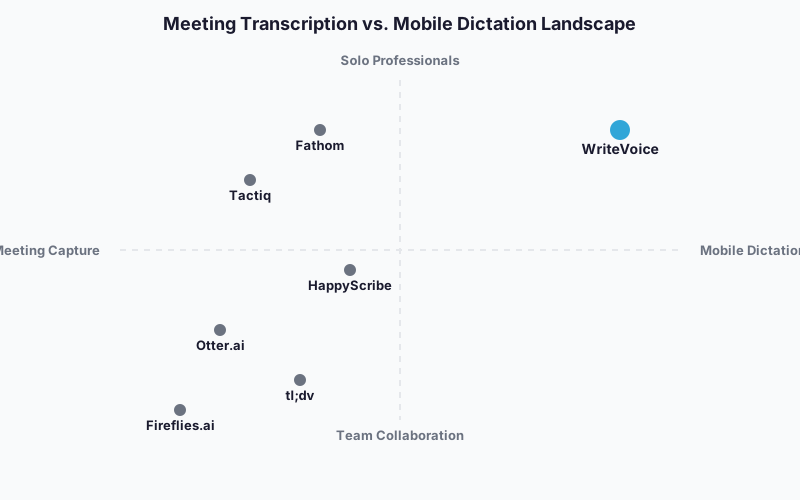
The best Tactiq alternative depends on what’s actually slowing you down. If your team needs unlimited meeting recording with video playback, Fireflies.ai or tl;dv will cover you better than Tactiq does. If you’re a solo professional spending most of your day in messaging apps – not just in meetings – WriteVoice handles voice-to-text dictation directly inside WhatsApp, Slack, and Gmail without a single copy-paste.

Tactiq Alternatives
Tactiq has earned its 4.8/5 rating and 1,000,000+ users for good reason: real-time meeting transcription that works without a bot joining your call is genuinely useful. But Chrome-only access, a 10-meeting-per-month free cap, and zero mobile support push a lot of professionals to look for something else. This page maps the best alternatives by use case – so you can match the right tool to the problem you’re actually trying to solve.
Why People Look for Tactiq Alternatives
Tactiq’s free plan caps you at 10 meetings per month and 5 AI credits. For anyone running daily standups, client calls, and internal syncs, that limit hits fast – and the jump to $8/month (billed annually) or $12/month monthly is fine, but the upgrade feels forced rather than earned. Reddit threads and review sites consistently flag the credit ceiling as the first thing that sends users searching.
The second recurring pain is platform breadth. Tactiq is a Chrome extension that supports Google Meet, Zoom, and Microsoft Teams – and nothing else. If your workflow mixes Loom reviews, in-person recording, phone calls, or international messaging apps, Tactiq simply doesn’t reach. There’s no native mobile app, no iOS keyboard, and no way to capture anything outside a browser-based video call.
A third group leaves Tactiq not because it fails, but because their work lives outside meetings. Founders, freelancers, and mobile-heavy professionals spend more time drafting Slack messages, emails, and LinkedIn posts than they do in Zoom calls. Tactiq captures meetings; it doesn’t help you act on them faster or compose the follow-up communication that meetings generate. That gap is real, and it’s what sends this audience toward a different category of tool entirely.
What to Look for in a Meeting Transcription or Voice Tool
Accuracy across accents and technical vocabulary matters more than any headline number. A tool that mishears industry jargon or struggles with non-native English speakers forces more editing than it saves. Look for self-reported accuracy rates above 95% and, ideally, review signals confirming real-world performance.
Free tier generosity varies a lot – Fathom offers unlimited free recordings while Tactiq stops at 10/month. Check whether the free tier is genuinely usable for your meeting volume or just a trial with a low ceiling.
Meeting platform compatibility is worth confirming before you commit. If you record outside Google Meet, Zoom, and Teams – in-person conversations, phone calls, audio notes – make sure the tool actually reaches those workflows.
Mobile and cross-platform access is a real gap with Tactiq. If you need to review transcripts or dictate on the go, check whether the alternative has iOS/Android apps or, for dictation, an in-app keyboard integration.
Privacy and data handling matters differently depending on your role. Tools that store audio and video server-side carry different risk profiles than zero-retention services. Healthcare professionals, lawyers, and executives should verify HIPAA-compatible or GDPR-compliant data practices before signing up.
Downstream integrations can save or cost you time. Tactiq’s AI Workflows push transcripts to HubSpot, Slack, Pipedrive, and Notion automatically. If that automation matters to your sales or ops workflow, confirm whether the alternative has comparable depth – or whether you’ll be manually copying action items.
Pricing model depends on your situation. A solo professional who needs unlimited dictation for 3+ years breaks even on a €119 lifetime deal faster than a $12/month subscription. A 10-person sales team needs per-seat pricing and admin controls. Price it out at your team size before defaulting to the cheapest-looking option.
The Best Tactiq Alternatives
1. WriteVoice
WriteVoice is an AI-powered voice dictation tool that transcribes and rewrites speech directly inside any iOS app, Mac desktop, or web browser – without switching apps or copy-pasting.
Best for: Solo professionals, founders, and mobile-heavy communicators who need polished voice-to-text inside WhatsApp, Slack, Gmail, and LinkedIn – not just inside video calls.
Strengths
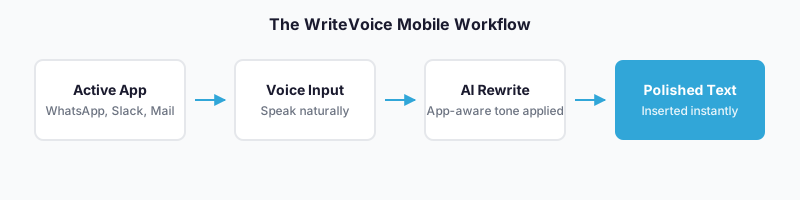
- iOS custom keyboard integration means you dictate inside the app you’re already in – no app-switching, no copy-paste friction
- 25+ AI rewrite styles (Professional, Email, Tweet, Casual, Shorten, Expand, Emojify) transform raw speech into send-ready text in under 1 second
- App-aware tone adjustment auto-detects whether you’re in LinkedIn, WhatsApp, or Gmail and adjusts output tone without manual selection
- Long-form meeting recording via web app generates structured summaries, action items, and translations into 30+ languages
- Privacy-first architecture: audio is processed in real time and immediately deleted – no recordings stored, no training on user data
- One-time lifetime deal at €119 covers iOS + Mac + Web with all future updates
Where it’s not the right fit
- Not built for teams that need shared meeting libraries, centralized transcript search, or multi-user admin controls
- No native Chrome extension or direct Zoom/Teams bot integration – joining scheduled meetings requires the web app
- No Android support confirmed – iOS and Mac only for the keyboard and desktop app
Pricing: Free tier at $0/month (2,000 words first month, basic AI rewrite). Unlimited plan at $15/month. Lifetime deal at €119 one-time. 30-day money-back guarantee on all paid plans. (as of mid-2025)
When to choose it: You’re a founder, manager, or executive who runs meetings but spends just as much time composing follow-up messages, emails, and posts on mobile. WriteVoice handles the communication that happens between meetings – and the meeting recording itself – in one tool, on one payment.
2. Otter.ai
Otter.ai is a cross-platform meeting transcription and note-taking service that records, stores, and searches audio and video across mobile, web, and desktop.
Best for: Professionals and small teams who need searchable meeting archives accessible from any device, including mobile.
Strengths
- 300 minutes/month free – a real difference from Tactiq’s 10-meeting cap
- Native mobile app (iOS and Android) for reviewing transcripts and recording in-person conversations
- Searchable transcript library with AI-generated summaries and action items
- Works across Google Meet, Zoom, Microsoft Teams, and in-person recording
Where it’s not the right fit
- Not designed for in-app mobile dictation – you still need to leave WhatsApp or Gmail to record, then return and paste
- Paid plans at $12–$30/month add up over time compared to lifetime options
- Audio is stored in the cloud, which may be a constraint for users with strict privacy or compliance requirements
Pricing: Free tier with 300 min/month. Pro at $12/month; Business at $30/month per user. (as of mid-2025)
When to choose it: You need a meeting transcript library you can search and share across a small team, and you want iOS and Android access to review recordings on the go.
3. Fireflies.ai
Fireflies.ai is a meeting intelligence platform that records, transcribes, and analyzes team meetings with video playback and AI-powered search.
Best for: Teams running high meeting volumes who need a centralized library with video clips, conversation analytics, and searchable transcripts.
Strengths
- Unlimited transcriptions on the free plan – no monthly meeting cap
- AI-powered search lets you review a 1-hour meeting in 5 minutes by querying topics, speakers, and keywords
- Video playback alongside transcripts for context that text alone can’t capture
- 100+ language support; used by teams at Netflix, Uber, and Nike
Where it’s not the right fit
- Not built for mobile dictation or in-app messaging workflows – the focus is entirely on recorded meetings
- Requires a bot to join calls, which some meeting participants find intrusive or which enterprise IT policies restrict
- Advanced analytics and video storage push toward higher-tier paid plans for teams needing full features
Pricing: Free tier with unlimited transcriptions (limited storage). Pro and Business plans available; pricing varies by seat count. (as of mid-2025 – check fireflies.ai for current rates)
When to choose it: Your team records many meetings per week and needs to reference, clip, and analyze conversations as a shared resource rather than just read a summary once.
4. tl;dv
tl;dv is a bot-free meeting recorder with unlimited free transcriptions and video recording, built for teams where compliance and call discretion matter.
Best for: Privacy-aware teams and compliance-heavy industries that need meeting recording without a third-party bot and without storage cost barriers.
Strengths
- Bot-free recording – no visible bot joins the call, which matters in client-facing meetings where participants notice
- Unlimited free transcriptions and video recordings on the free plan
- Advanced conversation intelligence, video highlights, and clip sharing
- Compliance-focused architecture suitable for privacy-heavy teams
Where it’s not the right fit
- Not designed for mobile dictation, messaging apps, or content outside virtual meetings
- Advanced features like CRM integrations and conversation analytics are gated behind paid plans
- Smaller integration ecosystem compared to Tactiq’s AI Workflows or Fireflies’ analytics suite
Pricing: Free tier with unlimited recordings. Paid plans for advanced features. (as of mid-2025 – check tldv.io for current rates)
When to choose it: Your team does sensitive client calls where a visible bot would raise concerns, and you want unlimited free recording without capping meetings per month.
5. HappyScribe
HappyScribe is a cross-platform transcription and subtitling service supporting 150+ languages with both virtual meeting capture and audio/video file upload.
Best for: Multilingual teams and content creators who transcribe both live meetings and pre-recorded audio or video files across many languages.
Strengths
- 150+ language support – more than most meeting tools cover
- Works with uploaded audio/video files in addition to live meetings – not Chrome-only
- 95%+ accuracy claimed with audio/video playback alongside transcripts
- Unlimited AI summaries on the free plan
Where it’s not the right fit
- Not built for in-app mobile dictation or voice-to-text in messaging apps
- Heavier workflow for quick meeting notes – better suited for deliberate transcription projects than fast daily standup capture
- Subtitling and media production features add complexity for users who only need meeting notes
Pricing: Free tier with limited minutes. Pay-as-you-go and subscription plans available. (as of mid-2025 – check happyscribe.com for current rates)
When to choose it: You work in multiple languages, need to transcribe recorded files as well as live meetings, or produce subtitled video content alongside your meeting notes workflow.
6. Fathom
Fathom is a free meeting notetaker for Zoom, Google Meet, and Microsoft Teams that records, transcribes, and summarizes calls. The free tier is unlimited – no meeting cap, no per-seat cost.
Best for: Individual professionals and small teams who want unlimited free meeting recording without a per-seat cost.
Strengths
- Unlimited free transcriptions and video recording – the most generous free plan in this category
- Clean, fast summaries and action items generated automatically after each call
- Integrates with HubSpot, Salesforce, and Slack for follow-up automation
- Fast to set up – installs quickly and works with major video conferencing platforms
Where it’s not the right fit
- Not built for mobile dictation, messaging app integration, or content outside video calls
- Team collaboration features and CRM depth are more limited than Fireflies or Tactiq at scale
- Less suited to teams that need advanced search, analytics, or custom AI workflows across large meeting libraries
Pricing: Free with unlimited recordings. Paid plans for team features. (as of mid-2025 – check fathom.video for current rates)
When to choose it: You’re an individual or small team that wants the simplest possible Zoom/Meet/Teams notetaker with no monthly meeting cap and no subscription to manage.
Quick Comparison
| Tool | Best For | Starting Price | Free Tier | Standout Feature |
|---|---|---|---|---|
| WriteVoice | Mobile dictation + in-app messaging | $15/mo or €119 lifetime | Yes | Dictate inside WhatsApp/Slack without leaving the app |
| Otter.ai | Searchable meeting archives on mobile | $12/mo | Yes (300 min/mo) | Mobile app with searchable transcript library |
| Fireflies.ai | Team meeting intelligence + video playback | Paid plans vary | Yes (unlimited transcripts) | AI-powered search across 1-hour meetings in 5 minutes |
| tl;dv | Bot-free recording for compliance teams | Paid plans vary | Yes (unlimited recordings) | Zero-bot recording for client-facing calls |
| HappyScribe | Multilingual transcription + media files | Pay-as-you-go | Yes (limited minutes) | 150+ languages + audio/video file upload |
| Fathom | Free unlimited notetaking for individuals | Free / Paid team plans | Yes (unlimited) | Most generous free tier in the category |
Pricing as of mid-2025. Check each tool’s pricing page for current rates.
Which Alternative Should You Choose?
If you need unlimited free meeting recording without hitting a cap…
Fathom is the clearest answer. Unlimited transcriptions and video recording at $0/month makes it the most practical Tactiq replacement for individuals who simply want fewer constraints on the free plan.
If you need to transcribe meetings across multiple languages or upload pre-recorded files…
HappyScribe’s 150+ language support and audio/video upload capability is the practical choice for multilingual teams and anyone working with content beyond live video calls.
If your team runs high meeting volumes and needs searchable video archives…
Fireflies.ai is purpose-built for this. The AI-powered search, video playback, and team analytics are designed for organizations running many meetings per week – not just individual note capture.
If you’re a solo professional who sends dozens of messages, emails, and posts every day…
WriteVoice is built for this workflow. Every other tool on this list is focused on meeting capture. WriteVoice handles the communication that happens between meetings – dictating directly inside WhatsApp, Slack, Gmail, and LinkedIn at up to 5x the speed of typing, with AI rewriting the output before you hit send.
If you run sensitive client calls where a recording bot would raise concerns…
tl;dv records without a bot joining the call, so external participants don’t see a third-party tool in the meeting. You still get the full transcript.
Ready to Try WriteVoice?
If you’re a founder, executive, or mobile-heavy professional who spends as much time composing follow-up messages as attending meetings, WriteVoice is built for that workflow – dictate directly inside any app, get polished text in under a second, and skip the copy-paste step entirely. Start free with no credit card required, or grab the lifetime deal at €119 for iOS, Mac, and Web with all future updates included. If it doesn’t click within 30 days, the money-back guarantee covers you.
Frequently Asked Questions
What should I look for in a meeting transcription tool?
Accuracy above 95% across accents and technical vocabulary matters more than headline numbers, since tools that mishear industry jargon or struggle with non-native speakers force more editing than they save. Check whether the free tier is genuinely usable for your meeting volume-Fathom offers unlimited recordings while Tactiq caps at 10 per month. Verify the tool reaches your actual workflows: if you record outside Google Meet, Zoom, and Teams (in-person calls, phone recordings, audio notes), confirm compatibility before committing.
Why do people leave Tactiq for alternatives?
Tactiq’s free plan caps users at 10 meetings per month and 5 AI credits, forcing an upgrade fast for anyone running daily standups and client calls. The Chrome-only browser extension doesn’t reach workflows outside video calls-there’s no mobile app, no iOS keyboard, and no support for phone calls, in-person recording, or messaging apps. A third group of users (founders, freelancers, managers) spend more time drafting follow-up Slack messages and emails than sitting in Zoom calls, so meeting transcription alone doesn’t solve their speed problem.
What’s the best free tier for meeting transcription?
Fathom and Fireflies both offer unlimited free transcriptions with no monthly cap, making them significantly more generous than Tactiq’s 10-meeting limit. Otter provides 300 minutes per month free-a real middle ground if you need searchable transcripts and mobile access without paying. The choice depends on whether you prioritize volume (Fathom/Fireflies), mobile access (Otter), or multilingual support (HappyScribe), since each tool’s free tier reflects its core design.
Is a lifetime deal worth it compared to monthly subscriptions?
For a solo professional using a tool for 3+ years, a €119 lifetime deal breaks even against $12/month subscriptions around month 10, and the gap widens over time-paying $180/year for recurring subscriptions adds up fast. The tradeoff is that lifetime deals often lack team features, integrations, and priority support that come with recurring plans. If you’re working solo or with a small team and don’t need advanced workflow automation, the one-time payment model saves money and eliminates subscription fatigue.
Why would I choose WriteVoice over a meeting transcription tool?
WriteVoice solves a different problem: it handles the communication that happens between meetings-dictating directly inside WhatsApp, Slack, Gmail, and LinkedIn at 5x the speed of typing, with AI rewriting the output before you send. Meeting tools like Tactiq, Otter, and Fireflies capture what was said in a call; WriteVoice transforms how you respond to it, eliminating the app-switching and copy-paste friction when composing follow-up messages on mobile. For founders and executives who spend as much time drafting messages as attending meetings, WriteVoice and a meeting tool are complementary, not competing.
Does WriteVoice work for team meetings?
WriteVoice’s web app does support meeting recording with structured summaries and action items, but it’s not built for team collaboration-there’s no shared meeting library, centralized search, or multi-user admin controls. For teams that need a centralized meeting archive everyone can access and search, tools like Fireflies or Otter are purpose-built and significantly more capable. WriteVoice is positioned as a solo professional’s tool for both quick dictation (iOS keyboard) and personal meeting notes (web app), not as a team meeting intelligence platform.
What makes Fireflies different from Tactiq?
Fireflies offers unlimited free transcriptions (no monthly cap), AI-powered search that reviews 1-hour meetings in 5 minutes by querying topics and speakers, and video playback alongside transcripts-features Tactiq doesn’t match on the free plan. Fireflies’ strength is team meeting intelligence: conversation analytics, video clips, and searchable archives across hundreds of calls. Tactiq’s strength is quick daily meeting automation (pushing transcripts to HubSpot, Pipedrive, and Slack via AI Workflows), so the choice depends on whether you prioritize search and archival (Fireflies) or downstream automation (Tactiq).
Is Otter.ai better than Tactiq for mobile users?
Otter has native iOS and Android apps that let you search your transcript library and record in-person conversations from any device, while Tactiq is Chrome-only with no mobile app. Otter’s 300 minutes per month free is also more generous than Tactiq’s 10-meeting cap. The tradeoff is that Otter doesn’t have Tactiq’s AI Workflows integration (pushing transcripts to CRM and project management tools automatically), so mobile convenience comes at the cost of less downstream automation.
Why would a team choose tl;dv instead of Tactiq?
tl;dv records without a visible bot joining the call, which matters in client-facing meetings where external participants notice third-party tools. It also offers unlimited free transcriptions and video recordings on the free plan, removing the 10-meeting monthly ceiling Tactiq enforces. For compliance-heavy teams and privacy-aware organizations, the bot-free architecture is a material advantage; for sales teams needing automated CRM updates, Tactiq’s AI Workflows are more powerful.
Does HappyScribe work for languages Tactiq doesn’t support?
HappyScribe covers 150+ languages compared to Tactiq’s more limited language support, making it the practical choice for multilingual teams recording meetings in Spanish, Mandarin, Hindi, Japanese, and other non-English languages. HappyScribe also accepts pre-recorded audio and video file uploads, so it’s not confined to live video calls the way Tactiq is. If your work spans both live meetings and transcribed podcasts, videos, or international interviews, HappyScribe’s breadth reaches more use cases.
Can I use WriteVoice as my only transcription tool?
WriteVoice’s meeting recording can work as a solo tool if you’re an individual professional who takes personal notes and doesn’t need to share transcripts with a team. It records, transcribes, and summarizes meetings into action items and generates translations into 30+ languages. However, if you need centralized team meeting archives, searchability across hundreds of calls, or CRM automation (pushing transcripts to HubSpot or Salesforce automatically), meeting-focused tools like Fireflies or Otter are more complete solutions.
What’s the privacy difference between WriteVoice and other meeting tools?
WriteVoice uses zero-retention architecture: audio is processed in real time and immediately deleted, with no recordings stored server-side and no training on user data. Most meeting transcription tools (Tactiq, Otter, Fireflies) store transcripts in the cloud for searchability, sharing, and integrations, which carries different compliance risk profiles. For healthcare professionals, lawyers, and executives handling sensitive information, WriteVoice’s privacy-first design eliminates the audit burden of server-stored audio, though this also means you lose the benefit of a searchable transcript library.
How do I choose between paying monthly versus a lifetime deal?
Monthly subscriptions ($12–$15/month) make sense if you’re trying a tool for the first time or if you need team features, integrations, and priority support that grow with your team. Lifetime deals (€119 one-time) are most cost-effective for solo professionals who plan to use the tool for 3+ years and don’t need advanced team collaboration or frequent feature updates. Calculate your 24-month cost at current monthly rates against the lifetime price-if you’ll use the tool longer, the one-time payment wins financially.
Is Fathom the best free option for meeting transcription?
Fathom is the most generous free tier in the category: unlimited transcriptions and video recording at $0/month, with no per-seat cost or meeting cap. It integrates with HubSpot and Slack for follow-up automation and works across Zoom, Google Meet, and Microsoft Teams. The tradeoff is that Fathom is simpler than Fireflies (no video search or advanced analytics) and less mature than Otter (no mobile app), so it’s best for individuals and small teams prioritizing simplicity and unlimited volume over advanced features.
When does a Tactiq alternative become necessary?
Tactiq becomes a constraint when you hit the 10-meeting-per-month free cap and your upgrade feels forced rather than earned, or when your workflow extends beyond Google Meet, Zoom, and Teams-into in-person recording, phone calls, or mobile messaging apps. If you’re a solo professional spending more time composing follow-up messages than in video calls, no meeting transcription tool (including Tactiq) solves the dictation and rewriting friction, which is where WriteVoice’s keyboard integration and AI rewriting step in. The right alternative depends on whether you’re constrained by volume (Fathom), platform reach (HappyScribe, tl;dv), search depth (Fireflies), or communication workflows entirely (WriteVoice).