
Rev Alternatives
TL;DR

The best Rev alternative depends entirely on your workflow. Transkriptor wins for affordable batch transcription of podcasts and interviews, Fathom wins for AI meeting summaries synced to your CRM, and WriteVoice wins for mobile professionals who need to dictate polished messages directly inside WhatsApp, Slack, or Gmail – without switching apps or paying per minute.
Rev Alternatives
Rev built a reputation on a clear promise: accurate transcripts, on demand. Podcasters, journalists, and enterprise content teams rely on it daily. But as more work happens in real-time messaging apps and mobile-first environments, a batch-oriented transcription marketplace starts showing gaps in speed, cost, and workflow fit. This page compares five of the strongest alternatives so you can match the right tool to how you actually work.
Why People Look for Rev Alternatives
Rev’s per-minute pricing is the most common trigger. Human transcription runs $1.43 per minute – which works out to $85.80 for a 60-minute recording. For teams processing hours of audio weekly, that bill compounds fast. Users frequently report sticker shock after uploading longer files, particularly when the output still requires editing before it’s usable.
The second friction point is raw transcripts. Rev transcribes; it doesn’t rewrite. What you get back is a faithful record of what was said – including filler words, false starts, and fragmented sentences. Users comparing Rev alternatives consistently cite the time spent reformatting outputs and fixing names as a reason to keep looking. The transcription step solves one problem but leaves the editing problem fully intact.
A third group leaves Rev because it simply doesn’t fit real-time workflows. Rev is a batch platform: record, upload, wait, download, paste. That’s workable for podcast post-production. It breaks down entirely when you’re trying to dictate a Slack message while commuting or capture live meeting notes while a conversation is happening. Rev was never built for those scenarios – and users who need them eventually stop trying to make it work.
What to Look for in a Transcription Tool
Accuracy and reliability. Transcription accuracy ranges from ~85% (basic AI) to 99%+ (human-verified). For high-stakes content – legal records, medical notes, published captions – that gap matters. For casual meeting notes, 95% AI accuracy is usually fine. Know your floor before you commit to a pricing tier.
Real-time vs. batch processing. Some tools (Rev, Transkriptor, Sonix) process uploaded files asynchronously. Others (Fathom, Tactiq, WriteVoice) work in real time, either joining your meetings live or transcribing as you speak. These are fundamentally different workflows, and most tools do only one well.
Post-transcription AI. Raw transcription is increasingly table-stakes. The question is what happens next. Does the tool generate summaries? Action items? Rewrite the transcript into a clean email or LinkedIn post? Rev stops at transcription. Alternatives vary widely in how much they do beyond that.
Pricing model and cost at scale. Per-minute pricing (Rev’s model) is economical for occasional large files and expensive for high-frequency short ones. Flat-rate subscriptions work better for teams processing audio daily. Lifetime deals make sense for individual power users who want to cut recurring costs entirely.
Platform and workflow integration. Where does the transcript end up? Fathom syncs notes directly to Salesforce or Notion. Tactiq works inside Google Meet and Zoom. WriteVoice inserts text directly into WhatsApp, Slack, or Gmail via a custom iOS keyboard. The real question is: how many steps does it take to go from spoken word to sent message or published document?
Privacy and data handling. Who hears your audio? Rev routes files to freelance transcribers, which is fine for podcast content and raises questions for confidential calls. Tools with zero-retention audio processing (audio deleted immediately after transcription) are better suited for healthcare, legal, and executive use cases subject to HIPAA or GDPR.
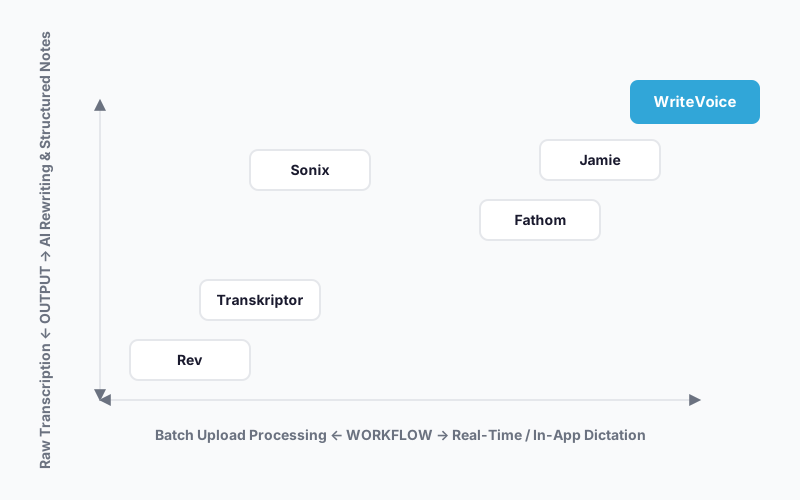
The Best Rev Alternatives
1. Transkriptor
Transkriptor is an AI transcription service that handles batch file uploads and returns clean transcripts faster and cheaper than Rev’s human-verified pipeline.
Best for: Content creators, researchers, and journalists transcribing pre-recorded audio – podcasts, interviews, lectures, focus groups.
Strengths
- Less expensive per minute than Rev’s human transcription tier
- Faster turnaround than Rev’s human-verified pipeline
- Handles common file formats for batch upload workflows
- Clean output formatting reduces post-processing time
Where it’s not the right fit
- Not designed for real-time meeting transcription or live dictation
- No AI rewriting or tone transformation layer – you get transcript, not polished draft
- Not built for in-app dictation across messaging or productivity tools
Pricing: Check transkriptor.com for current rates. It’s cheaper than Rev’s human tier, but specific per-minute pricing wasn’t confirmed at time of writing.
When to choose it: You have a library of pre-recorded audio files you need transcribed accurately and affordably, and you don’t need AI-generated summaries or real-time processing. Transkriptor matches Rev’s core batch transcription use case at a lower price point.
2. Fathom
Fathom is an AI meeting assistant that joins your video calls, transcribes them live, and generates a structured summary in under 30 seconds – with optional direct sync to Salesforce, Notion, and Asana.
Best for: Sales teams and remote professionals who need meeting transcripts turned into CRM-ready notes automatically, without manual copy-paste.
Strengths
- Summaries generated in under 30 seconds after call ends
- Direct CRM sync to Salesforce and workflow tools via Zapier
- Ask Fathom AI chatbot queries across your meeting history
- Integrates with Notion and Asana for task capture
Where it’s not the right fit
- CRM sync limited to 3 users per email domain on free plan
- Not designed for dictating messages or emails outside of a meeting context
- No in-app keyboard or mobile dictation capability
Pricing: Free plan available with basic features. Paid plans required for full CRM sync – check fathom.video for current pricing as of 2025.
When to choose it: You’re on calls all day and the bottleneck is getting meeting outcomes into your CRM or project management tool. Fathom eliminates the note-taking and copy-paste step entirely for structured sales and project workflows.
3. Sonix
Sonix is an automated transcription and media intelligence platform. It generates transcripts, subtitles, AI summaries, and chapter titles from a single upload, with Adobe Premiere Pro integration and automated translation in 54+ languages.
Best for: Video producers, podcasters, and media teams who need transcripts, subtitles, and multi-language versions from a single upload.
Strengths
- Generates transcripts, subtitles, and AI summaries in one workflow
- Automated translation in 54+ languages with a clean multilingual output pipeline
- Adobe Premiere Pro and Zapier integrations for media production workflows
- Thematic analysis and topic detection for content strategy
- SEO-friendly media player for embedding content
Where it’s not the right fit
- Not designed for live dictation or real-time in-app text input
- Batch-upload model means you can’t use it to dictate a Slack message on the go
- Higher price point than basic transcription-only tools
Pricing: Free trial available. Check sonix.ai for current subscription and per-minute rates as of 2025.
When to choose it: You produce video or podcast content at volume and need transcripts that feed directly into a subtitling, translation, and distribution workflow. For multilingual media production, nothing else on this list comes close.
4. Jamie
Jamie is a privacy-focused AI meeting assistant that generates structured notes, detects action items, and identifies speakers. Its architecture is built around data security, which makes it a better fit for sensitive meetings than tools that treat privacy as an afterthought.
Best for: Executives, legal professionals, and consultants who need accurate, structured meeting notes from confidential calls – where who said what matters as much as what was said.
Strengths
- Speaker-aware transcription with structured action item detection
- Data security built into the architecture, not bolted on as a setting
- Structured output (not just raw transcript) reduces post-meeting editing
- Workflow integrations for task management
Where it’s not the right fit
- Focused on meeting transcription – not designed for mobile dictation or messaging workflows
- Not a batch transcription tool for pre-recorded files like podcasts
- No AI rewriting across 25+ communication styles
Pricing: Subscription-based – check meetjamie.ai for current plan pricing as of 2025.
When to choose it: You run sensitive, high-stakes meetings (board calls, legal consultations, client strategy sessions) and need structured notes you can trust – with security handled at the architecture level, not just a checkbox in the settings.
5. WriteVoice
WriteVoice is an AI dictation tool that transcribes your speech and immediately rewrites it into send-ready text. It runs as a custom iOS keyboard, a Mac desktop app, and a web app, so it works inside any app without copy-pasting.
Best for: Mobile-heavy professionals – founders, sales reps, managers – who dictate Slack messages, emails, WhatsApp replies, and LinkedIn posts throughout the day and need polished output without leaving the active app.
Strengths
- Custom iOS keyboard means you dictate directly inside WhatsApp, Slack, Gmail, iMessage – no app-switching required
- 25+ AI rewrite styles (Professional, Email, Tweet, Casual, Expand, Shorten, and more) transform rambling voice notes into send-ready text
- App-aware tone detection automatically adjusts output for LinkedIn vs. WhatsApp vs. Gmail without manual style selection
- Unlimited dictation at $15/month vs. Rev’s $1.43/minute ($85.80 for a 60-minute file)
- Audio processed in real-time and immediately discarded. No recordings stored, no training on user data. Built for healthcare, legal, and executive use where that matters.
- One-time lifetime deal available at writevoice.io/lifetime-deal (€119, 30-day money-back guarantee)
- 120+ languages supported
Where it’s not the right fit
- Not designed for batch transcription of pre-recorded files (podcasts, archived interviews)
- No human-verified transcription layer for legal-defensibility requirements
- Android not currently supported – iOS, Mac, and Web only
Pricing: Free plan (2,000 words first month, no credit card required). Unlimited plan at $15/month as of 2025. Lifetime deal at €119 one-time. Check writevoice.io for current rates.
When to choose it: You dictate constantly on your phone – messages, email replies, social posts – and “speak elsewhere, copy-paste into app” is costing you focus. Tap the mic in your keyboard, speak naturally, get back clean text, and send without leaving the app.
Quick Comparison
| Tool | Best For | Starting Price | Free Tier | Standout Feature |
|---|---|---|---|---|
| Transkriptor | Affordable batch transcription | Check site | Yes | Lower per-minute cost than Rev human tier |
| Fathom | Meeting notes with CRM sync | Free / paid tiers | Yes | Sub-30-second summaries synced to Salesforce |
| Sonix | Multilingual media production | Check site | Trial | Transcription + subtitles + translation in one workflow |
| Jamie | Secure, structured meeting notes | Check site | No | Speaker-aware notes with security-first architecture |
| WriteVoice | In-app mobile dictation + AI rewriting | $15/month | Yes (2,000 words) | Dictate polished text inside any app via custom iOS keyboard |
Pricing as of 2025. Check each tool’s pricing page for current rates.
Which Alternative Should You Choose?
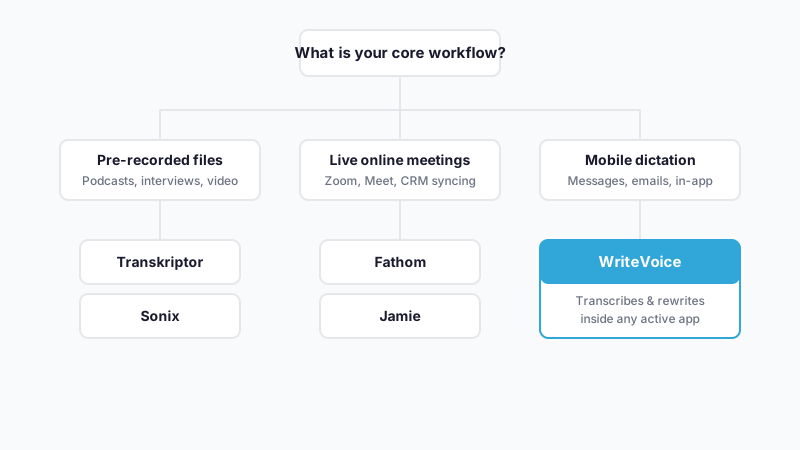
If you transcribe pre-recorded audio files…
Stay with Rev or switch to Transkriptor. Both handle batch file upload for podcasts, interviews, and lectures – Transkriptor at a lower per-minute cost, Rev if you need the human-verified 99%+ accuracy tier for published or legal content.
If you need live meeting transcription with CRM integration…
Fathom is the clearest fit. It joins your calls live, generates a structured summary in under 30 seconds, and pushes action items directly to Salesforce or Notion – no manual note-taking or data entry required.
If you produce video or multilingual content at volume…
Sonix handles the full media production pipeline – transcript, subtitles, automated translation in 54+ languages, and Adobe Premiere integration – in a single workflow that Rev’s batch model can’t match.
If you run sensitive, high-stakes meetings and need speaker-aware structured notes…
Jamie is the right call here. Its security-first architecture and structured output format – not just raw transcript – make it the right tool for legal, executive, and confidential sessions where who said what matters.
If you dictate messages, emails, and posts on your phone all day…
WriteVoice is the only tool on this page built for that workflow. Its iOS custom keyboard lets you dictate directly inside WhatsApp, Slack, Gmail, or any other app without switching. At $15/month there’s zero marginal cost per message. Rev charges $1.43/minute for human transcription – a single 30-second Slack message would run $0.72 and still come back as raw, unedited text. WriteVoice doesn’t work that way.
Ready to Try WriteVoice?
If you’re dictating dozens of messages a day on your phone and the copy-paste-edit loop is eating your focus, WriteVoice fixes that directly. Start free at writevoice.io – no credit card required, and the iOS keyboard installs in under two minutes. The Unlimited plan comes with a 30-day money-back guarantee if your workflow doesn’t change.
Frequently Asked Questions
What should I look for in a Rev alternative?
The right alternative depends on your workflow: batch transcription (Rev, Transkriptor), live meeting notes (Fathom, Jamie), or mobile dictation (WriteVoice). Prioritize accuracy for legal/medical use cases, real-time vs. batch processing capability, whether the tool generates summaries or rewrites beyond transcription, pricing model (per-minute vs. flat-rate), and how well it integrates into your existing apps. For mobile professionals dictating messages and emails throughout the day, WriteVoice’s in-app integration eliminates the copy-paste friction that Rev’s batch model can’t address.
Is Rev still worth using?
Yes, Rev remains the right choice for batch transcription of pre-recorded content when you need high accuracy or human-verified output. Its 99%+ human transcription tier is unmatched for legal documents, published captions, and archived interviews where defensibility matters. However, if your workflow is real-time meetings, live dictation on mobile, or high-frequency short-form messaging, Rev’s per-minute pricing ($1.43/min) and batch-only model make it prohibitively expensive or technically incompatible-which is why alternatives like Fathom, Jamie, and WriteVoice have emerged.
Why is WriteVoice on this list?
WriteVoice solves a specific workflow Rev doesn’t: mobile professionals who dictate dozens of messages, emails, and posts daily inside messaging apps like WhatsApp, Slack, and Gmail. Rev charges $1.43 per minute for human transcription (a 30-second message = $0.72 plus raw, unedited text); WriteVoice charges $15/month unlimited. The iOS custom keyboard lets you speak directly inside any app without switching or copy-pasting-WriteVoice then applies AI rewriting in 25+ styles to turn rambling speech into polished, send-ready text instantly. For this specific audience, WriteVoice is a 5–10x faster and more economical workflow than Rev.
What makes a good transcription software alternative?
The strongest transcription tools balance accuracy, speed, cost, and post-transcription capability. Accuracy ranges from 85% (basic AI) to 99%+ (human-verified)-choose based on whether your output needs legal defensibility. Real-time tools (Fathom, Tactiq, WriteVoice) join calls or work as you speak; batch tools (Rev, Transkriptor, Sonix) process uploaded files. Beyond raw transcription, modern alternatives add AI summaries, action-item detection, speaker identification, or rewriting into multiple formats-capabilities Rev doesn’t offer. Finally, pricing should align with frequency: Rev’s per-minute model works for occasional large files but breaks down at high frequency, while WriteVoice’s unlimited tier suits daily dictation and Jamie’s flat rate suits meeting-heavy teams.
How does WriteVoice’s pricing compare to Rev?
Rev’s human transcription costs $1.43 per minute-a 60-minute meeting runs $85.80, and a 30-second Slack message costs $0.72 without AI rewriting included. WriteVoice’s Unlimited plan is $15/month for unlimited dictation, or €119 one-time lifetime deal (as of 2025), with 25+ AI rewrite styles and 120+ languages included. For mobile professionals dictating 50+ times daily, Rev’s per-message cost accumulates to $35–$40/month minimum, while WriteVoice’s $15/month has zero marginal cost per dictation. For occasional batch transcription, Rev’s per-minute model is economical; for frequent real-time dictation, WriteVoice’s fixed rate eliminates cost friction entirely.
Does WriteVoice work for meeting transcription like Rev?
WriteVoice has web-based meeting recording for live transcription and summaries, but it’s not its primary strength-Fathom and Jamie are better specialized tools for meeting workflows. WriteVoice excels at real-time dictation inside messaging apps (WhatsApp, Slack, Gmail) via iOS keyboard or Mac hotkey, turning rambling speech into polished, app-aware text instantly. If your bottleneck is getting structured summaries and action items synced to your CRM or Notion after calls, Fathom or Jamie are stronger choices. WriteVoice is the right fit if you’re dictating messages, emails, and quick notes during work inside your active app-not for batching and post-processing transcripts like Rev.
Which Rev alternative is best for batch transcription?
Transkriptor is the strongest direct alternative to Rev for batch transcription of pre-recorded audio-it handles file uploads, returns clean transcripts, and costs less per minute than Rev’s human tier. Sonix offers a more feature-rich pipeline if you need transcripts, subtitles, automated translation in 54+ languages, and Adobe Premiere integration in a single workflow. For legal or medical transcription requiring 99%+ accuracy and human verification, Rev’s human-transcription tier is still unmatched-there is no cheaper alternative at that accuracy level. Choose Transkriptor for cost savings on standard batch transcription, Sonix if you’re producing multilingual video or podcast content, and stay with Rev if legal defensibility is non-negotiable.
What is the best Rev alternative for remote teams?
The answer depends on your team’s primary bottleneck. Fathom is best for sales and management teams where the friction is turning meeting notes into CRM-ready summaries and action items-it generates structured output in under 30 seconds and syncs directly to Salesforce, Asana, or Notion. Jamie is best for legal, consulting, and executive teams running sensitive calls where speaker identification and security-first architecture matter more than speed. WriteVoice is best for distributed teams where individuals are constantly dictating Slack messages, email replies, and status updates on mobile and want zero-friction in-app dictation without copy-paste. For pure meeting transcription at lower cost than Rev, both Fathom and Jamie offer flat-rate plans that eliminate per-minute surprise bills.
Can I replace Rev with WriteVoice?
Only if your use case is mobile dictation of messages, emails, and short-form content-not batch transcription of pre-recorded files. WriteVoice’s iOS keyboard and Mac hotkey let you dictate polished text directly inside WhatsApp, Slack, Gmail, or LinkedIn without app-switching; Rev’s batch-upload model and per-minute pricing don’t accommodate that workflow. For podcasts, interviews, or archived meetings, Rev and Transkriptor remain the right tools. For frequent in-app dictation on mobile, WriteVoice is 5–10x faster and cheaper than using Rev. The two tools solve different problems in the voice-to-text ecosystem: Rev is for transcribing past meetings; WriteVoice is for speaking your future messages.
What Rev alternative has the best privacy features?
Jamie and WriteVoice both prioritize privacy-first architecture. Jamie is built on data security foundations with speaker-aware transcription designed for confidential calls where GDPR and professional confidentiality matter. WriteVoice processes audio in real-time and immediately discards recordings-no storage, no training on user data-making it the clearest fit for healthcare professionals, lawyers, and executives subject to HIPAA or GDPR. Rev routes audio files to freelance transcribers, which raises questions for confidential communications. If your workflow involves sensitive medical, legal, or executive dictation, WriteVoice and Jamie are stronger choices than Rev’s marketplace model.
Which Rev alternative is free?
Fathom offers a free tier with basic meeting transcription and limited CRM sync (3 users per email domain). WriteVoice provides a free plan with 2,000 words per month, no credit card required, and access to the full iOS keyboard and 25+ rewrite styles-a real free tier, not just a trial. Sonix offers a free trial but not a permanent free tier. Transkriptor and Jamie require checking their current pricing pages. For ongoing free access, WriteVoice’s free tier is the most generous on this list if your dictation volume stays under 2,000 words monthly.
Does WriteVoice work on Android?
No, WriteVoice is not currently available on Android-only iOS, Mac (Apple Silicon and Intel), and Web. If Android is your primary dictation platform, you’ll need to evaluate other tools like Google’s native Recorder app, Otter.ai’s Android app, or continue using Rev’s batch model. The iOS custom keyboard is WriteVoice’s core differentiator-it lets you dictate inside any app without copy-pasting-which Google has not yet opened as a third-party capability on Android’s keyboard architecture.
How does WriteVoice’s AI rewriting compare to getting a raw Rev transcript?
Rev returns a faithful transcript of what was spoken-including filler words, false starts, and fragmented sentences that require manual editing before the output is usable. WriteVoice applies automatic AI rewriting in 25+ styles (Professional, Email, Tweet, Casual, Expand, Shorten) and detects which app you’re in to adjust tone automatically (LinkedIn gets thought-leader tone, WhatsApp gets casual tone, Gmail gets formal tone). A rambling 30-second voice note comes back from Rev as raw text; from WriteVoice it comes back as a polished, send-ready message. This rewriting step is why WriteVoice eliminates the editing bottleneck that Rev users consistently cite as a pain point.
What is the fastest Rev alternative for live meetings?
Fathom generates structured summaries in under 30 seconds after your call ends, making it the fastest for turning meeting audio into actionable output. Jamie provides speaker-aware transcription and action-item detection at speed, and WriteVoice’s web app can record live meetings, but neither is optimized for speed the way Fathom is. Rev is asynchronous-you upload after the meeting is over, introducing delay. If your workflow requires capturing meeting outcomes during the call, Fathom or Jamie are faster than Rev; if you need the summary available 30 seconds after the call, Fathom is the clear winner.