
Otter.ai Alternatives
TL;DR
The best Otter.ai alternative depends on whether you’re recording team meetings or dictating on the go. Fireflies.ai and Fathom win for meeting transcription and team collaboration, WriteVoice wins for in-app voice dictation with instant AI rewriting across messaging apps like WhatsApp, Slack, and Gmail, and HappyScribe wins for multilingual teams needing 140+ language support.
Otter.ai Alternatives
Otter.ai built the AI meeting transcription category and still leads it – it turns hours of meetings into searchable, shareable transcripts. But its 300-minute free cap, English-only transcription, and subscription-only pricing push a lot of users to look elsewhere. This page maps the real alternatives to the real use cases, so you can pick the right fit without guessing.
Why People Look for Otter.ai Alternatives
Otter.ai’s free plan runs out fast. At 300 minutes per month with a hard 30-minute cap per conversation and only 3 audio imports lifetime, most active users hit the ceiling within their first week. Upgrading to Pro costs $16.99/month – and you’re still buying a fixed block of 1,200 minutes whether you use them or not. Users have noted the inflexibility directly: “Need to transcribe 1,500 minutes one month but only 400 the next? You’re still paying for the same plan.”
The language gap is a second driver. Otter still cannot transcribe non-English languages, which is a hard stop for global teams and non-English speakers – a surprising gap in a product that has been around since 2016.
The third group leaving Otter isn’t looking for a meeting transcription replacement at all. They’re individual contributors, founders, and mobile-heavy professionals who wanted voice-to-text for messaging apps – and discovered that Otter is fundamentally built for post-meeting analysis, not real-time dictation inside WhatsApp, Slack, or Gmail. For them, Otter was never the right tool. They’re searching for something that doesn’t exist in the meeting-intelligence category.
What to Look for in a Voice Transcription Tool
Not all transcription tools solve the same problem. Before picking one, run your use case against these five criteria.
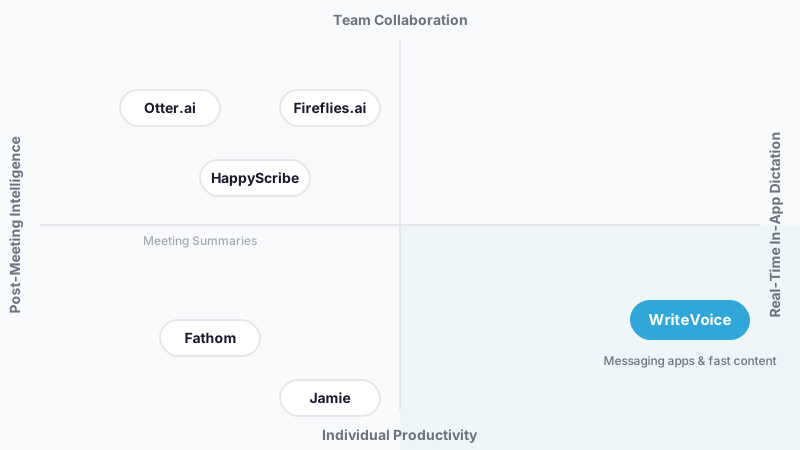
Meeting intelligence vs. in-app dictation: Meeting-intelligence tools (Otter, Fireflies, Avoma) are built for post-meeting analysis, joining calls, building searchable knowledge bases, syncing to CRMs. In-app dictation tools (WriteVoice) are built for real-time communication, speaking directly into WhatsApp, Slack, or Gmail without switching apps. Buying the wrong category is the most common mistake.
Minute caps vs. unlimited usage: Cap-based pricing punishes variable usage. A freelancer who transcribes heavily for one client for two weeks pays the same monthly rate as someone who transcribes every day. Look for tools with flat unlimited pricing or one-time lifetime payments if your usage fluctuates.
Raw transcript vs. polished output: Some tools give you a transcript; others rewrite it. A raw transcript from a rambling voice note is still a rambling voice note, just in text. Tools with AI rewrite layers (25+ styles in WriteVoice, for example) take the messy input and produce a polished email, LinkedIn post, or Slack message ready to send.
Language support: Otter.ai is English-only. HappyScribe supports 140+ languages. WriteVoice supports 120+. If your team communicates in Spanish, Portuguese, Arabic, or any non-English language, language breadth matters a lot.
Privacy and data retention: Bot-based meeting recorders join your calls and store transcripts on third-party servers. For lawyers, healthcare professionals, and executives handling sensitive conversations, that creates real compliance exposure under HIPAA and GDPR. Zero-retention tools (WriteVoice, Jamie, HappyScribe’s bot-free mode) process audio in real time and immediately discard it, nothing stored, nothing trained on.
Free tier depth: Fathom’s free tier covers unlimited Zoom, Teams, and Google Meet recordings with no time cap. Otter’s free tier gives 300 minutes before hitting a wall. WriteVoice’s free tier is a limited first-month trial of 2,000 words. Know which category you’re evaluating before assuming “free” means comparable.
The Best Otter.ai Alternatives
1. WriteVoice
WriteVoice is an AI voice dictation tool that transcribes speech and instantly rewrites it into polished output – directly inside the app you’re already using, without switching.
Best for: Mobile-heavy professionals and founders who need fast, polished messages and content inside WhatsApp, Slack, Gmail, LinkedIn, and iMessage – without copy-pasting from a separate app.
Strengths
- iOS custom keyboard means you dictate inside any app – WhatsApp, iMessage, Slack, Notion – without ever leaving it
- 25+ AI rewrite styles (Professional, Tweet, Email, Casual, Shorten, Expand, Emojify) applied in under one second
- App-aware tone adjustment: WriteVoice detects LinkedIn vs. Gmail vs. WhatsApp and auto-adjusts tone without any manual input
- 120+ language support with custom vocabulary that learns your personal style over time
- Zero-retention privacy model: audio is processed in real time and immediately discarded – no storage, no training on your data
- One-time lifetime deal at €119–€199 means no recurring charges
Where it’s not the right fit
- Not designed for team meeting intelligence – no CRM integration, no shared knowledge base, no multi-user access
- Free tier is a first-month trial (2,000 words), not a sustainable free plan
- No Android support – iOS, Mac, and Web only
- Meeting recording is available on the web app but is secondary to its core in-app dictation use case
Pricing: Free trial (2,000 words, first month). Unlimited plan at $15/month. Lifetime deal at €119–€199 one-time payment (as of mid-2025). Free tier: Yes (limited).
When to choose it: You communicate heavily through messaging apps, you’re tired of slow mobile typing or copy-pasting from a dictation app, and you want polished output without editing. Especially strong for privacy-sensitive users – lawyers, healthcare professionals, and executives – who need zero audio retention.
2. Fathom
Fathom is a free AI meeting recorder that captures, transcribes, and summarizes Zoom, Google Meet, and Microsoft Teams calls with no time limits.
Best for: Individual contributors and small teams who want a genuinely free, zero-friction meeting summary tool without a credit card.
Strengths
- Genuinely unlimited free core features – no minute caps, no conversation limits, no import restrictions
- Easy to set up and get running without technical configuration
- Clean summaries and action item extraction from recorded meetings
- Integrates with Zoom, Google Meet, and Microsoft Teams natively
Where it’s not the right fit
- Not designed for in-app dictation or real-time messaging – it’s a post-meeting tool
- Limited language support compared to HappyScribe or WriteVoice
- Team analytics and CRM integration are minimal at the free tier; not built for sales intelligence
Pricing: Free (core features, no time cap). Paid plans for advanced features. Free tier: Yes (genuinely unlimited core).
When to choose it: You want the best free Otter.ai alternative for individual meeting recording and summaries. If recurring subscription costs are a dealbreaker, Fathom’s free plan is the clearest win on this list.
3. Fireflies.ai
Fireflies.ai is a team-focused meeting intelligence platform that auto-joins calls, builds a searchable knowledge base from every meeting, and integrates with CRMs and project management tools.
Best for: Teams and managers who need shared visibility across all recorded meetings, collaborative note-taking, and workflow integrations with tools like Salesforce, HubSpot, and Notion.
Strengths
- Auto-joins Zoom, Teams, Google Meet, and Webex without manual setup
- Builds a searchable transcript library across the entire team – find any conversation from any meeting
- Strong CRM integrations for sales teams (Salesforce, HubSpot)
- Analytics on talk time, sentiment, and meeting themes for managers and coaches
Where it’s not the right fit
- Not designed for individual in-app dictation or mobile messaging workflows
- Bot joins your meetings by default – not suitable for sensitive conversations where third-party presence is inappropriate
- Starting price of $10/month per user adds up quickly for larger teams compared to flat-rate alternatives
Pricing: Free tier available. Pro at $10/month per user (as of mid-2025). Free tier: Yes.
When to choose it: Your team runs frequent meetings across multiple members and needs shared, searchable transcripts plus CRM sync. The best choice for sales teams and managers who need meeting intelligence – not just personal note-taking.
4. Jamie
Jamie is a bot-free meeting assistant that transcribes and summarizes conversations offline and online, designed explicitly for privacy-conscious professionals who don’t want a bot joining their calls.
Best for: Privacy-sensitive professionals – lawyers, consultants, executives, and healthcare workers – who need accurate meeting notes without a third-party bot present in the call.
Strengths
- Bot-free: Jamie doesn’t join your meeting – it runs locally or in the background without announcing itself to other participants
- Offline transcription capability – works without an internet connection for sensitive environments
- Accurate summaries and action item extraction, consistently well-reviewed
- Pricing based on number of meetings rather than minutes – better for predictable budgeting
Where it’s not the right fit
- Not designed for in-app dictation, mobile messaging, or real-time communication workflows
- Less suited to large sales teams needing CRM sync or multi-user collaboration features
- Language support is narrower than HappyScribe or WriteVoice
Pricing: Plans based on meeting count (as of mid-2025 – check Jamie’s pricing page for current rates). Free tier: Yes (limited).
When to choose it: You want accurate meeting notes without a visible bot, or you’re in a profession where recording compliance matters. Jamie is the clearest choice when bot-free privacy is the primary requirement.
5. HappyScribe
HappyScribe is an AI transcription and meeting notes platform supporting 140+ languages, with a bot-free recording option designed for global and multilingual teams.
Best for: Global teams communicating across multiple languages who need accurate transcription, in-person meeting recording, and video recording in every plan.
Strengths
- 140+ language support – the broadest on this list, and a direct contrast to Otter.ai’s English-only limitation
- Bot-free recording option for in-person and private meetings
- Video recording included in every plan – not gated behind premium tiers
- Built for global teams where accuracy across languages is the primary requirement
Where it’s not the right fit
- Not designed for in-app dictation or mobile-first messaging workflows
- Less focused on team analytics or CRM integration than Fireflies or Avoma
- More expensive than Fathom for teams that don’t need multilingual support
Pricing: Multiple tiers based on usage (as of mid-2025 – check HappyScribe’s pricing page for current rates). Free tier: Yes (limited).
When to choose it: Your team operates across multiple languages and needs bot-free, accurate transcription. HappyScribe’s 140+ language support makes it the right call when language breadth is what actually matters.
Quick Comparison
| Tool | Best For | Starting Price | Free Tier | Standout Feature |
|---|---|---|---|---|
| WriteVoice | In-app dictation for messaging apps | $15/mo (or €119 lifetime) | Yes (limited trial) | Dictates + rewrites inside any iOS app in under 1 second |
| Fathom | Free individual meeting recording | $0 (core free) | Yes (genuinely unlimited core) | Unlimited free Zoom/Meet/Teams summaries |
| Fireflies.ai | Team meeting intelligence + CRM sync | $10/mo per user | Yes | Searchable team-wide meeting knowledge base |
| Jamie | Bot-free private meeting notes | Per-meeting pricing | Yes (limited) | Offline transcription, no bot in call |
| HappyScribe | Multilingual global teams | Usage-based | Yes (limited) | 140+ language transcription with bot-free option |
Pricing as of mid-2025. Check each tool’s pricing page for current rates.
Which Alternative Should You Choose?
If you need team meeting transcription with shared access…
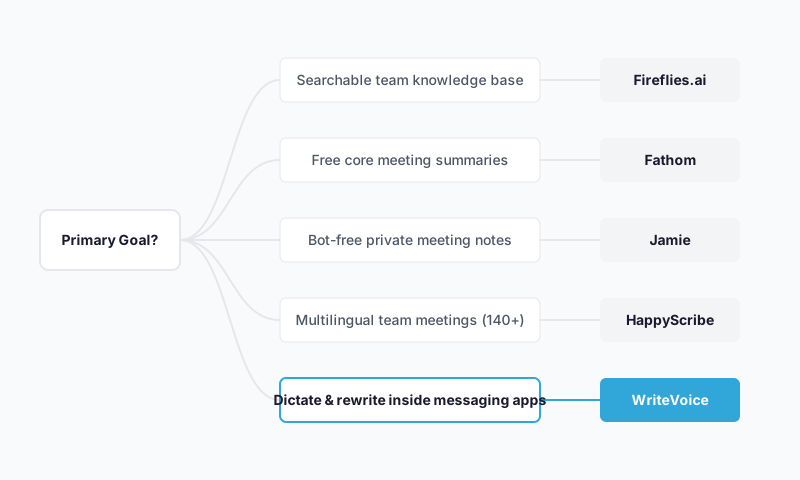
Fireflies.ai is the strongest fit. It auto-joins meetings, builds a searchable library across your whole team, and syncs to CRMs – exactly what Otter.ai was trying to do, with better team collaboration features.
If you want a free meeting summary tool with no minute caps…
Fathom is the clearest answer. Its core features – unlimited recording and summaries for Zoom, Meet, and Teams – are free with no time limits. No credit card, no surprise cap.
If you work in a sensitive profession and can’t have a bot in your calls…
Jamie is built exactly for this. No bot joins the meeting. Offline transcription is available. For lawyers, executives, and healthcare professionals, no bot in the call means no compliance headache.
If you dictate messages, emails, and posts on your phone all day…
WriteVoice is the right tool – and the only one on this list that solves this specific problem. It installs as an iOS custom keyboard, so you tap the mic inside WhatsApp, Slack, Gmail, or any other app, speak naturally, and get a polished message back in under a second without ever leaving the app. The 25+ rewrite styles and app-aware tone adjustment mean the output is ready to send – not a rough transcript to clean up. If you’re also privacy-sensitive (healthcare, legal, executive), the zero-retention audio model means nothing is stored.
If your team communicates across multiple languages…
HappyScribe supports 140+ languages with a bot-free option – the widest language coverage on this list. If your team works across multiple languages and accuracy matters, it’s the right call.
Ready to Try WriteVoice?
If you spend significant time dictating messages, emails, or LinkedIn posts on your phone – and you’re tired of slow typing, sloppy autocorrect, or copy-pasting between a dictation app and the actual app you’re trying to send from – WriteVoice is built for that workflow specifically. Start with the free tier, no credit card required. If it clicks, the Unlimited plan is $15/month, or grab the lifetime deal and pay once.
Frequently Asked Questions
What should I look for in a voice transcription tool?
The core decision is whether you need post-meeting analysis (team intelligence, CRM sync, knowledge base) or real-time dictation inside messaging apps without switching contexts. Beyond that, evaluate minute caps vs. unlimited pricing, whether the tool outputs raw transcripts or polished, rewritten text, language support breadth, and privacy model-bot-based tools store transcripts on servers, while zero-retention tools process audio and immediately discard it. Free tier depth matters too; Fathom offers genuinely unlimited free core features, while WriteVoice’s free tier is a limited first-month trial.
Why do users leave Otter.ai for alternatives?
Otter.ai’s 300-minute monthly free cap hits most active users within their first week, and upgrading to Pro ($16.99/month) locks you into fixed-minute blocks whether you use them or not. The second major gap is language support-Otter still cannot transcribe non-English, which is a dealbreaker for global teams. A third, often-overlooked group leaves Otter because they were never looking for meeting intelligence at all; they’re individual contributors and founders who want in-app voice dictation for WhatsApp, Slack, and Gmail, and Otter’s meeting-centric design simply doesn’t fit that workflow.
Is Otter.ai still worth using?
Yes, absolutely-for the specific use case it was built for. If your team runs frequent meetings and needs shared, searchable transcripts, CRM integration, and meeting analytics, Otter.ai remains a solid choice. The gap for most users isn’t that Otter is bad; it’s that Otter solves the team-meeting-intelligence problem, not the individual-in-app-dictation problem or the multilingual-team problem or the privacy-first problem. Choosing Otter for those other use cases is like choosing a hammer when you need a screwdriver-the tool works fine, it’s just the wrong tool.
What makes a good Otter.ai alternative?
A strong alternative must first solve a specific problem Otter doesn’t address-whether that’s in-app dictation (WriteVoice), genuinely free recording without caps (Fathom), bot-free privacy for sensitive professions (Jamie), multilingual support (HappyScribe), or team CRM integration (Fireflies). The alternative should not try to be Otter-for-everyone; instead, it should excel at one specific use case and be honest about where it’s not the right fit. The best alternatives make it easy to understand who they’re built for and who they’re not, which saves users time and prevents costly tool-switching regret.
Does WriteVoice work inside any app, or just messaging apps?
WriteVoice works inside any app on iOS-WhatsApp, Slack, Gmail, iMessage, LinkedIn, Notion, Slack, email, notes, browsers, anywhere you can type. On Mac, the hotkey trigger works system-wide. The core value is that you never leave the active app; you tap the microphone, speak, select a rewrite style (Professional, Tweet, Email, Casual, etc.), and the polished text is inserted directly into the text field. This eliminates the copy-paste friction that exists with separate dictation apps, which is why WriteVoice solves a fundamentally different problem than Otter.ai, which is built for post-meeting analysis, not real-time in-app communication.
Is Fathom really free, or does the free tier have a catch?
Fathom’s core meeting recording and summaries are genuinely free with no time limits, no minute caps, and no hard conversation limit-it’s one of the rare truly unlimited free tiers. The free plan covers Zoom, Google Meet, and Microsoft Teams recording natively. There’s no catch in the sense that you hit a sudden paywall; however, advanced features like custom branding, team analytics, and enhanced integrations are available only on paid plans. If you only need basic recording and summaries, Fathom’s free tier is the clearest alternative to Otter’s restricted 300-minute plan.
Why would I choose Jamie over Fireflies or Otter if I need team meeting notes?
Jamie is specifically designed for professionals in sensitive fields-lawyers, consultants, executives, healthcare workers-where having a bot join the call is either inappropriate or creates compliance risk. Jamie doesn’t join your meeting; it transcribes locally or in the background without announcing a third party. For team meeting intelligence with CRM sync and analytics, Fireflies.ai is the stronger fit; for bot-free privacy, Jamie is the only correct choice.
Does HappyScribe support languages that Otter.ai doesn’t?
Yes, fundamentally. Otter.ai is English-only, while HappyScribe supports 140+ languages-a direct, decisive advantage for any global team communicating in Spanish, Portuguese, Arabic, Mandarin, French, or any other non-English language. HappyScribe also offers a bot-free recording option, so you’re not trading language support for privacy. If your team operates across multiple languages, HappyScribe is the right Otter alternative; if you need English-only but also need in-app dictation with instant rewriting, WriteVoice fills that gap instead.
Can I use WriteVoice to replace my team’s meeting transcription tool?
Not as a primary replacement. WriteVoice is built for individual in-app dictation-speaking into WhatsApp, Slack, Gmail to generate fast, polished messages-not for recording team meetings and building a shared knowledge base. WriteVoice’s web app does support meeting recording, but that feature is secondary; Fireflies.ai, Jamie, or HappyScribe are better designed for that workflow if team collaboration and shared transcripts are your requirement. WriteVoice is strongest when paired with another tool: use it for personal dictation and quick content creation, while using Fireflies or Jamie for actual meeting intelligence.
What’s the privacy difference between WriteVoice and other transcription tools?
WriteVoice uses a zero-retention model: audio is processed in real time and immediately discarded-nothing is stored, nothing is used for training, and there’s no centralized server holding your conversations. Most meeting-intelligence tools (Otter.ai, Fireflies.ai) build a searchable knowledge base by storing transcripts on their servers, which creates compliance exposure under HIPAA and GDPR, particularly for healthcare and legal professionals. Jamie and HappyScribe both offer bot-free options with similar zero-retention principles. For lawyers, healthcare professionals, and executives handling sensitive information, WriteVoice’s explicit privacy model is a competitive advantage-you get fast dictation without worrying about where your words are stored.
Why does WriteVoice cost less than Otter.ai when I need lifetime access?
WriteVoice offers a one-time lifetime payment at €119–€199 because it targets individual contributors and freelancers, not enterprises; the business model is volume-based LTD sales rather than high-value recurring subscriptions from teams. Otter.ai charges per user on a subscription model because it’s built for team collaboration and recurring engagement; the recurring revenue is core to their pricing. For a solo founder or freelancer who can’t stomach another monthly charge or worries about losing unused minutes, WriteVoice’s lifetime deal removes that friction entirely. Otter’s subscription model isn’t worse; it’s just a different pricing philosophy for a different audience.
Which alternative is best for privacy-sensitive use cases like healthcare or legal?
Jamie and WriteVoice are the clearest fits. Jamie is bot-free-no third party joins your calls-which is critical for healthcare professionals, lawyers, and executives handling HIPAA- or attorney-client-privileged conversations. WriteVoice’s zero-retention model means audio is never stored or trained on, making it ideal for dictating sensitive case notes, clinical observations, or confidential memos directly into your legal case management system or EHR without copy-pasting. HappyScribe also offers a bot-free option with 140+ language support. If your primary concern is that no third-party bot is present in your meetings, Jamie is the only tool on this list built with that as the core requirement.
Can I dictate directly into my CRM or legal case management system with WriteVoice?
Yes, on Mac and web. WriteVoice works inside any text field on your Mac via the hotkey trigger, so you can dictate case notes directly into your legal case management system, dictate observations into your EHR, or dictate emails into your CRM-all without leaving the active app. On iOS, the custom keyboard works inside any app with a text field, so if your CRM or case management tool is iOS-compatible, you can dictate directly into it. The polished output (thanks to the 25+ rewrite styles) means your notes are structured and professional without manual editing, and the zero-retention privacy model means nothing is stored on WriteVoice’s servers.
What’s the difference between WriteVoice’s free tier and the paid Unlimited plan?
WriteVoice’s free tier gives you 2,000 words in your first month, which is a limited trial designed to test the product-not a sustainable free plan like Fathom’s unlimited recording. The Unlimited plan at $15/month (or €119–€199 lifetime) removes all word caps, unlocks 25+ rewrite styles, adds 120+ language support with custom vocabulary learning, enables all devices (iOS, Mac, Web), and includes priority support. If you dictate regularly-daily messages, frequent emails, multiple LinkedIn posts, meeting notes-the 2,000-word free tier will exhaust quickly, so the paid plan makes sense within 1-2 weeks for active users.
Why isn’t WriteVoice available on Android?
WriteVoice is currently iOS, Mac, and Web only-no Android app or keyboard exists. This is a genuine limitation if your team uses Android devices. For Android users who need in-app dictation, native Android dictation or alternative tools are the only options; for meeting transcription on Android, Fathom, Fireflies, or HappyScribe all support Android via their mobile apps. WriteVoice’s absence from Android is worth noting, though the iOS custom keyboard integration is difficult to replicate on Android’s more permissive keyboard architecture, which partly explains the exclusion.