
Maestra Alternatives
TL;DR
The best Maestra alternative depends on what you’re actually trying to do. Otter.ai wins for team meeting transcription with speaker identification and calendar sync. Descript wins for podcast and audio editing. WriteVoice wins for professionals who need to dictate polished messages inside WhatsApp, Slack, or Gmail without switching apps.

Maestra Alternatives
Maestra built a solid product for video translation, AI dubbing, and subtitle generation – if you’re localizing video content for global audiences, it does that job well. But not everyone searching for Maestra alternatives needs video dubbing. Many are looking for faster transcription, lower pricing, or a tool built for messaging and mobile work. This page breaks down the five best alternatives by use case so you can find the right fit for your actual workflow.
Why People Look for Maestra Alternatives
Maestra’s enterprise pricing is the most common friction point. With enterprise tiers starting at $2,990/month according to market research, Maestra is built for teams with budget – not for individual professionals, students, or founders who need transcription without a procurement process. Users frequently report sticker shock when they discover that Maestra’s full feature set sits behind pricing designed for corporate buyers.
The second driver is feature mismatch. Maestra is a video-first platform – it shines for dubbing, subtitle generation, and multilingual video translation. But a significant portion of people searching for Maestra alternatives aren’t trying to dub videos into Spanish. They want to transcribe a meeting, send a voice-dictated Slack message, or clean up a recorded voice note. Maestra’s interface and workflow are optimized for video teams, not mobile professionals or solo knowledge workers who need something faster and lighter.
The third signal: mobile dictation. Maestra does not have a custom keyboard or in-app dictation experience for iOS. Users who want to speak into WhatsApp, Slack, or Gmail directly – without opening a separate app, recording, exporting, and pasting – find that Maestra simply isn’t designed for that workflow. That segment of users ends up looking at entirely different tools.
What to Look for in a Transcription and Dictation Tool
Turnaround speed matters more than you’d think. How long does it take from the moment you finish speaking to having clean, usable text? For meeting transcription, a few minutes is acceptable. For messaging – dictating a WhatsApp reply while walking – sub-second turnaround is the difference between useful and annoying. Know whether you need post-processing speed or real-time speed.
Platform coverage is worth checking before you pay. Some tools are desktop-only, some are meeting-room-only, and some live inside your mobile keyboard. If you work across iPhone, Mac, and browser, check whether the tool syncs across all three – or whether you’re paying for each platform separately.
Raw transcription versus AI rewriting is the biggest capability split in this category. Transcription tools output what you said, including filler words, false starts, and run-on sentences. AI rewriting tools clean that up into polished text automatically. If you can edit a transcript afterward, raw transcription is fine. If you need something ready to send in five seconds, you need rewriting built in.
Pricing structure compounds fast. A $30/month tool that you use indefinitely costs $360/year and $1,800 over five years. Several tools in this category offer lifetime deals or one-time payments that significantly undercut subscription costs for individual users – worth checking before committing to monthly billing.
Privacy and data retention policy matters more than the feature list if you’re in healthcare, legal, or finance. Some tools store your audio and transcripts on their servers for replay and collaboration. Others delete audio immediately after processing. If you don’t want your conversations stored, the retention policy should be your first filter.
Use-case fit is the thing people get wrong most often. Meeting transcription, mobile dictation, podcast editing, and video dubbing are four different problems that require four different tools. The biggest mistake is choosing a tool built for a different use case and wondering why the workflow feels awkward.
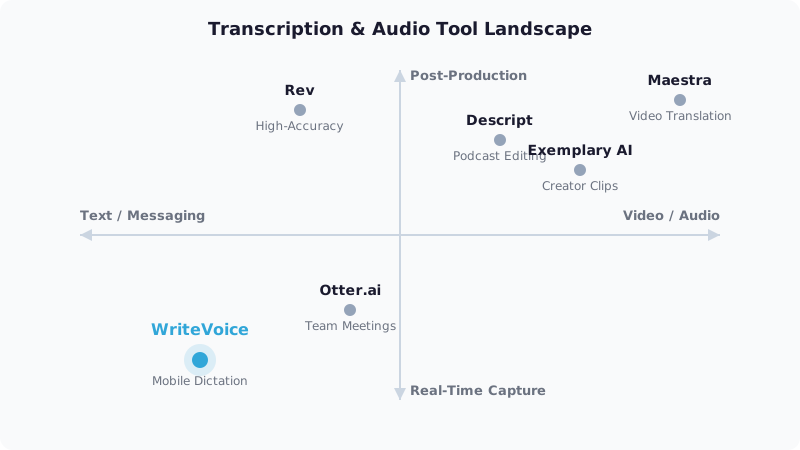
The Best Maestra Alternatives
1. WriteVoice
WriteVoice is an AI-powered dictation tool available as an iOS custom keyboard, Mac desktop app, and web app – it transcribes your speech and rewrites it into polished text inside whatever app you’re already using, without copy-pasting.
Best for: Mobile professionals who dictate messages, emails, and LinkedIn posts directly inside WhatsApp, Slack, Gmail, or any iOS app – and need them polished and ready to send in under a second.
Strengths
- Custom iOS keyboard means you dictate from inside WhatsApp, Slack, iMessage, Notion, or any app – the mic lives in your keyboard, not a separate tool
- Sub-1-second transcription + AI rewriting with 25+ styles (Professional, Email, Tweet, Casual, Shorten, Expand, Emojify, and more)
- App-aware tone adjustment – automatically detects LinkedIn vs. WhatsApp vs. Gmail and adjusts output tone without manual selection
- 120+ language support with 98%+ self-reported transcription accuracy
- Meeting recording via web app with auto-generated summaries and action items
- Lifetime deal available (€119–€199 one-time) covering iOS + Mac + Web – no recurring subscription required
- Privacy-first: audio is processed in real time and immediately deleted – no recordings stored, no training on user data
Where it’s not the right fit
- Not built for video dubbing, multilingual video translation, or subtitle generation – Maestra handles those workflows better
- No speaker identification or calendar integration for team meeting transcription – Otter.ai is better suited for multi-participant meetings
- No audio editing capability – Descript is the right tool for podcast post-production
- Android support is not confirmed; iOS-only for the keyboard experience
Pricing: Free tier at $0/month (2,000 words first month, no credit card required); Unlimited plan at $15/month; Lifetime deal at €119–€199 one-time. 30-day money-back guarantee. As of mid-2025 – check writevoice.io/pricing for current rates.
When to choose it: WriteVoice is the right pick if your core need is dictating polished messages on mobile – the iOS keyboard integration puts the mic inside every app you use, eliminating the copy-paste step that every other tool in this list still requires.
2. Otter.ai
Otter.ai is a real-time meeting transcription platform with live captions, automated summaries, speaker identification, and calendar/Zoom integrations built specifically for team collaboration.
Best for: Teams that run back-to-back Zoom or Google Meet calls and need searchable, shareable transcripts with speaker-labeled notes delivered automatically after every meeting.
Strengths
- Real-time transcription with live captions during active meetings
- Speaker identification distinguishes between participants automatically
- Calendar and Zoom/Google Meet/Teams integrations so meetings are captured without any manual setup
- Collaborative shared transcript libraries searchable across the team
- Freemium model with a functional free tier for individuals
Where it’s not the right fit
- Mobile experience requires app-switching – not designed for dictating directly inside WhatsApp or Slack
- No AI rewriting layer; outputs raw transcription that requires manual editing before sending
- Meeting-focused infrastructure is overkill for solo dictation, messaging, or content creation workflows
Pricing: Freemium (free tier available); paid plans estimated in the $10–$20/month range per user – check otter.ai/pricing for current rates. Pricing as of mid-2025.
When to choose it: If your primary need is automatic transcription of Zoom/Meet calls with speaker ID and a searchable team archive, Otter.ai is purpose-built for that. It wins in multi-participant meeting scenarios where WriteVoice’s more lightweight toolset isn’t enough.
3. Descript
Descript is an audio and video editing platform where you edit the media by editing the text transcript – with filler word removal, speaker identification, and publishing tools built in.
Best for: Podcasters, video creators, and content teams who need to edit recordings as text, remove filler words at scale, and publish polished audio/video from a single workflow.
Strengths
- Edit audio and video by editing the transcript – delete a word from the text and it disappears from the recording
- Automated filler word detection and removal across entire recordings
- Speaker identification with labeled transcript lanes
- Student discount (50% off) makes it accessible for academic creators
- Handles long-form recording editing with strong format export options
Where it’s not the right fit
- Not designed for real-time mobile dictation or in-app messaging – requires recording, uploading, and editing in the Descript interface
- No iOS keyboard integration; the workflow requires opening Descript as a standalone application
- Higher price point than WriteVoice for individual users who don’t need audio editing
Pricing: Freemium tier available; paid plans vary – check descript.com/pricing for current rates. Pricing as of mid-2025.
When to choose it: Choose Descript if you’re producing polished podcast episodes or video content and need to edit the actual audio file. It’s the most capable tool in this list for post-production; it’s not the right fit for anyone who needs a dictation keyboard.
4. Exemplary AI
Exemplary AI is a creator-focused transcription and content repurposing platform that automatically generates short-form clips, social threads, and blog posts from long-form audio or video recordings.
Best for: YouTubers, podcasters, and social media creators who want to upload one long-form recording and automatically extract Reels, Shorts, LinkedIn posts, and Twitter threads without manual editing.
Strengths
- AI-generated short-form clips from long-form video – surfaces the most shareable moments automatically
- Text-based video editing with transcript-driven clip extraction
- Content generation layer produces social posts, summaries, and descriptions from a single upload
- Claims 12x faster than manual repurposing workflows in its own marketing
- More relevant than Maestra for creators who need distribution, not just transcription
Where it’s not the right fit
- Upload-based workflow; not designed for real-time mobile dictation or in-app messaging
- No iOS keyboard or in-app rewriting capability – all work happens in the Exemplary AI interface
- Best for creators with existing recorded content; less useful for professionals dictating on the go
Pricing: Check exemplary.ai/pricing for current rates – exact pricing not publicly confirmed at time of research. As of mid-2025.
When to choose it: Choose Exemplary AI if you’re a content creator with a library of long-form recordings who wants automated distribution across social channels. It’s the most direct Maestra alternative for the creator-repurposing use case, without Maestra’s video-dubbing overhead.
5. Rev
Rev offers both AI-powered transcription and professional human transcription on a pay-as-you-go model – no subscription required – built for researchers, journalists, and legal professionals who need high-accuracy transcripts with turnaround guarantees.
Best for: Researchers, journalists, or legal teams who need highly accurate transcripts of recorded interviews or proceedings and are willing to pay per-file rather than subscribe monthly.
Strengths
- Human transcription option available for maximum accuracy on challenging recordings (accents, technical terminology, overlapping speakers)
- Pay-as-you-go pricing with no subscription lock-in
- Used in research and legal workflows where accuracy is non-negotiable
- AI transcription available for faster, lower-cost turnaround on clear recordings
Where it’s not the right fit
- Not a real-time or in-app dictation tool – the workflow is upload → wait → receive transcript
- No AI rewriting layer; outputs raw transcript requiring manual editing before use
- Not built for mobile messaging workflows; each file is a separate transaction
Pricing: Pay-as-you-go (AI and human rates per audio minute) – check rev.com/pricing for current rates. As of mid-2025.
When to choose it: Choose Rev when you have a recorded interview, deposition, or complex audio file that needs the most accurate possible transcript – and you’d rather pay per file than commit to a monthly subscription.
Quick Comparison
| Tool | Best For | Starting Price | Free Tier | Standout Feature |
|---|---|---|---|---|
| WriteVoice | Mobile in-app dictation + instant AI rewriting | $15/mo (or €119 lifetime) | Yes | Custom iOS keyboard with sub-1-second rewriting inside any app |
| Otter.ai | Team meeting transcription | ~$10/mo | Yes | Speaker ID + calendar-integrated auto-capture |
| Descript | Podcast and audio editing | Varies | Yes | Edit audio by editing the text transcript |
| Exemplary AI | Creator content repurposing | Varies | Not confirmed | Auto-generates short-form clips from long-form recordings |
| Rev | High-accuracy research transcription | Pay-as-you-go | No | Human transcription option for complex recordings |
Pricing as of mid-2025. Check each tool’s pricing page for current rates.
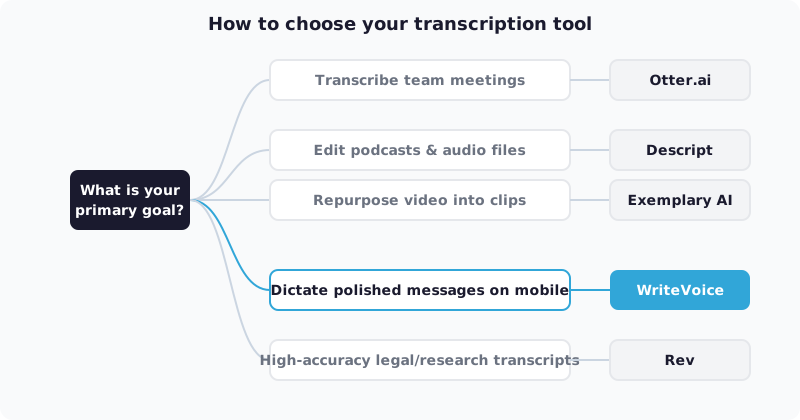
Which Alternative Should You Choose?
If you need to transcribe team meetings with multiple speakers…
Otter.ai is the right pick. Its calendar integrations, speaker identification, and collaborative transcript libraries are purpose-built for multi-participant Zoom or Meet calls. WriteVoice’s meeting recording is better suited for solo recordings – it lacks the multi-speaker infrastructure that teams need.
If you produce a podcast or video content and need to edit recordings…
Descript wins here. The ability to edit audio by editing the text is unique – no other tool in this list does it. If your workflow involves cutting, trimming, and polishing audio files, Descript’s edit-by-transcript approach will save you significant time.
If you’re a content creator repurposing long-form videos into social posts and clips…
Exemplary AI is the closest direct alternative to Maestra for creator workflows. It automatically surfaces shareable moments and generates short-form clips and posts from uploaded recordings – without Maestra’s enterprise pricing.
If you dictate messages in WhatsApp, Slack, Gmail, or LinkedIn and need them polished before you hit send…
WriteVoice is the only tool in this list that solves that specific problem. The iOS custom keyboard puts the microphone inside every app – speak naturally, pick a rewrite style, and send in under a second without leaving the conversation. At $15/month unlimited or €119 as a lifetime purchase, it’s designed for individual professionals, not enterprise video teams.
If you need high-accuracy transcripts of recorded interviews or legal proceedings…
Rev is the right fit. The human transcription option handles accents, technical language, and overlapping speakers better than any AI-only tool. Pay per file with no subscription required.
Ready to Try WriteVoice?
If you spend your day dictating messages on mobile – and you’re tired of voice-noting then manually editing then copying into WhatsApp or Slack – WriteVoice eliminates every step in that chain. Start free at writevoice.io with no credit card required, or grab the lifetime deal and pay once for iOS, Mac, and Web. There’s a 30-day money-back guarantee if the workflow doesn’t click.
Frequently Asked Questions
What is the best Maestra alternative overall?
The best Maestra alternative depends entirely on your workflow. If you transcribe team meetings, Otter.ai wins with speaker identification and calendar integration. If you edit podcasts, Descript’s text-based editing is unmatched. If you dictate messages on mobile inside WhatsApp or Slack, WriteVoice is the only tool that rewrites inside the active app without copy-pasting. For creators repurposing long-form video into clips and posts, Exemplary AI handles that automatically. Choose based on your actual use case, not feature count.
Which Maestra alternative is best for mobile professionals?
WriteVoice is purpose-built for mobile professionals who dictate inside messaging apps. It’s the only tool with an iOS custom keyboard that lets you speak directly into WhatsApp, Slack, Gmail, or LinkedIn-then instantly rewrites the text into polished copy without switching apps. At $15/month unlimited or €119 lifetime, it’s designed for individual professionals, not enterprise teams. For anyone who spends their day on mobile and tired of voice-noting then manually editing, WriteVoice eliminates the entire copy-paste workflow.
What should I look for in a transcription tool alternative to Maestra?
Prioritize turnaround speed, platform coverage, and whether you need raw transcription or AI rewriting. Turnaround speed matters more than it seems-sub-second for messaging, a few minutes for meetings. Platform coverage determines whether you pay once or multiple times; some tools charge per device. AI rewriting is the biggest capability split: raw transcription includes filler words and false starts; AI rewriting cleans that into send-ready text automatically. Pricing structure compounds fast-a $30/month tool costs $1,800 over five years, so check for lifetime deals that might cut that dramatically.
Is Otter.ai a good Maestra alternative?
Otter.ai is an excellent alternative if you transcribe team meetings with multiple speakers. It includes speaker identification, calendar integration with Zoom and Google Meet, and a searchable transcript library-built specifically for meeting collaboration. However, Otter.ai requires app-switching and produces raw transcription, not AI-rewritten text. If your primary need is mobile dictation into messaging apps, WriteVoice’s in-app keyboard and instant AI rewriting offer a faster workflow. Otter.ai is better for teams; WriteVoice is better for individuals on the go.
Does Descript replace Maestra?
Descript is a strong alternative for podcasters and video creators who need to edit audio by editing text, but it solves a different problem than Maestra. Descript’s edit-by-transcript approach is unmatched for podcast post-production and filler word removal at scale. However, Descript is not designed for video dubbing or multilingual subtitle generation-Maestra’s core strength. If you produce long-form audio or video content, Descript wins for editing. If you need video translation or dubbing, Maestra still owns that segment.
What is Exemplary AI best for compared to Maestra?
Exemplary AI automates the creator workflow that Maestra handles with enterprise overhead: uploading long-form recordings and extracting short-form clips, social posts, and blog content without manual editing. Exemplary AI is purpose-built for YouTubers and podcasters repurposing content across platforms; Maestra is built for video translation and dubbing teams. For creators focused on distribution over production, Exemplary AI’s automated clip generation and social thread extraction eliminate hours of manual work. For Maestra’s dubbing capabilities, you still need Maestra.
Is Rev a good alternative to Maestra for transcription?
Rev is an excellent alternative if you need highly accurate transcripts from interviews, depositions, or complex audio recordings and don’t want a monthly subscription. Its human transcription option handles accents, technical terminology, and overlapping speakers better than any AI-only tool. However, Rev operates on a pay-as-you-go model per file, not a real-time or in-app dictation system. If your workflow is upload → receive transcript, Rev is ideal. If you need real-time meeting transcription or mobile dictation, WriteVoice or Otter.ai are better fits.
Why would I choose WriteVoice over Maestra?
You’d choose WriteVoice if you’re a mobile professional dictating on the go, not a video production team-they’re built for entirely different use cases. WriteVoice’s custom iOS keyboard lets you speak directly inside WhatsApp, Slack, or Gmail and get polished text in under a second, without copy-pasting. Maestra is an enterprise video translation platform starting at $2,990/month; WriteVoice is $15/month unlimited or €119 lifetime. If you’re an individual professional or founder who dictates messages, not a team that dubs videos, WriteVoice is faster, cheaper, and more focused on your workflow.
What makes WriteVoice different from other transcription alternatives?
WriteVoice is the only tool that transcribes and rewrites inside the active app without copy-pasting, creating sub-1-second turnaround for in-app messaging. Every other tool in this category (Otter.ai, Descript, Exemplary AI, Rev) requires opening the tool, uploading or recording, exiting, then pasting into your messaging app. WriteVoice’s app-aware tone adjustment automatically detects LinkedIn versus WhatsApp versus Gmail and adjusts output tone without manual selection. The iOS custom keyboard means the mic lives in your keyboard, making WriteVoice omnipresent across all apps-a distribution advantage competitors can’t easily replicate.
Can WriteVoice handle team meeting transcription like Maestra can?
WriteVoice can transcribe meetings via its web app and generate auto-summaries and action items, making it suitable for solo recordings or dictation. However, it lacks speaker identification, calendar integration, and multi-participant infrastructure that team-focused tools like Otter.ai provide. WriteVoice is designed for individual professionals dictating on mobile or solo meetings, not for teams running back-to-back Zoom calls where meeting auto-capture and searchable archives are essential. For team transcription, Otter.ai is the better fit; WriteVoice shines for solo work and mobile messaging.
Which tool is best for content creators: WriteVoice or Descript?
Descript is the right choice for content creators who produce podcasts or videos and need to edit the actual recordings. Its text-based editing approach-where deleting a word from the transcript removes it from the audio file-is unmatched for post-production workflows. WriteVoice is better for creators who want to dictate fast ideas or social posts on mobile without editing; it’s a capture tool, not an editing tool. If your workflow involves cutting, polishing, and publishing recordings, choose Descript. If you want to brainstorm content ideas on the go via voice-to-text, WriteVoice is faster.
Is there a free Maestra alternative?
Otter.ai and Descript both offer free tiers with functional features for individuals, though they’re limited compared to paid plans. WriteVoice offers a free tier with 2,000 words per month-no credit card required, no time limit-which is enough for light daily use if you’re dictating 20-50 short messages. However, if you exceed 2,000 words monthly, you’ll need the $15/month unlimited plan or the €119 lifetime deal. Free tier transcription quality is comparable across all three tools; the limitation is volume, not accuracy.
How does WriteVoice pricing compare to Maestra?
WriteVoice costs $15/month unlimited or €119-€199 as a one-time lifetime purchase covering iOS, Mac, and Web. Maestra’s enterprise tier starts at $2,990/month according to market research, designed for video production teams with procurement budgets. For an individual professional, WriteVoice is approximately 200x cheaper annually than Maestra’s enterprise pricing. Even compared to other alternatives, WriteVoice’s lifetime deal option is unusually affordable-as of mid-2025, it’s one of the lowest entry points in the category for someone who wants unlimited use without recurring billing.
What are the main limitations of WriteVoice?
WriteVoice is not built for video dubbing, multilingual video translation, or subtitle generation-workflows where Maestra excels. It lacks speaker identification and calendar integration for team meeting transcription, making Otter.ai better suited for multi-participant scenarios. Android support is not confirmed; the keyboard experience is iOS-only. WriteVoice has no audio editing capability, so podcasters and video producers will need Descript or another editor. For anyone whose core need falls outside mobile in-app dictation, you’ll likely need a different tool alongside or instead of WriteVoice.
Should I keep using Maestra or switch to one of these alternatives?
Keep using Maestra if you’re a video production or dubbing team translating content into multiple languages-Maestra is purpose-built for that workflow and still the strongest choice. Switch if your primary need is outside video: team meeting transcription (move to Otter.ai), podcast editing (move to Descript), mobile dictation (move to WriteVoice), or creator content repurposing (move to Exemplary AI). Maestra’s enterprise pricing is a genuine barrier for individuals and small teams, so if budget is your friction point and your use case isn’t video translation, the alternatives in this list offer better value. Choose based on your workflow, not on Maestra’s feature count.
Can I use WriteVoice instead of a voice memo app?
Yes-WriteVoice replaces the voice memo + manual editing + copy-paste workflow entirely. Speak naturally into the WriteVoice keyboard inside WhatsApp, Slack, Gmail, or any iOS app, and the AI removes filler words, fixes grammar, and structures the text automatically. Unlike voice memo apps where you record, transcribe, edit manually, then copy into your target app, WriteVoice rewrites and sends in under a second without leaving the active conversation. For professionals who dictate 20-50 messages daily, WriteVoice eliminates the editing step that voice memo apps require, making it significantly faster than the traditional voice note workflow.