
Happy Scribe Alternatives
TL;DR
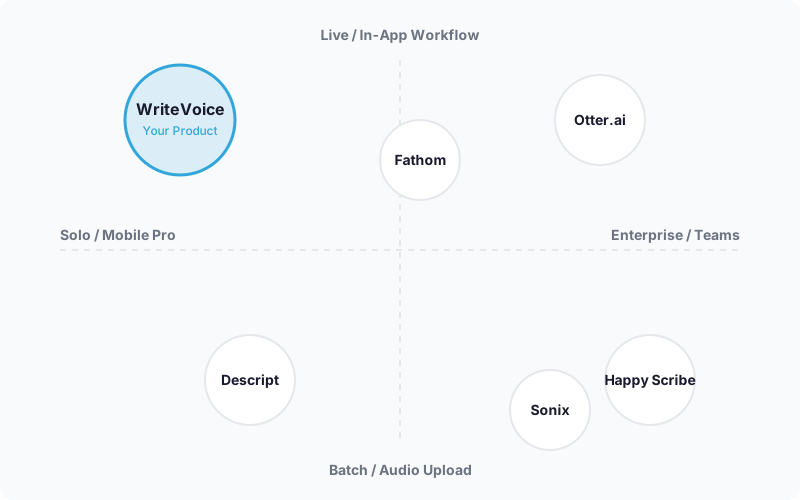
The best Happy Scribe alternative depends on your workflow. Otter.ai is the strongest pick for real-time meeting transcription and team collaboration, Descript wins for video and podcast creators who edit by transcript, and WriteVoice is built for mobile professionals who need to dictate polished text directly inside apps like WhatsApp, Slack, or Gmail – without switching tabs or editing raw transcripts.
Happy Scribe Alternatives
Happy Scribe has earned its 6 million users for good reason – 120+ languages, SOC 2 and GDPR compliance, and a human proofreading layer that pushes accuracy to 99% make it a serious choice for media teams and enterprises. But browser-only access, limited pricing transparency, and a workflow built for batch transcription leave a lot of users searching for something that fits their actual day. This page covers five tools across the main use cases – meeting notes, video editing, multilingual batch transcription, and mobile dictation – so you can pick the right one for your situation.

Why People Look for Happy Scribe Alternatives
Happy Scribe’s biggest structural gap is what it doesn’t have: a native mobile app. The platform is browser-based only, which works fine when you’re at a desk uploading audio files, but falls apart the moment you want to dictate a quick message on your phone or capture a voice note while walking between meetings. Users who need transcription on the go consistently report the same frustration – open browser, navigate to the app, record or upload, wait, copy text, switch to WhatsApp or Slack. That’s four context switches for what should be one action.
Pricing opacity is the second recurring complaint. Happy Scribe’s entry price is listed at $9/month in some sources, but actual costs for higher-tier team usage are difficult to pin down from the public website. Users who need to budget predictably – especially freelancers, small teams, and creators – find the lack of transparent tier comparisons frustrating before they’ve even signed up.
The third pattern is workflow mismatch. Happy Scribe is purpose-built for large content volumes: media production, subtitling, compliance workflows, batch audio upload. Users who want fast turnaround on short dictations – emails, Slack messages, meeting follow-ups – are using a professional broadcast tool for a casual productivity problem. The power is there, but it’s more than they need, and the interface reflects that complexity.
What to Look for in a Transcription Tool
Accuracy for your audio type. Overall accuracy percentages (Happy Scribe claims 95% AI, 99% with human review; WriteVoice claims 98%+) tell you little unless you know how they perform on your content. Accents, technical jargon, multilingual speakers, and noisy environments all degrade results. Look for a free tier or trial that lets you test with your own recordings before committing.
Mobile vs. desktop workflow. If you spend significant time on iPhone or Android, a browser-only tool will force you into a multi-step copy-paste workflow every time. Mobile-native apps (or iOS keyboard integrations like WriteVoice) solve this structurally. If you work exclusively at a desk processing uploaded files, desktop-first tools are fine.
AI rewriting vs. raw transcript. Most tools give you the transcript and stop there – you still edit. A smaller category (WriteVoice being the clearest example) applies AI rewriting to transform raw dictation into polished text automatically. If you dictate naturally and don’t want to edit output, the rewriting step matters more than transcription speed.
Team collaboration and compliance. Enterprise teams often need SSO, audit logs, multi-user workspaces, and compliance certifications like SOC 2 Type II or GDPR. Happy Scribe, Otter.ai Business, and Sonix address this. WriteVoice and Fathom do not – they’re individual and small-team tools. Know which category you’re buying for.
Pricing model. Subscriptions suit ongoing workflows; pay-as-you-go works for occasional users; lifetime deals suit individuals who want to own their tools long-term. The right model depends on your usage frequency and tolerance for recurring charges, not just the monthly price.
Integration with your existing stack. If your workflow lives in Zoom, Google Meet, or Microsoft Teams, native integration (Otter.ai, Happy Scribe, Fathom) eliminates manual upload steps. If it lives in Notion, Speakwise’s native integration is a workflow advantage. If it lives across every app on your phone, an iOS keyboard solution beats any integration list.
The Best Happy Scribe Alternatives
1. Otter.ai
Otter.ai is a real-time meeting transcription and collaboration platform with native integration into Zoom, Google Meet, and Microsoft Teams.
Best for: Teams needing live meeting transcription, collaborative note-taking, and AI-generated summaries synced to their video conferencing stack.
Strengths
- Real-time transcription during live calls – transcript appears as the meeting happens
- Native Zoom, Google Meet, and Teams integration with automatic meeting join
- AI-generated summaries and action items delivered post-meeting
- Free tier: 300 minutes/month, no credit card required
- Higher G2 user satisfaction scores than Happy Scribe
Where it’s not the right fit
- The Business plan caps imported file transcription at 6,000 minutes/user/month even on the $19.99/user/month tier – not designed for large-volume batch transcription projects
- No AI rewriting layer: you get the transcript, not polished prose ready to send
- Mobile experience is functional but not designed for quick in-app dictation workflows
Pricing: Free (300 min/month). Pro at $8.33/month billed annually or $16.99/month monthly. Business at $19.99/user/month annually. (Pricing as of mid-2025.)
When to choose it: If your primary need is transcribing and summarizing recurring meetings in Zoom or Google Meet with teammates reviewing the same notes, Otter.ai fits that workflow better than anything else here.
2. Descript
Descript is a video and podcast editing platform where you edit the media by editing the transcript – delete a sentence from the transcript, and the corresponding audio or video is removed.
Best for: Podcasters, YouTubers, and video creators who want to speed up editing by working in text rather than waveforms.
Strengths
- Edit audio and video by editing the transcript – the only tool in this list that works this way
- Multitrack editing, screen recording, and AI voiceover generation in one product
- Transcription is built into the video production pipeline, not bolted on
- Creator-friendly UX with templates for podcast and video formats
Where it’s not the right fit
- Starting at $24/month, it’s priced for creators with active production workflows – not occasional transcription users
- No real-time meeting transcription; designed for recorded content, not live calls
- Desktop-optimized workflow is not suited to mobile dictation or quick message composition
Pricing: Starts at $24/month. Free trial available. (Pricing as of mid-2025.)
When to choose it: If you produce regular podcast episodes or YouTube videos and want to cut editing time by working from text, Descript is in a category of its own. No other tool in this list edits the media by editing the words.
3. Fathom
Fathom is an AI meeting notes tool with a 5.0/5 rating on G2 across 807 reviews and a 4.95/5 ease-of-use score.
Best for: Individuals and small teams who want AI meeting notes that work immediately, without the setup complexity of enterprise transcription platforms.
Strengths
- 5.0/5 G2 rating (807 reviews) – the strongest satisfaction signal in this list
- 4.92/5 value-for-money score – users consistently say it’s worth the price
- Clean, fast interface: meeting ends, notes appear, done
- Faster to set up than most enterprise-grade alternatives
Where it’s not the right fit
- Not designed for batch transcription of pre-recorded audio or video files
- No mobile in-app dictation workflow; meeting-focused only
- Enterprise compliance credentials are not as explicitly documented as Happy Scribe’s SOC 2 / GDPR certifications
Pricing: Starts at $15/month. (Pricing as of mid-2025.)
When to choose it: If you want AI meeting notes that just work and user satisfaction matters in your buying decision, Fathom’s ratings make it the clearest choice for individual professionals and small teams.
4. Sonix
Sonix is a professional-grade transcription platform with strong multilingual accuracy, a clean editing interface, and integrations including Zapier and API access.
Best for: Professionals and teams processing multilingual audio – interviews, research, global media – who need integration with broader workflows via API or Zapier.
Strengths
- 120+ language support with emphasis on non-English accuracy
- Automatic speaker identification in multi-speaker recordings
- Zapier integration and API access for custom workflow automation
- Clean, reviewable transcript interface for editing and export
Where it’s not the right fit
- Starting at $22/month (some sources cite $10/month for entry tier – confirm current pricing directly), cost scales up quickly for high-volume teams
- No real-time meeting transcription; upload-and-process workflow
- Not designed for quick mobile dictation or in-app messaging scenarios
Pricing: Starting around $10–22/month depending on tier. Free trial available. (Pricing as of mid-2025 – check Sonix pricing for current rates.)
When to choose it: If you’re transcribing multilingual interviews, research calls, or media content and need API access or Zapier automation, Sonix has the integration options that simpler tools in this category don’t.
5. WriteVoice
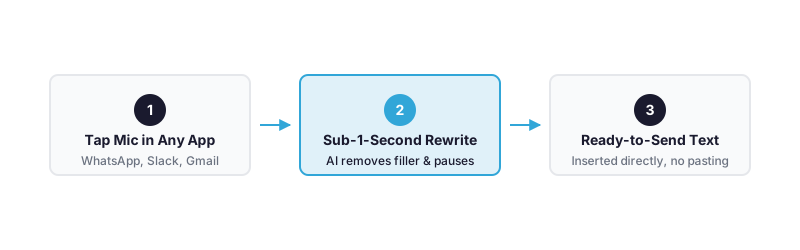
WriteVoice is an AI voice dictation and content transformation tool that works as an iOS custom keyboard, a Mac desktop app, and a web app – transcribing your voice and instantly rewriting it into polished text inside whatever app you’re already using.
Best for: Mobile professionals who dictate messages, emails, and social content on the go and want polished output delivered directly inside WhatsApp, Slack, Gmail, or any other app – without copy-pasting or manual editing.
Strengths
- iOS custom keyboard: dictate and get polished text without ever leaving the app you’re in – no browser, no copy-paste
- Sub-1-second turnaround from raw speech to rewritten, ready-to-send text
- 25+ AI rewrite styles (Professional, Tweet, Email, Casual, Shorten, Expand, and more) applied automatically based on the active app
- 120+ language support with privacy-first audio processing – audio deleted immediately, never stored, never used for model training
- One-time lifetime deal (€119) covers iOS + Mac + Web with all future updates – no recurring subscription required
- Unlimited dictation and AI rewrites at $15/month on the subscription plan – cheaper than stacking a transcription tool and a writing assistant separately
Where it’s not the right fit
- Not designed for enterprise teams needing SSO, audit logs, or SOC 2 / GDPR compliance certification
- Meeting transcription exists on the web app but is a secondary feature, not the core architecture
- No Android support – iOS and Mac only on mobile and desktop
Pricing: Free starter (2,000 words first month, no credit card). Unlimited at $15/month. Lifetime deal at €119 one-time. (Pricing as of mid-2025.)
When to choose it: If you’re a founder, freelancer, executive, or knowledge worker who spends a lot of time composing messages on your iPhone and wants to go from voice to polished, ready-to-send text in one second without leaving the app, WriteVoice is built for exactly that.
Quick Comparison
| Tool | Best For | Starting Price | Free Tier | Standout Feature |
|---|---|---|---|---|
| Otter.ai | Real-time meeting transcription | $8.33/mo (annual) | Yes – 300 min/mo | Live transcript during Zoom/Meet/Teams |
| Descript | Video and podcast editing | $24/mo | Free trial | Edit video by editing the transcript |
| Fathom | Simple AI meeting notes | $15/mo | Limited | 5.0/5 G2 rating, 807 reviews |
| Sonix | Multilingual batch transcription | ~$10–22/mo | Free trial | Zapier + API integration, 120+ languages |
| WriteVoice | Mobile in-app dictation | $15/mo or €119 lifetime | Yes – 2,000 words free | Dictate polished text inside any iPhone app |
Pricing as of mid-2025. Check each tool’s pricing page for current rates.
Which Alternative Should You Choose?
Most people searching for Happy Scribe alternatives are solving one of five distinct problems. Here’s the honest map.
If you primarily transcribe and summarize recurring team meetings…
Otter.ai is the strongest fit. Its native integration with Zoom, Google Meet, and Teams means the bot joins automatically, real-time transcript appears during the call, and AI-generated summaries and action items land in your inbox when it ends. The free 300-minute/month tier lets you test it on real meetings before spending anything.
If you produce podcasts or YouTube videos and want to cut editing time…
Descript is in a category by itself. No other tool lets you edit the audio or video by simply deleting text from the transcript. If your workflow involves recorded media production, Descript’s transcript-based editing will change how you work.
If you want the simplest AI meeting notes with the highest user satisfaction…
Fathom earns this slot with a 5.0/5 G2 rating across 807 reviews and a 4.92 value-for-money score. It does less than Otter.ai’s full feature set, but what it does, it does exceptionally cleanly. Best for individuals and small teams who want meeting notes without setup complexity.
If you transcribe multilingual interviews or need API/Zapier automation…
Sonix is the professional-grade choice. Its multilingual accuracy, automatic speaker identification, and integration depth (Zapier, REST API) make it the right fit for researchers, journalists, and global media teams processing content at volume.
If you’re a mobile professional who dictates messages, emails, or social content on the go…
WriteVoice solves the problem none of the others address: getting polished text directly inside the app you’re already using on your iPhone, in under a second, without copying anything anywhere. If your bottleneck is mobile typing speed rather than batch transcription volume, WriteVoice is built for your workflow – not Happy Scribe’s.
Ready to Try WriteVoice?
If you spend significant time composing messages on your iPhone – slow typing, voice notes you still have to edit, or copying text between apps – WriteVoice is built to cut all of that out. Start free, no credit card required, and dictate your first polished message inside WhatsApp or Slack in under a minute. If it doesn’t work for your workflow within 30 days, there’s a money-back guarantee on every paid plan.
Frequently Asked Questions
What should I look for in a Happy Scribe alternative?
Choose based on your primary workflow: real-time meeting transcription, batch file processing, video editing, or mobile dictation. Accuracy matters less than fit-a 98% transcription tool is useless if it forces browser workflows when you need mobile speed. Key evaluation criteria include mobile vs. desktop design, AI rewriting vs. raw transcript output, team collaboration features, compliance requirements, and pricing model (subscription, pay-as-you-go, or lifetime). Match the tool’s architecture to your actual bottleneck, not to feature count.
Is Happy Scribe still worth using?
Yes, absolutely-for the workflows it was designed for. Happy Scribe excels at large-volume batch transcription, enterprise team collaboration, compliance-certified processing, and multilingual content with human proofreading fallback. Its 41,000+ teams and 6M+ users prove it delivers ROI at scale for media production, broadcasting, and regulated industries. The reason people search for alternatives is not that Happy Scribe is bad, but that it’s over-engineered for mobile dictation or quick single-user workflows-use cases Happy Scribe was never built to address.
What makes a good transcription tool for mobile professionals?
A good mobile transcription tool must eliminate app-switching friction and deliver results fast enough to preserve focus. Native mobile integration (iOS keyboard, in-app dictation) beats browser-based workflows by four context switches. Sub-second turnaround from voice to usable output matters more than marginal accuracy gains; a 98% transcript you send immediately beats a 99% transcript you spend five minutes editing. Privacy guarantees-audio deleted, never stored, never trained on-are essential for professionals handling sensitive client information, healthcare data, or legal content.
How do Otter.ai and WriteVoice differ in meeting transcription?
Otter.ai is purpose-built for live meeting transcription with real-time collaborative notes synced to Zoom, Google Meet, and Teams-you join a meeting, the bot joins automatically, transcript appears as the call happens. WriteVoice transcribes meetings on its web app but that’s a secondary feature; its core strength is quick dictation. For recurring team meetings with live collaboration needs, Otter.ai is the clearer fit; for solo professionals capturing meeting notes and wanting instant polished text, WriteVoice’s speed and app-aware tone adjustment offer distinct value.
Why is WriteVoice on this list?
WriteVoice owns a specific gap none of the other alternatives address: fast, polished dictation directly inside any iPhone app without switching or copy-pasting. For mobile professionals dictating Slack messages, emails, and social content-founders, executives, freelancers, law students-WriteVoice cuts four context switches down to one and delivers ready-to-send text in one second. It’s on the list because it honestly solves a distinct use case (mobile in-app dictation with instant rewriting) rather than competing directly with Happy Scribe’s enterprise transcription positioning.
What is the best Happy Scribe alternative overall?
There is no single best alternative because Happy Scribe alternatives solve different problems. Otter.ai wins for real-time meeting collaboration, Descript wins for podcast and video creators, Fathom wins for simple AI meeting notes with highest user satisfaction (5.0/5 G2 rating), Sonix wins for multilingual batch transcription with API integration, and WriteVoice wins for mobile professionals who dictate inside apps. The right alternative depends entirely on whether you’re solving a meeting transcription problem, batch processing problem, content creation problem, or mobile speed problem.
Which alternative is best for freelancers and solo professionals?
For freelancers, the answer splits by workflow: if you transcribe client calls, Otter.ai’s free 300-minute tier and $8.33/month Pro plan offer fast ROI; if you dictate messages and emails constantly on your phone, WriteVoice’s €119 lifetime deal eliminates recurring charges and delivers sub-1-second polished text. Fathom’s $15/month or WriteVoice’s free starter (2,000 words/month) both let you test risk-free before committing. Freelancers tend to value transparent, one-time or low-commitment pricing over feature breadth, which favors Fathom, WriteVoice, and Otter’s free tier over Happy Scribe’s enterprise-focused opacity.
Does Descript replace Happy Scribe for content creators?
No, Descript and Happy Scribe solve different problems for creators. Happy Scribe transcribes raw audio fast and at scale; Descript assumes transcription is done and lets you edit the media by editing the transcript. Descript is strongest if you produce regular podcast episodes or YouTube videos where transcript-based editing saves hours versus waveform editing. If you’re a creator who just needs fast transcription of raw recordings before editing them elsewhere, Happy Scribe or Sonix are more direct fits; Descript is the choice only if editing-by-transcript matches your actual production workflow.
How do pricing models differ across Happy Scribe alternatives?
Happy Scribe operates on tiered subscription pricing ($9–30+/month depending on team size and volume). Otter.ai offers freemium (300 min free) then subscription tiers. Descript starts at $24/month subscription-only. Fathom and Sonix operate on monthly subscription starting at $15 and ~$10–22/month respectively. WriteVoice alone offers a lifetime deal (€119 one-time) alongside subscription ($15/month), appealing to individuals who want to own their tools rather than rent them indefinitely. Subscription is standard; pay-as-you-go is rare; lifetime pricing is nearly unique to WriteVoice in this category.
What is the difference between transcription accuracy and rewriting quality?
Transcription accuracy is how faithfully the tool converts speech to text; Happy Scribe claims 95% AI accuracy and 99% with human review. Rewriting quality is how well the tool transforms raw transcription (full of filler words, pauses, rambling) into polished prose. Most tools deliver transcription but stop there, leaving you to edit; WriteVoice uniquely adds instant AI rewriting with 25+ styles applied automatically based on context. For quick messaging workflows, rewriting quality often matters more than transcription accuracy-a 98% transcript you still edit is slower than a 96% transcript that’s already polished and ready to send.
Is there a Happy Scribe alternative that works offline?
No tool in this list guarantees full offline functionality; all require cloud processing for transcription and AI features. Otter.ai, Descript, and WriteVoice have offline-capable mobile apps (particularly WriteVoice’s iOS keyboard) that queue dictation locally and sync when connectivity returns, but the AI processing-transcription, rewriting, summarization-happens server-side. If you need offline-first transcription, standalone tools like Whisper (open-source) or Dragon NaturallySpeaking (older, local-processing model) are separate categories. For cloud-based tools in the Happy Scribe ecosystem, assume always-connected workflows.
Which alternative integrates best with Zoom, Teams, and Google Meet?
Otter.ai has the tightest native integration, with automatic bot join, real-time transcript sync, and AI summaries pushed to your inbox post-call. Happy Scribe also integrates with these platforms but requires manual meeting upload rather than live join. WriteVoice, Descript, Fathom, and Sonix lack native meeting platform integration and require manual recording or export for transcription. If your entire workflow centers on recurring video conferencing and you want transcription to be invisible and automatic, Otter.ai is the only tool in this list purpose-built for that use case.
Can I use WriteVoice and Happy Scribe together?
Yes, and this is common practice. They solve different problems: Happy Scribe handles batch transcription, compliance workflows, and team collaboration; WriteVoice handles quick mobile dictation and instant rewriting inside apps. A freelancer might use Happy Scribe to transcribe and archive client calls weekly, then use WriteVoice daily to dictate fast emails and Slack messages on their iPhone without touching Happy Scribe at all. They’re not competitors but complementary tools operating at different speeds and scales-treating them as either-or misses the real workflow value.
What should I do if my primary need is batch audio transcription?
For batch transcription-uploading pre-recorded files and getting accurate, editable transcripts back-Happy Scribe, Sonix, and Otter.ai Business are all solid choices. Happy Scribe excels at scale and compliance; Sonix excels at multilingual accuracy and Zapier/API integration; Otter.ai’s upload tier is functional but secondary to its meeting transcription focus. WriteVoice, Descript, and Fathom are not designed for batch workflows. Start with a free trial on Sonix or Otter.ai to test on your actual audio-accuracy varies wildly by content type, and marginal differences in claimed accuracy (95% vs. 98%) mean little until you test on your own recordings.
Why do some professionals prefer a lifetime deal over monthly subscription?
Lifetime deals-WriteVoice’s €119 one-time payment-appeal to individuals and small teams because they eliminate recurring payment friction, offer long-term cost certainty (one payment covers iOS, Mac, Web, and all future updates), and psychologically signal ownership rather than rental. For freelancers on variable income, a $15–20/month subscription compounds into $180–240/year, which a one-time €119 (≈$130) beats in year one and thereafter. Enterprises prefer subscriptions (easier budgeting, annual contracts); individuals prefer ownership. Neither model is objectively better, but the availability of lifetime deals removes the forced subscription dependency that locks out price-sensitive professionals from the tool category entirely.