
TurboScribe Alternative: WriteVoice for Real-Time In-App Dictation
TL;DR
TurboScribe is built for batch transcription of pre-recorded audio and video files. If you need a TurboScribe alternative for real-time in-app dictation, WriteVoice transcribes and rewrites your words directly inside WhatsApp, Slack, Gmail, or any app you’re in. No file upload, no copy-paste, no tab switching. If your bottleneck is message and email composition on mobile, WriteVoice is the stronger fit.
TurboScribe Alternative: WriteVoice for Real-Time In-App Dictation

Most people searching for a TurboScribe alternative aren’t looking for another batch transcription tool. They want a faster way to write. Typing on a phone at 30 WPM while your thoughts run at 150 WPM is the actual problem. WriteVoice fixes that with a custom iOS keyboard and Mac app that transcribes and rewrites your voice in under a second, directly in the app you’re already using. Here’s how the two tools differ, and which one actually fits your workflow.
What is TurboScribe?
TurboScribe is an AI-powered transcription service that converts uploaded audio and video files into text. You upload a recording (a meeting, podcast episode, therapy session, lecture) and TurboScribe returns a text transcript, often within seconds. It runs on Whisper AI and supports 98 spoken input languages, with translation into 134+.
TurboScribe is built for high-volume, asynchronous transcription. Researchers processing 50-hour interview archives, therapists transcribing daily patient sessions, podcast hosts working through a back catalog: these are its ideal users. It replaced per-minute billing with a flat $10/month unlimited plan, which is genuinely the right pricing model for that kind of volume.
TurboScribe has real traction: over a hundred named testimonials from students, journalists, and business professionals, and coverage from reviewers like Wirecutter. Speaker diarization, SRT subtitle export, 50 simultaneous file uploads, and ChatGPT prompt integration make it a solid choice for media and research workflows.
Where TurboScribe Excels
Unlimited flat-rate batch transcription
TurboScribe’s $10/month Unlimited plan removes every quota constraint: unlimited transcriptions, files up to 10 hours long, 50 simultaneous uploads. For a researcher transcribing 100 hours of interview audio per month, it’s the cleanest pricing structure available. No per-minute surprises, no overage charges.
Speaker diarization for multi-speaker recordings
TurboScribe automatically separates and labels different voices in group meetings and interviews. For journalists, UX researchers, and HR teams processing recordings with multiple speakers, this removes hours of manual labeling from the workflow. No competing tool in WriteVoice’s category offers this.
Translation pipeline to 134+ languages
Beyond transcription in 98 input languages, TurboScribe supports translation output into 134+ languages. For international research groups, global media teams, or multilingual customer support, that’s transcription and translation in one step.
ChatGPT integration for post-transcription processing
After transcription, users can run ChatGPT prompts directly against the transcript to generate summaries, extract action items, or reformat content. For teams processing large text outputs, it works more like a lightweight content pipeline than a pure transcription tool.
Team plan with consolidated billing
TurboScribe’s Teams plan at $120/user/year offers consolidated billing and shared transcript management. For business teams with recurring transcription needs across departments, this is a manageable entry point that WriteVoice’s individual-user model doesn’t match.
What to Look for in a TurboScribe Alternative
Does it work inside the apps you already use?
Some tools require you to open a separate app, record or upload, then copy-paste the output into WhatsApp or Slack. If your primary bottleneck is message and email composition speed (not file transcription), look for a tool with keyboard-level or hotkey integration that inserts text directly where you’re writing.
Does it rewrite as well as transcribe?
Raw speech-to-text produces filler words, run-on sentences, and unstructured output. A tool that only transcribes hands you more editing work. Check whether the alternative applies AI rewriting automatically: filler word removal, tone adjustment, structured output. You want something ready to send, not a draft to clean up.
What is the true cost over two or more years?
A $10/month subscription costs $240 over two years and $1,200 over ten. Compare that against tools offering a one-time lifetime license. If you expect to use the tool long-term, calculate the break-even point before committing to a recurring plan.
Does it delete your audio or store it?
Healthcare professionals, lawyers, and executives dictating sensitive content need to know whether audio is stored on the vendor’s servers. Some tools retain recordings for AI training or compliance purposes. Check the data retention policy explicitly: “encrypted storage” and “zero storage” are meaningfully different for regulated industries.
Does it support your language?
For non-English speakers, language support isn’t a checkbox. It’s the core feature. Verify that the tool supports your native language for input, and check whether tone adaptation and rewriting work in that language, not just transcription.
How well does it handle accents and technical vocabulary?
Generic transcription models struggle with regional accents, medical terms, legal jargon, and proper nouns. Ask whether the tool supports custom vocabulary or improves with use. A 95% accurate tool in your domain is worth more than a 99% accurate tool on standard American English.
Is it available on all the devices you actually use?
A Mac-only tool does not help if you compose most messages on your iPhone. A web-only tool adds friction if you need offline capability. Confirm that the alternative covers iOS, Mac, and web, or whatever device mix your workflow requires.
Where TurboScribe Falls Short
Not built for real-time in-app composition
TurboScribe requires uploading a pre-recorded file, waiting for processing, then copying the output into another app. For a user dictating a Slack reply or composing a LinkedIn post on their phone, this workflow adds three to five steps that break focus. TurboScribe is built for async file processing, not live communication.
No AI rewriting or tone adaptation
TurboScribe transcribes accurately, but it doesn’t rewrite. The output is what you said: filler words, pauses, informal sentence structure included. If you want polished prose from a voice note, you’re editing manually or running it through a separate AI tool afterward. WriteVoice eliminates that second step.
No mobile keyboard integration
TurboScribe has no iOS custom keyboard. Mobile users can’t dictate directly inside WhatsApp, iMessage, or any other app. They open TurboScribe, upload or record, retrieve the transcript, paste it. For a founder replying to 50 Slack messages a day on their phone, those four extra steps add up fast.
Free tier limited to 3 transcripts per day
TurboScribe’s free plan caps usage at 3 transcripts per day with a 30-minute maximum file length and lower processing priority. Anyone doing real evaluation will hit that ceiling within a day. WriteVoice’s free tier offers 2,000 words in the first month with no time limit.
WriteVoice vs TurboScribe: A Different Approach
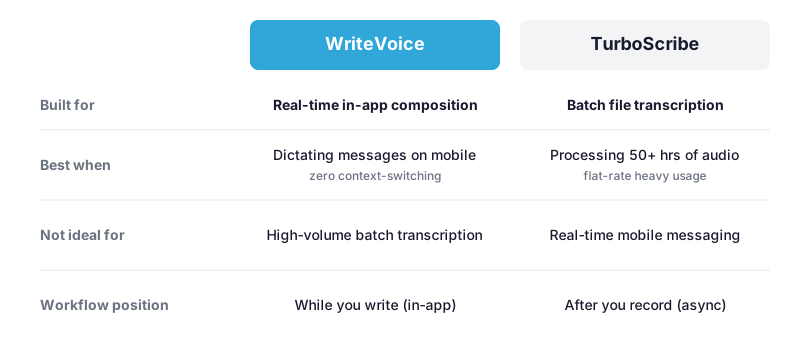
TurboScribe processes recordings after the fact. WriteVoice processes words as you’re composing them. That’s not a minor feature gap. It’s a completely different workflow problem, and the right tool depends on which one you actually have.
Real-time in-app composition vs. transcribing files after the fact
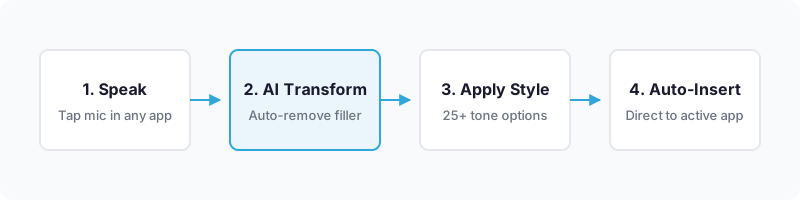
WriteVoice installs as a custom iOS keyboard replacement. From inside WhatsApp, Slack, Gmail, iMessage, or Notion, you tap the mic button, speak, select a rewrite style, and send without leaving the app. The whole thing takes under five seconds. TurboScribe requires opening the app, uploading or recording a file, retrieving the result, and pasting. For daily message composition, that’s four extra steps WriteVoice removes from the workflow entirely.
25+ AI rewrite styles vs. transcription-only output
WriteVoice applies one of 25+ AI rewrite styles to every dictation automatically: Professional, Email, Tweet, Casual, Expand, Shorten, Emojify, and more. Raw speech becomes a send-ready message in under a second. For a founder dictating a LinkedIn post or a manager replying to a client email on mobile, that’s the difference between done and editing. TurboScribe returns accurate text of what was said. Structuring and rewriting are left to you.
App-aware tone adjustment
WriteVoice detects the active app and adjusts tone automatically: thought-leader framing for LinkedIn, conversational short-form for WhatsApp, formal register for Gmail. No other tool in this category does this at the keyboard level. If you’re switching between LinkedIn and WhatsApp thirty times a day, that’s not a small thing.
One-time pricing vs. ongoing subscription
WriteVoice offers a lifetime deal at €119 (around $130 USD) covering iOS, Mac, and Web with all future updates. TurboScribe’s Unlimited plan is $10/month, which adds up to $1,200 over ten years. The break-even is around 13 months of TurboScribe usage. If you plan to use an AI dictation tool for more than a year, WriteVoice is cheaper. Nothing else in this category offers a one-time purchase across all platforms.
Privacy: zero-storage vs. encrypted storage
WriteVoice processes audio in real-time and immediately deletes it. No recordings stored, no data used for training. TurboScribe stores encrypted transcripts with private per-user access for compliance and transcript retrieval. That’s solid security, but it’s still storage. For healthcare professionals, lawyers, and executives dictating privileged content, the gap between “encrypted and stored” and “never stored” is real under HIPAA and GDPR. WriteVoice explicitly targets this use case; TurboScribe doesn’t.
Where TurboScribe is still the right answer
If your primary workflow is batch transcription of pre-recorded audio, processing 50 hours of research interviews, transcribing a podcast back catalog, handling multi-speaker recordings that need speaker labels, TurboScribe is the right tool. Its $10/month unlimited model, speaker diarization, SRT export, and 50-file simultaneous upload are built for that scale. WriteVoice doesn’t compete on batch processing. It’s a real-time composition tool, not a media pipeline.
Which Should You Choose?
Choose TurboScribe if:
- You need to batch transcribe large volumes of pre-recorded audio or video files (50+ hours per month)
- Your workflow involves multi-speaker recordings that require speaker diarization and labeling
- You work in a team and need consolidated billing with shared transcript access
- You want to post-process transcripts with ChatGPT prompts or export SRT subtitle files
- Your usage is project-based or seasonal, making a $10/month commitment lower risk than a lifetime purchase
Choose WriteVoice if:
- You compose most of your messages, emails, and posts on your iPhone and want to dictate instead of type
- You want polished, send-ready output from voice notes without editing, not raw transcripts you still have to clean up
- You dictate in multiple app contexts (WhatsApp, LinkedIn, Gmail, Slack) and want automatic tone adjustment
- You handle sensitive content (medical, legal, executive) and need zero-storage audio processing
- You want to own the tool with a one-time payment rather than pay $120/year indefinitely
Switching from TurboScribe to WriteVoice
The main habit that transfers is speaking instead of typing. If you’re already comfortable dictating into TurboScribe, that part carries over. The change is where you start the recording. Instead of opening TurboScribe and uploading, you tap the mic inside the app you’re already in. Same mental model, different location.
The workflow itself is different. WriteVoice isn’t a transcription retrieval tool. There’s no file to download, no transcript to copy. The rewritten output appears inline, ready to send. If you’re used to reviewing a full TurboScribe transcript and editing before use, expect an adjustment: WriteVoice produces shorter, polished outputs suited for messages and posts, not verbatim long-form transcripts.
For batch-processing use cases like podcast episodes or research archives, WriteVoice isn’t a replacement. Those workflows belong with TurboScribe or a dedicated tool like Exemplary AI.
To get started with WriteVoice, install the iOS app and add the custom keyboard through iOS Settings → General → Keyboard → Keyboards → Add New Keyboard. On Mac, download the desktop app and set your preferred hotkey. The free tier includes 2,000 words in the first month, enough to run the in-app keyboard workflow through a full week of messaging before deciding between the $15/month plan or the one-time lifetime deal.
Try WriteVoice
If your real problem is composing messages on mobile, not transcribing recorded files, WriteVoice is the TurboScribe alternative that solves it inside every app you’re already using. Start free with 2,000 words and no credit card. Or buy once with a 30-day money-back guarantee and never pay again.
Frequently Asked Questions
Is TurboScribe free to use?
TurboScribe’s free plan allows 3 transcripts per day with a 30-minute file length limit and lower processing priority. It works fine for occasional use, but regular workflows hit that ceiling fast. WriteVoice’s free tier offers 2,000 words in the first month with no daily cap, which gives you more room to actually evaluate it before paying.
What is TurboScribe best for?
TurboScribe is built for batch transcription of pre-recorded audio and video files. Researchers processing 50-hour interview archives, podcast hosts converting back catalogs, therapists transcribing patient sessions, teams needing speaker diarization: that’s who it’s for. The $10/month unlimited plan and 50-file simultaneous upload are real strengths for that kind of volume. WriteVoice is for the opposite problem: real-time message and email composition on mobile, where typing speed is the bottleneck.
How does WriteVoice compare to TurboScribe for transcription accuracy?
Both tools offer high transcription accuracy. TurboScribe uses Whisper AI with 98% accuracy across 98 languages; WriteVoice reports 98%+ accuracy with sub-1-second turnaround. The real difference is what happens after: TurboScribe returns verbatim text with filler words and unstructured speech. WriteVoice applies one of 25+ AI rewrite styles and produces send-ready prose. If you only need accurate text, both work. If you need polished output without editing, WriteVoice removes that step.
Can WriteVoice replace TurboScribe for batch transcription?
No. WriteVoice is built for real-time in-app dictation, not batch file processing. It can’t upload pre-recorded files, handle 10-hour audio archives, or perform speaker diarization. Those are the features that make TurboScribe valuable for researchers and media producers. If your primary workflow is transcribing 50+ hours of pre-recorded audio per month, stay with TurboScribe.
Who should switch from TurboScribe to WriteVoice?
Switch if your bottleneck is composing messages and emails on mobile, not transcribing recorded files. Founders replying to 50 Slack messages a day, students taking notes during lectures, professionals who currently type at 30 WPM and want to speak instead: those are the people this is for. TurboScribe users doing batch transcription should stay put; those doing real-time mobile communication should try WriteVoice.
What makes WriteVoice different from TurboScribe?
WriteVoice installs as a custom iOS keyboard and works inside any app: WhatsApp, Slack, Gmail, Notion. No switching, no copying. You speak, the AI rewrites in under a second, you pick a style, and send. TurboScribe requires uploading a file, waiting for processing, and pasting the result somewhere else. They solve different problems for different workflows.
Does WriteVoice have a free trial like TurboScribe?
WriteVoice offers 2,000 words free in the first month with no credit card required. TurboScribe’s free tier is 3 transcripts per day with lower priority and file size limits. WriteVoice gives you more room to evaluate before committing; TurboScribe’s free plan pushes you toward the $10/month plan fairly quickly.
Is WriteVoice available on Android like TurboScribe?
WriteVoice is available on iOS, Mac (Apple Silicon and Intel), and Web. TurboScribe is web-based and platform-agnostic, supporting Android file uploads through any browser. If you require native Android support, TurboScribe is accessible via browser upload, while WriteVoice currently has no native Android keyboard. For iOS-first users, WriteVoice’s keyboard integration is unmatched.
How much does WriteVoice cost compared to TurboScribe?
TurboScribe is $10/month ($120/year) for unlimited transcriptions, adding up to $1,200 over ten years. WriteVoice is $15/month ($180/year) for subscription, or €119 (around $130 USD) as a one-time lifetime deal covering iOS, Mac, and Web. The lifetime deal breaks even with 13 months of TurboScribe usage. For short-term or seasonal needs, TurboScribe’s $10/month is the lower commitment.
Does WriteVoice store audio recordings like TurboScribe?
WriteVoice processes audio in real-time and immediately deletes it. No storage, no training on user data. TurboScribe stores encrypted transcripts with private per-user access for compliance and transcript retrieval. For healthcare professionals, lawyers, and executives dictating sensitive content, WriteVoice’s zero-storage architecture is the stronger privacy option under HIPAA and GDPR. For teams that need transcript archives, TurboScribe’s secure storage is an asset.
Can you use WriteVoice and TurboScribe together?
Yes. Plenty of workflows benefit from both. Use WriteVoice for real-time message composition on mobile: no context-switching, no copying. Use TurboScribe for batch transcription of pre-recorded media, research interviews, or meeting archives. They solve different problems and can run alongside each other. The question is which friction point matters most to you right now.
What languages does WriteVoice support versus TurboScribe?
WriteVoice supports 120+ languages for input and rewriting, with app-aware tone adaptation that adjusts based on context. TurboScribe transcribes 98 input languages and translates output to 134+, which gives it an edge for international teams that need a cross-language translation pipeline. For non-English speakers composing messages, WriteVoice’s coverage is solid. For multilingual research teams, TurboScribe’s translation depth wins.
Is WriteVoice worth the price over a free dictation app?
What separates WriteVoice from free dictation apps is AI rewriting: filler word removal, tone adjustment, polished output. Native iOS dictation just transcribes. Google Recorder transcribes and translates but doesn’t integrate inside messaging apps as a keyboard. WriteVoice’s €119 lifetime deal covers all three capabilities across all devices. If you compose daily on mobile and want send-ready output without editing, it’s worth the price.
Generated by BlazeHive