
Happy Scribe Alternative
TL;DR
Happy Scribe is built for media teams that upload audio and video files to a browser and need subtitles, transcripts, and team collaboration at scale. WriteVoice is built for mobile professionals who dictate inside WhatsApp, Slack, and Gmail without ever leaving the app. If you spend most of your day communicating on iPhone and hate the upload-transcribe-copy-paste loop, WriteVoice is the stronger fit.
Happy Scribe Alternative
Most people searching for a Happy Scribe alternative aren’t unhappy with accuracy – they’re unhappy with workflow. No mobile app means every dictation requires a browser upload. No in-app keyboard means every polished message requires copy-pasting from somewhere else. WriteVoice works differently: it lives inside your iOS keyboard, so you speak, it rewrites, and you send – without switching apps. Here’s how the two tools compare and exactly who should use which.

What is Happy Scribe?
Happy Scribe is a browser-based transcription and subtitling platform used by 6 million users and 41,000+ teams worldwide. You upload an audio or video file – or connect a meeting via Zoom, Google Meet, or Teams – and Happy Scribe returns a transcript, subtitle file, or translated document. It supports 120+ languages and dialects, offers optional human proofreading at 99% accuracy, and integrates with Google Calendar, Outlook, and major video conferencing tools.
Happy Scribe was designed for professional media workflows. Broadcasters, EdTech companies, newsrooms, and content production teams use it to transcribe interview recordings, caption YouTube libraries, and localize video content for international distribution. If your day involves processing dozens of media files and distributing content across languages, that’s the environment Happy Scribe was purpose-built for.
With GDPR and SOC 2 Type II certifications, Happy Scribe also serves compliance-sensitive organizations in regulated industries across Europe and beyond. It’s a mature platform with case studies from universities (80% cost reduction at Biola University), sports media (75% time savings at Skydance Sports), and digital publishers (50% editing time cut at Welcome to the Jungle).
Where Happy Scribe Excels
Enterprise team collaboration at scale
Happy Scribe supports shared workspaces, multi-user access, SSO, and custom branding. For teams of five or more who need to divide transcript review, approve captions, and collaborate across departments, Happy Scribe’s infrastructure handles that without workarounds. It’s the reason 41,000+ teams have adopted it – individual tools simply don’t manage file libraries or user permissions at that level.
Production-grade subtitling and localization
Captioning a YouTube channel or localizing a podcast for international markets requires more than transcription. Happy Scribe provides SDH-compliant subtitles, a visual styling editor, and foreign subtitle translation at $5–$12 per minute depending on language. For media teams producing accessible content across multiple languages, this is a dedicated workflow no general-purpose dictation tool replicates.
Human proofreading with guaranteed accuracy
When 98% transcription accuracy isn’t enough – legal depositions, medical consultations, financial filings – Happy Scribe’s human review service delivers 99% accuracy with vetted native-speaking proofreaders available in 70 languages and 24-hour turnaround. The AI transcribes first; human experts verify every line. That two-pass guarantee is something AI-only tools can’t match.
Compliance certifications that pass procurement
Happy Scribe is GDPR and SOC 2 Type II certified. For enterprise buyers in healthcare, finance, or government where compliance documentation is a procurement requirement, those certifications are table-stakes. They’re verifiable, auditable, and accepted by legal and security teams who need more than a privacy promise.
Deep language and dialect support
Happy Scribe transcribes Swiss German, Catalan, Javanese, Tamil, Punjabi, and 120+ other languages and regional dialects. For organizations distributing content to niche linguistic communities or transcribing multi-dialect interviews, that depth matters. Many tools claim broad language support but thin out quickly on less common dialects.
What to Look for in a Happy Scribe Alternative
Does it work on mobile, or only in a browser?
Some transcription tools are browser-only, which means every dictation requires opening a desktop interface, uploading a file, and downloading results. If you communicate primarily via iPhone, check whether the alternative runs as a native mobile app or iOS keyboard – not just a mobile-optimized website.
Does it rewrite raw speech or just transcribe it?
Transcription returns what you said, including filler words, false starts, and rambling sentences. If you need polished messages for Slack, LinkedIn, or email, ask whether the tool transforms raw dictation into channel-appropriate text automatically – or whether that editing work is still yours to do.
What is the actual per-minute or monthly cost at your volume?
Pay-as-you-go pricing at $0.25/minute sounds cheap until you do 600 minutes/month ($150). Flat subscription pricing is easier to budget. And lifetime license options (one-time payment, all future updates) are worth calculating for long-term cost if you plan to use the tool for more than a year.
Is audio stored after processing, or deleted immediately?
Some tools retain audio recordings after transcription – for quality review, model training, or customer support purposes. For lawyers, doctors, therapists, and executives dictating sensitive content, ask explicitly: is audio deleted in real-time, or stored on the vendor’s servers? The answer determines your compliance and legal exposure.
Does it require app-switching or copy-pasting?
The standard workflow for most voice tools is: dictate → transcribe → copy → paste into target app. Each step is friction. An iOS keyboard integration eliminates that loop entirely. If you send 30+ messages per day across multiple apps, the difference between integrated and copy-paste dictation compounds quickly.
Does it support team workflows, or is it individual-focused?
If you need shared transcript libraries, multi-user review, or SSO for a team of five or more, check whether the tool has collaboration features built in – or whether it’s designed purely for solo use. Many alternatives are excellent individual tools but lack the access controls enterprise teams require.
Is there a lifetime license option, or is it subscription-only?
Solo operators, freelancers, and indie creators often prefer one-time payments over perpetual subscriptions. Check whether the tool offers a lifetime deal, and calculate the breakeven point against monthly pricing before committing.
Where Happy Scribe Falls Short
No native mobile app
Happy Scribe runs in a browser. There is no iOS app and no custom keyboard. Mobile professionals who need to dictate directly inside WhatsApp, Slack, or iMessage have no path to in-app dictation – they’re stuck opening a browser tab, uploading audio, waiting for processing, then copying output back to the original app. For a professional who sends 20–30 messages per day on iPhone, that workflow is not viable.
Designed for file upload, not real-time dictation
Happy Scribe’s core workflow is built around files: upload an MP3 or connect a meeting recording. It wasn’t designed for sub-second real-time transcription of a spoken Slack message. Users who want to dictate and immediately send a polished reply, whether they’re walking or between meetings, will find the batch processing model mismatched to that use case.
No AI rewriting across communication channels
Happy Scribe transcribes and subtitles; it does not rewrite for tone. A dictated sentence goes out as spoken (minus filler words). There is no automatic detection of whether you’re writing a LinkedIn post versus a casual WhatsApp reply, and no 25-style AI rewriting layer that transforms raw speech into channel-appropriate content. Users who need polished output across multiple platforms must edit manually after transcription.
Subscription-only pricing for solo users
Happy Scribe offers subscription plans starting at $9/month with pay-as-you-go add-ons, but no lifetime license option. For freelancers and indie creators who prefer to buy software once and own it indefinitely, the perpetual subscription model adds up – and there’s no exit from recurring billing if usage drops seasonally.
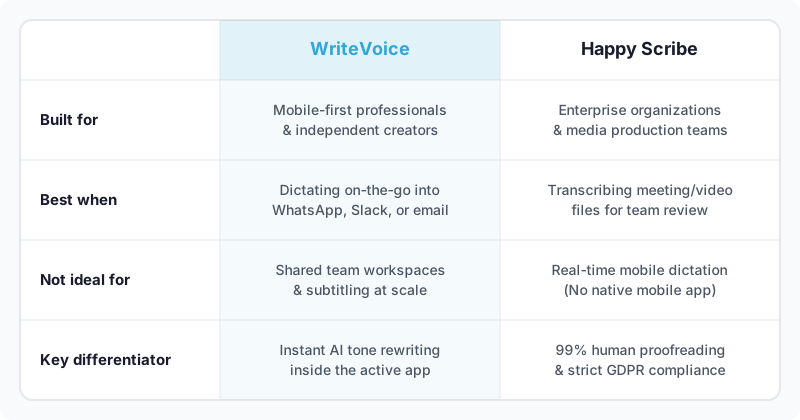
WriteVoice vs Happy Scribe: A Different Approach
Happy Scribe is fundamentally a processing platform: you bring it files, it returns structured text. WriteVoice is fundamentally an input tool: it replaces your keyboard and transforms speech into polished text in the moment you’re communicating. The two products have almost no overlap in day-to-day workflow – which is exactly why WriteVoice is a genuine alternative for mobile professionals rather than just a cheaper version of the same thing.
The most concrete difference is the iOS custom keyboard. WriteVoice installs as a keyboard replacement on iPhone, which means when you open WhatsApp to reply to a client, you tap the microphone inside the WhatsApp keyboard, speak your message, select a rewrite style, and hit send – no second app, no uploading, no copy-pasting. Happy Scribe has no iOS keyboard and no mobile app. For professionals who communicate primarily on iPhone, that gap is decisive: the average speaking speed is 150 WPM versus 30 WPM typing on glass, and the WriteVoice workflow captures that speed advantage end-to-end.
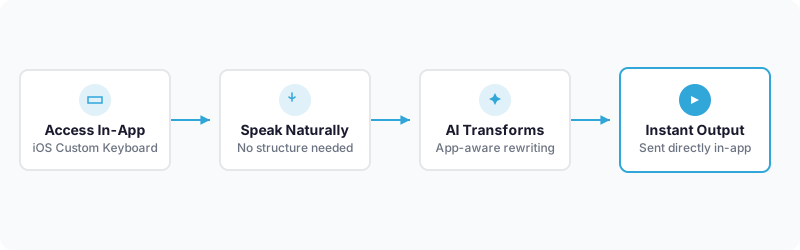
The second difference is app-aware tone adjustment. WriteVoice automatically detects which app is active and adjusts the AI rewrite output accordingly – professional and thought-leader for LinkedIn, casual and short for WhatsApp, formal for Gmail. You don’t select a mode or configure a setting; the tool reads context and adjusts. Happy Scribe transcribes what you said and returns it as-is. If you dictate
Frequently Asked Questions
Can WriteVoice replace Happy Scribe for my team’s transcription needs?
WriteVoice is not designed for team collaboration or batch transcription workflows – it’s built for individual mobile professionals who dictate real-time messages inside apps like WhatsApp and Slack. Happy Scribe excels at processing dozens of media files with shared workspaces, multi-user editing, and SSO for teams of five or more. WriteVoice is the better choice if you’re a solo operator or small team dictating frequently on iPhone; Happy Scribe is better if your workflow centers on uploading, reviewing, and localizing audio or video files across a distributed team.
Is WriteVoice better than Happy Scribe for privacy and data handling?
Both tools respect privacy, but they handle data differently. Happy Scribe is GDPR and SOC 2 Type II certified with formal audit trails required for enterprise procurement; WriteVoice explicitly states audio is deleted immediately after processing with no storage or training on user data. For lawyers, doctors, and executives dictating confidential content on mobile, WriteVoice’s transparent delete-on-process model is clearer and more straightforward than compliance certifications alone. If your organization requires formal audit reports for procurement, Happy Scribe’s published certifications are the stronger choice.
Does WriteVoice have a lifetime deal like Happy Scribe offers?
WriteVoice offers a lifetime license for €119–€199 (one-time payment) covering unlimited dictation across iOS, Mac, and Web with all future updates. Happy Scribe offers subscription plans only, starting at $9/month with no lifetime option. For solo creators, freelancers, and indie professionals who prefer to own software rather than rent it, WriteVoice’s lifetime deal breaks even in roughly 8–13 months depending on usage, after which you pay nothing forever. Happy Scribe’s subscription model is preferable for teams whose collaboration features justify recurring costs.
What is the biggest workflow difference between WriteVoice and Happy Scribe?
Happy Scribe is a file-processing platform: you upload audio or video to a browser, it transcribes and returns structured text. WriteVoice is an iOS keyboard that integrates directly into any app – you speak inside WhatsApp, Slack, or Gmail, the tool rewrites in under one second, and you send without copy-pasting or leaving the app. For mobile professionals sending 20+ messages daily on iPhone, WriteVoice eliminates the upload-transcribe-copy-paste loop entirely. Happy Scribe’s workflow is designed for media teams processing interview recordings and video libraries, not for in-app real-time dictation.
Does WriteVoice offer human proofreading and 99% guaranteed accuracy like Happy Scribe?
WriteVoice claims 98%+ transcription accuracy through AI but does not offer human proofreading or verification services. Happy Scribe provides optional human review with 99% guaranteed accuracy, backed by vetted native-speaking proofreaders available in 70 languages with 24-hour turnaround. If your work involves legal depositions, medical records, or other regulated content requiring certified accuracy guarantees, Happy Scribe is the stronger choice. WriteVoice’s AI accuracy is sufficient for business communication, creative content, and most professional use cases where human review is not a compliance requirement.
Can I use WriteVoice to caption videos and create subtitles like Happy Scribe does?
WriteVoice has no subtitling or video captioning features. Happy Scribe is purpose-built for media production, offering SDH-compliant subtitles, visual styling editors, and foreign-language subtitle translation at $5–$12 per minute. If you produce YouTube videos, podcasts, or accessible content requiring captions in multiple languages, Happy Scribe is the dedicated tool. WriteVoice is focused on real-time dictation for messaging, emails, LinkedIn posts, and meeting notes – not video post-production workflows.
Which tool is faster for dictating a quick message on mobile?
WriteVoice is substantially faster for real-time mobile messaging. You tap the microphone in your keyboard, speak, the tool rewrites in under one second, and you send – all without leaving the app. Happy Scribe requires opening a browser, uploading audio, waiting for processing, downloading the result, and then copying back to your messaging app. For a WhatsApp reply or Slack message, WriteVoice is 4–5x faster because it eliminates the upload-transcribe-copy-paste workflow entirely. Happy Scribe’s strength is batch processing long-form content, not individual quick messages.
Does WriteVoice automatically adjust tone for different apps like LinkedIn versus WhatsApp?
Yes, WriteVoice automatically detects the active app and adjusts the AI rewrite output accordingly – professional and thought-leader tone for LinkedIn, casual and concise for WhatsApp, formal for Gmail. You don’t need to select a mode or configure settings; context detection is built in. Happy Scribe transcribes and returns what you said; it does not rewrite for channel-appropriate tone. If you send 20+ messages daily across multiple platforms and want polished output that matches each channel automatically, WriteVoice eliminates the manual editing step Happy Scribe requires.
What size team should use WriteVoice versus Happy Scribe?
WriteVoice is designed for individual professionals and small solo teams with no collaboration features, shared workspaces, or SSO. Happy Scribe supports teams of five or more with multi-user access, shared transcript libraries, and admin controls required for distributed workflows. If you’re a solopreneur, freelancer, or founder dictating frequently on mobile, WriteVoice is the fit. If your team reviews transcripts together, assigns captions to multiple people, or requires centralized access controls, Happy Scribe is necessary.
Does WriteVoice work on Android like Happy Scribe does?
WriteVoice is available on iOS (custom keyboard), Mac desktop, and web app only – no Android support is documented. Happy Scribe is platform-agnostic because it runs in a browser on any device, including Android phones and tablets. If you need cross-platform support including Android, Happy Scribe is the only option between these two. WriteVoice’s iOS-first design means mobile professionals on iPhone get the deepest in-app integration, but Android users cannot access the keyboard feature.
How do the costs compare at different usage levels?
WriteVoice’s lifetime deal at €119 breaks even against its $15/month subscription in 8 months; against Happy Scribe’s $9/month in roughly 13 months. If you plan to use dictation regularly for more than a year, WriteVoice’s upfront payment becomes cheaper than either subscription over time. Happy Scribe’s pay-as-you-go pricing ($0.25/minute) reaches $150/month at 600 minutes, making subscription more economical for heavy users. For light users (under 100 minutes/month), Happy Scribe’s $9/month starter plan is cheaper; for daily dictation users, WriteVoice’s lifetime deal usually wins on total cost of ownership.
When should I use Happy Scribe instead of WriteVoice?
Use Happy Scribe if you need to transcribe video files, caption YouTube libraries, distribute transcripts across a team, translate content into 120+ dialects with human verification, or require GDPR and SOC 2 audit reports for compliance procurement. Happy Scribe is the tool for media production teams, broadcasters, and regulated organizations processing dozens of files monthly. Use WriteVoice if you dictate frequently on iPhone inside messaging apps, prefer one-time payment over subscription, want automatic tone adjustment for different channels, or need privacy-first real-time dictation without storing audio. The two tools address fundamentally different workflows – they’re not competitors, they’re complements for different job sizes.