A Simple Guide to Turning Voice Notes into Text
Turning your voice notes into text is like having a magic helper. You talk, and your words show up on the screen. It's much faster than typing. A tool like WriteVoice can listen to you and write down everything you say right away.
Why Talking Is the New Typing
Think about telling your friend a story. It's super fast, right? Now, think about typing that same story. It takes a lot longer. For most of us, talking is just easier. Using your voice to "write" helps get your ideas onto the screen without stopping.
Sometimes, the best ideas pop into my head when I'm not at my desk. Maybe I'm walking the dog or in the car. I can't stop to type. Voice notes are perfect for catching those ideas before they fly away.
A Faster Way to Get Things Done
When you change your voice notes to text, you get a superpower. It helps you:
- Catch Ideas Fast: Hear a good idea in your head? Just say it out loud, and it's saved.
- Write Without Getting Stuck: Talking feels easy, so you can focus on your idea, not on finding the right letters on the keyboard.
- Give Your Hands a Rest: Let your fingers take a break from all that typing.
This one small change helps you do more, faster. Instead of spending a long time typing an email, you can just say it in a few minutes. It's great for writing reports, taking notes in class, or just writing in a diary.
The real magic is turning your jumbled thoughts into neat words without using a keyboard. You can talk about a big idea on your walk. By the time you get home, it's all written down for you.
Not sure if it's for you? Let's see how talking and typing are different.
Talking vs Typing: Which is Better?
This chart shows why talking your notes can be easier and faster than typing them.
| What's Good About It | Talking Your Notes | Typing on a Keyboard |
|---|---|---|
| Speed | Way faster. Most people talk 3 times faster than they type. | Slower. You have to think about each word. |
| Easy to Do | You don't need your hands. You can do it while walking. | You need to sit down with a computer or phone. |
| Flow of Ideas | Feels like a conversation. This can help you think of new ideas. | You might stop to fix mistakes or find the right words. |
| Helps Everyone | Great for people who have a hard time typing. | Can be hard for some people to do. |
Both ways are good. But for getting ideas down fast, talking is the winner.
More People Are Using Their Voice
Using our voices to talk to our gadgets is getting more and more popular. The tools that listen to us are getting smarter. Soon, lots more people will be talking to their computers.
This is because many people now work from home. They need faster ways to write things down in apps like Gmail, Slack, and Jira. You can discover more insights about this growing technology and see how big it's getting.
How to Make Clear Voice Recordings
To get good text, you need to make a good recording. Don't worry, you don't need a fancy microphone. The one on your phone is great if you use it right.
Pretend the app is a person listening to you. If you mumble from far away, they won't hear you well. The best spot is to hold your phone about six inches from your mouth. That's about the length of a new crayon.
Doing this helps a lot. When the recording is clear, the text will be right. That saves you time from fixing mistakes later.
Finding a Good Place to Record
Where you are matters. A noisy coffee shop or a room with a loud TV can make it hard for the app to hear you. It might hear other people or sounds and add them to your text by mistake.
You don't need a special quiet room. Just find a quiet corner, a closet, or even your car. This one small step makes your recording much, much clearer.
A secret tip: The microphone on your headphones is amazing. It's made to pick up just your voice and block out other noises.
A clear recording is the secret to getting the words right. Good sound in means good text out. It’s that simple.
How to Talk for the Best Results
The goal is to talk like you normally do, like you're talking to a friend. You don't need to talk super slow or shout. Talking too slowly can actually confuse the app. Smart tools like WriteVoice are made to understand a normal talking speed.
Here are a few easy tips:
- Just Be You: Use your normal voice. Don't try to sound different.
- Take Little Breaks: Pause for a second between sentences. This helps the app know when a sentence ends.
- Say the Punctuation: You can "speak" your dots and commas. For example, say: "The party is at two o'clock comma and I will bring the cake period."
One of my favorite tricks is to say "new paragraph" or "new line." This breaks up big chunks of text and makes it easier to read.
To learn about tools that can help, check out our guide on a voice activated recorder app.
Turning Your Voice into Perfect Text
This is the fun part. After you record your thoughts, a special tool can turn the sound into words in just a few seconds. With an app like WriteVoice, you can talk and watch the words pop up on your screen.
The best part? It doesn't just write words. It understands your commands. You can say something like, "Email Dad comma I will be home soon exclamation point." The app adds the comma and the exclamation point for you. This saves you from having to fix it later.
From Spoken Words to Finished Notes
This is more than just getting words on a page. It's about making a finished note without ever using your keyboard. Because the tool gets it right almost every time, you won't have to spend much time fixing things.
A cool trick is to teach the app your special words. You can add names of people, pets, or games you play. Once the app learns them, it will spell them right every time.
Here’s a quick peek at how WriteVoice can turn a spoken idea into a neat note.
As you can see, the tool doesn't just write what you say. It also follows directions. If you say "add bullet point," it will make a list for you. This makes your notes ready to use right away.
Why This Tool is Getting So Popular
The smart brain inside tools like WriteVoice is becoming a must-have for work and school. People need to work faster, and this helps them do it.
The AI has gotten so smart that it makes way fewer mistakes than it used to. This makes it a tool you can trust. For example, people who manage projects are saving hours every day because they don't have to type notes. Doctors and lawyers can talk about private things safely, knowing the app keeps their words secret.
The goal is simple: get your thoughts written down as soon as you have them, looking perfect and ready to go, without ever touching a keyboard.
Making It Work for You
It's super easy to get started. You don't need to learn anything hard. Just remember these things:
- Talk Normally: You don't need to talk like a robot. Just use your everyday voice.
- Use Punctuation Words: Just say "period," "comma," or "question mark" out loud.
- Try Formatting Words: Need a new section? Just say "new paragraph." This keeps your note looking neat.
These simple tips will make it feel easy and natural. To learn more about all the ways you can use your voice, check out our guide on how to convert voice memos to text.
Using Your Voice in All Your Favorite Apps
The real magic of turning voice notes into text is using those words anywhere you want. An idea stuck in one app isn't very helpful. That's why a great tool like WriteVoice works with the other apps you use every day on your computer and phone. It’s like giving your voice a key that opens any box you can type in.
Think about writing a long email. Instead of sitting and typing for a long time, you can just speak your thoughts. Or maybe you need to send a quick message to your family while you're out. This is where it gets really cool—your voice becomes your keyboard.
How It Works Everywhere
How it works is simple but very smart. A good voice-to-text tool puts your words right where the blinking line is on your screen. You don't have to copy and paste anything. If you can type there, you can talk there.
This means you can speak your words into:
- Email: Write emails in Gmail or Outlook without typing.
- Chat Apps: Send messages in Slack or Microsoft Teams just by talking.
- Documents: Write stories in Google Docs or Microsoft Word as fast as you can think.
- Project Tools: Add notes to your homework in Jira or Asana in a snap.
This straight line from your brain to the screen changes everything. You're no longer slowed down by how fast you can type. It makes everything you do feel easier and more natural.
This simple picture shows how a thought in your head becomes words on the screen.
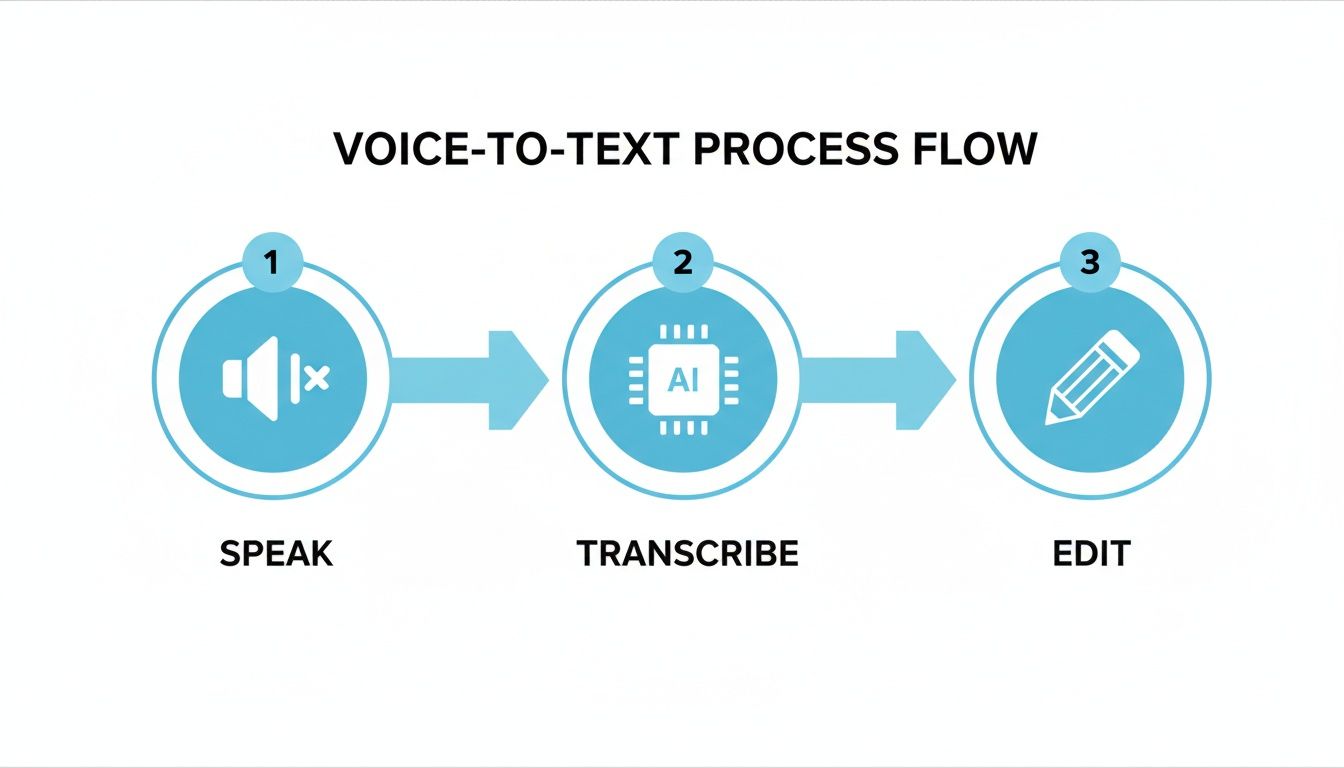
The important thing to see is how few steps it takes. An idea in your head becomes text you can use in a flash.
The real power is not just changing your voice to text. It's putting that text anywhere you need it. This takes away the hard part between thinking and doing.
For example, a student could add notes to three different homework assignments just by talking. They can click on one, say the note, then click on the next one. It's much faster than typing each one. This is what makes turning voice notes to text so helpful.
Secrets for Better and Safer Notes
Getting your spoken words into text saves a lot of time. A few easy tricks can make it work even better. When you first use an app to turn voice notes to text, it won't know your special words—like friends' names or names from video games.
You can teach the AI your own words. It's like adding a new friend to your contacts. By adding words like your friend "Katarina" or your team name "Project Falcon," the app learns them. Then, it will get them right every single time. No more fixing silly mistakes.
Make Your Voice Easier to Hear
Sometimes, we have to record in noisy places. A loud lunchroom can make a recording messy and confuse the app. The easiest fix is to use headphones that have a little microphone on the cord.
Even the simple earbuds that came with your phone work great. The microphone is close to your mouth, so it hears your voice better than all the noise around you. This one tiny change makes a huge difference.
The secret to perfect text is a clear recording. If the AI can hear you well, it can write down your words almost perfectly. All you need is a quiet spot or a simple microphone.
Keeping Your Words Private
When you are talking about secret plans or private feelings, you want to know they are safe. This is why picking the right tool is so important. A safe app like WriteVoice does all the work right on your phone or computer.
This means your voice and your words are never sent to another computer somewhere else. Your private thoughts stay private. To learn more, read about why voice AI is a safe choice. This is a big reason why doctors and lawyers use this kind of tool for their important work.
Use Simple Commands to Be Faster
You can do more than just say words. You can also control how your text looks with your voice. Instead of stopping to type a period, just say the word out loud.
It's easy once you get used to it:
- Say "comma" to add a comma.
- Say "question mark" at the end of a question.
- Say "new paragraph" to start a new idea on a new line.
These voice commands might feel a little funny at first, but soon they'll feel normal. Using them makes sure your text is neat and ready to share without a lot of extra work.
This kind of tool is getting better all the time. Soon, almost everyone will use them because they are so accurate. For grown-ups at work, this tech has already made their notes much better and their jobs much faster. You can learn more about the growth of real-time transcription and see how powerful it's becoming.
Common Questions About Voice Notes to Text
People often wonder how turning voice notes to text really works. It sounds tricky, but it's actually very simple. Let's answer some of the questions I hear the most.
Is Talking Really Faster Than Typing?
Yes, for sure! For almost everyone, talking is much, much faster than typing.
Think about it. Telling a friend a story only takes a few minutes. But typing that same story would take a lot longer. Most people talk about 150 words per minute. But the average person only types about 40 words per minute.
That's a big difference. You can get your ideas down three or four times faster just by speaking them. When you use an app that writes down your words as you say them, you save a lot of time.
The best part is getting your ideas on the page as fast as you think them. Your voice is the quickest way to go from your brain to the screen, so you don't forget your great idea while your fingers are trying to keep up.
Are These Apps Good at Hearing Words?
They have gotten really, really good. They are much better than the old tools from a long time ago. A good tool can understand what you're saying almost perfectly. It's like having a super listener who never makes a mistake. In fact, many new tools are over 99% accurate.
Of course, a noisy room can make it a little harder. If you're in a loud place or you mumble, the app might get a word wrong. But the new technology is very smart and can listen for your voice even when there's other noise.
Are My Words Kept Private?
This is a very important question. With a safe tool like WriteVoice, your voice and your text are all kept right on your own device. Nothing is saved on another computer or shared with anyone else.
Think of it like a secret diary that only you can open. Your words belong only to you. It's important to pick an app that promises to keep your stuff private, especially if you're talking about work secrets or personal feelings.
Can I Use This for My Apps at School or Work?
Yes! The best voice-to-text tools are made to work anywhere you can type. So if you're writing a paper in Google Docs, sending an email in Gmail, or adding a note in Jira, you can use your voice.
You don't need to install anything special for each app. If you see that blinking line on the screen where you type, you can talk instead. It connects your voice right to your work, no matter what app you're using.
Ready to stop typing and start talking? WriteVoice turns your voice into text instantly, anywhere you work. Try WriteVoice for free and see how much time you can save.