What Is Real Time Transcription Software?
Real time transcription software is a tool that hears what you say and writes it down on a screen. It happens right away, like magic. Think of it as a helper who types everything for you as you talk. For busy people, this is a way to get more done by talking instead of typing.
Turn Your Voice Into Text Instantly
Imagine you have a great idea for an email. Instead of using your fingers to type, you just talk. As you speak, the words show up on the screen, all typed out for you. This works in any app you are using.
This is what real-time transcription does. It connects your thoughts to the text on the screen. It makes work feel more natural and much faster.
This helps lots of people, like doctors who need to write notes or writers thinking of new stories. Most people can type about 40 words in a minute. But we can talk much faster, at 150 words in a minute. This tool keeps up with your thoughts so you never forget a good idea.
Why Talking Is Faster Than Typing
The speed difference is huge. When you use your voice, your hands are free. You can just think about what you want to say, not how to type it. This makes it easier to be creative.
Think about these cool things:
- Get Ideas Anywhere: You can talk and have your notes typed while you walk around your room or fix your desk.
- Fewer Mistakes: Good software can be right over 99% of the time. This means fewer spelling mistakes to fix later.
- Works Where You Work: The best tools work with the apps you already use, like your email or your homework apps.
The main benefit is simple: you spend less time typing and more time on the work that matters. You work smarter by using your voice.
Typing vs. Speaking: A Quick Look
Let's see how different typing is from talking to your computer. It will be clear why many people are switching.
See the difference between typing and using this software to see why people are changing how they work.
| Thing to Compare | Typing with Hands | Real Time Transcription Software |
|---|---|---|
| Speed | Slow, about 40 words in a minute. | Super fast, writes over 150 words in a minute. |
| Work | You need your hands, eyes, and you have to focus on the keys. | You don't need your hands. You can capture ideas as they come. |
| Mistakes | It's easy to make typing mistakes that you have to fix. | It's very correct, often getting over 99% of words right. |
| Where you can work | You have to sit at your desk with your keyboard. | It works in any app on your computer, tablet, or phone. |
This is a big change in how you do your work. A job that took an hour of typing can now be done in just a few minutes. This gives you more time for other important things.
How Software Understands Your Voice
Have you ever wondered how a computer can listen to you and type your words? It's not magic. It's a smart computer brain called Artificial Intelligence (AI). Think of this AI as a student who has listened to people talk for millions of hours.
It has learned what sounds go with what words. It can even guess what you might say next. This happens in a tiny part of a second. That's why it feels like your thoughts are just showing up on the screen.
This smart brain is why the world AI transcription market was worth $4.5 billion in 2024 and is expected to grow to $19.2 billion by 2034. This big growth shows that people everywhere are using their voices instead of their keyboards. They can often get four times more work done. This is super helpful for the 60% of people who work from home and find it hard to remember what was said in online meetings. Having notes right away is a must-have. You can find more details on this trend and its effect on productivity here: https://www.writevoice.io/blog/speech-to-text-software/
From Sounds to Sentences
When you talk, your words go on a quick, three-step journey to become text. First, the microphone on your computer is like an ear. It catches the sounds of your voice. The software then cuts up those sounds into tiny pieces.
Next, the smart AI brain starts working fast. It takes those sound pieces and plays a matching game. It looks for words it knows in its big word library.
Last, the software puts the words together to make sentences. It even adds dots and commas to make it easy to read.
This picture shows how simple it is to turn your voice into words on a page.
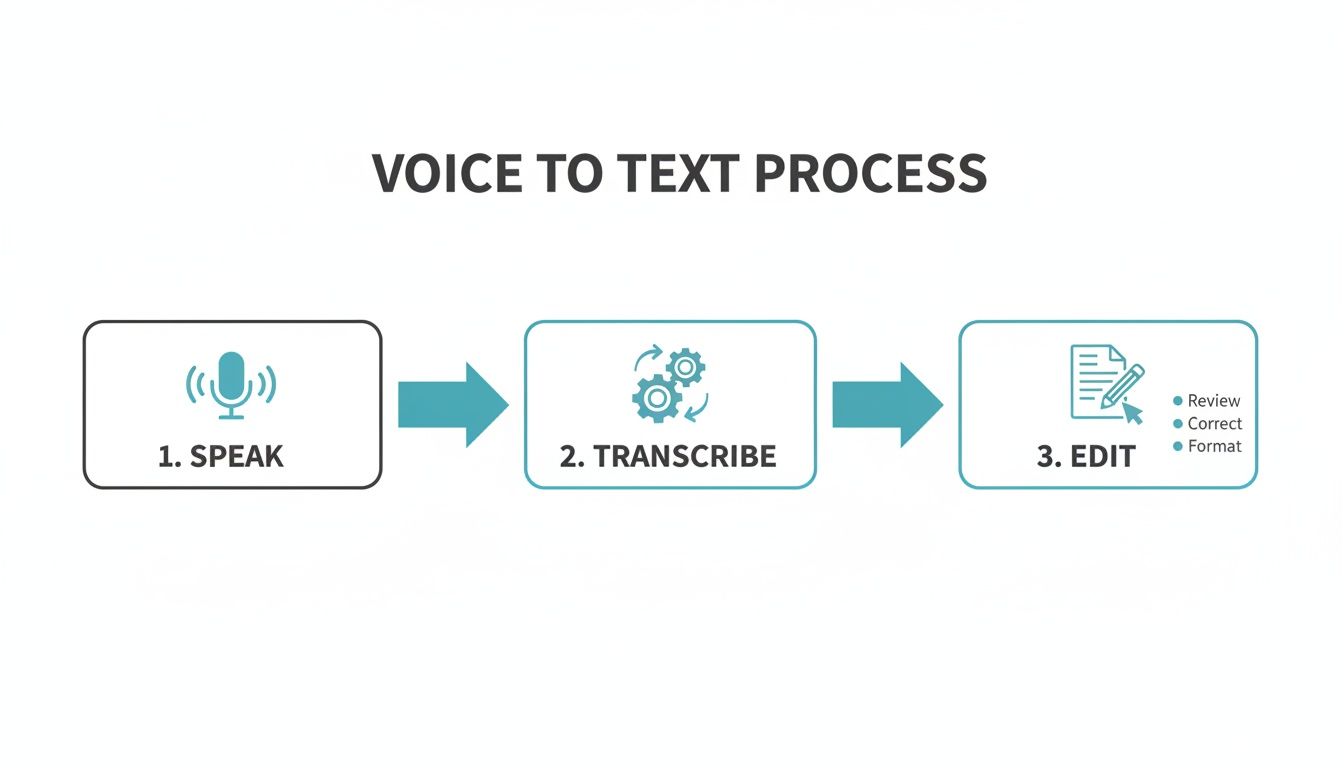
As you can see, it's a smooth trip from talking to a finished paper you can edit.
The Brains Behind the Speed
So, what makes real-time transcription software so fast and right? The secret is two helpers working together: an acoustic model and a language model.
The Acoustic Model: This is the "ear." It has been trained to know the smallest sounds in a language. For example, it knows the "c" sound in "cat" is different from the "ch" sound in "chair."
The Language Model: This is the "brain." After the ear hears the sounds, the brain steps in. It guesses which words are most likely to come next. It knows about grammar and what makes sense.
Think of it like a smart helper who not only hears what you say but also understands what you mean. This teamwork is why new tools can be right over 99% of the time.
Learning Your Unique Voice
The best software doesn't just understand words. It gets to know you. The more you use it, the better it learns your accent, how fast you talk, and the special names or words you use a lot.
This is how the software gets better and better over time. The main goal is always to make an easy audio to text conversion. Making it personal is what makes it feel so easy.
This means the tool keeps getting smarter and makes fewer mistakes. It's like having a helper who knows you better every day.
What Makes a Great Transcription Tool?
Not all of these tools are the same. Many can turn your talking into text. But the best ones have a few things that make them really helpful. Knowing what to look for will help you find a tool that saves you time.
First, you need it to be very correct. The whole point is to get your words right. A tool that makes lots of mistakes will make more work for you. It's like hiring a bad typist. You would spend more time fixing mistakes than if you just typed it yourself. Look for tools that are right over 99% of the time.
Next is speed. The text should show up on your screen as soon as you say the words. If there is a long wait, it can break your focus and slow you down.
Getting the Details Right: Making It Your Own
A great tool does more than just type words. It learns your way of talking. This is where a custom dictionary helps a lot. It’s a game-changer.
This lets you teach the software special words, names, or company names it might not know. For example, maybe you always talk about a game called "Cosmic Racers" or a friend named "Zayden." You can add these words to the dictionary one time. Then, the software will always spell them right.
Being able to teach the software your special words is what makes a tool great. It's like having a personal helper who understands your world.
Another thing that saves a lot of time is smart formatting. When we talk, we don't say "period" or "comma." A smart tool adds these for you.
- Automatic Punctuation: It adds periods, commas, and question marks where they should go.
- Capital Letters: It knows to make the first letter of a sentence big. It also does this for names of people and places.
- New Paragraphs: Some smart tools can even tell when you pause to start a new paragraph.
This means the text it makes is clean and ready to share with very little fixing.
Where and How It Works
Finally, the best real-time transcription software doesn't make you copy and paste all the time. It should work right where you do your work. This is called system-wide integration.
A tool like this lets you talk directly into almost any app on your computer:
- Email: Write emails in Gmail or Outlook without the keyboard.
- Messaging: Send quick messages in Slack or Microsoft Teams just by talking.
- Project Management: Update your tasks in tools like Jira or Asana without using your hands.
- Documents & Notes: Write stories or take notes in Google Docs or other note apps.
When a tool works like this, it feels like a part of your computer. You just click where you want to type, start talking, and the words appear. This is what makes it a real time-saver.
Who Really Needs Real-Time Transcription?
You might be surprised who can use this kind of tool. It's not just for special jobs. It's for anyone who feels slow when they type. Let's look at how different people use real-time transcription software to work faster.
Think about a manager who is very busy. Instead of stopping to type updates in a tool like Jira, they can just say what they're thinking. A ten-minute typing job becomes a one-minute talking job. Then they can move on to the next thing.
This isn't about being lazy. It's about working smarter and using your brain for the important stuff.
A Personal Helper for Every Worker
This tool helps many people because the problem is the same for everyone: getting ideas from your head onto a screen. It's like giving everyone a personal helper who can type as fast as you can think.
Here are a few examples of who gets a big help:
- Busy Bosses: In an important meeting, if you look down to type, you miss what people are doing. With this tool, they can stay in the conversation and know that a perfect copy of what was said is being saved.
- Lawyers: Keeping secrets is very important for them. A safe tool lets them talk about client information without worrying. They can speak their notes and know the tool is not saving the audio.
- Parents Working from Home: Imagine a parent gets a quick question from a coworker. Instead of finding a quiet place to type a long answer, they can just say it in a few seconds and get back to their family.
The main idea is simple: if your job means turning thoughts into words, you can do it faster by talking. This leaves you more brain power for the big ideas that really matter.
A Big Help in Healthcare
Doctors and nurses are some of the busiest people. They have so much paperwork to do. Every minute they spend typing is a minute they are not with a patient. This is where real-time transcription helps a lot.
The medical transcription software market was worth over $2.5 billion in 2024 and is expected to grow to more than $8.4 billion by 2032. Why is it growing so fast? Because these tools help doctors finish notes up to four times faster than typing, and they keep patient information safe. You can read more about the industry's rapid adoption of voice technology.
This means a doctor can finish her notes right after seeing a patient by just talking for a minute. The notes are right and complete. This lets her move on to the next person without a big pile of paperwork waiting.
A Boost for Students and Researchers
It's not just for work. Students in a class can use this to write down everything a teacher says. They can get perfect notes without missing anything important. In a lab, scientists can say what they see as it happens, so no great idea is forgotten.
AI is changing school work in big ways. For anyone in school, special tools can help them learn faster. You can discover other top AI tools transforming academic research that work well with transcription tools.
This tool helps anyone who has great ideas but feels slowed down by a keyboard. It gives us all a way to share our thoughts as fast as we can think them.
How Your Privacy and Data Are Kept Safe
When you are talking about secret client information or your next big idea, you don't want to worry about who is listening. Your words are your own. It is very important to choose real time transcription software that is built to keep your words private.
Many tools send your voice to a faraway computer to be turned into text. The danger is that your voice or the words could be saved or used by the company. That's a big problem when you are talking about secret things.
Think of it like a secret meeting. You wouldn't have it in a park where everyone can hear. The safest tools make a private, quiet room for your words.
Keeping Your Words to Yourself
A truly private tool does all the work right on your own computer. This is called on-device processing. It's the best way to be safe. Your voice is turned into text on your machine. This means your voice is never sent to a company's computer and is never saved. After the words show up on your screen, the sound of your voice is gone.
This is the safest way. It's like having a talk that leaves no trace.
This is very important for people whose jobs need to be kept secret:
- Lawyers: Can talk about secret client information without worrying about it being stolen.
- Doctors: Can talk about patient notes and know they are following the rules to keep them safe.
- Bosses: Can plan their company's next big move knowing their secrets are safe.
The safest real time transcription software is like disappearing ink. It turns your words into text, and then the sound of your voice vanishes, leaving nothing behind for anyone to find.
This way, you know your secret notes and private ideas stay yours. To learn more about how voice tools keep you safe, you can read our guide on whether voice AI is safe.
What Is Encryption and How Does It Help
You might hear the word encryption when people talk about safety. It's a big word for a simple idea. Encryption is like putting your words in a locked box before sending them over the internet.
Imagine you write a secret note, put it in a locked box, and give it to someone to deliver. Even if someone stops the deliverer, they can't read the note without the key.
Encryption does the same thing for your words on the computer. It scrambles them up so they look like nonsense. Only the person with the right digital "key" can unscramble them. It's an important way to keep strangers from reading your stuff.
How to Know If a Tool Is Truly Private
When you look at different software, you need to be like a detective. Don't just look at how fast it is. Look at how it handles your words.
Look for these signs that a tool cares about your privacy:
- They Don't Store Your Voice: The company must say very clearly that they do not save your voice recordings or the text. This is the most important thing to check.
- It Works On Your Computer: The best tools do all the work on your machine. This makes sure your words never leave your control.
- Clear Privacy Rules: A company that cares about privacy will have easy-to-read rules that explain how they protect you. It won't be full of confusing big words.
By picking tools that follow these rules, you can talk with no worries, knowing your words are always safe.
How to Choose the Right Transcription Software
There are so many real-time transcription tools out there. Picking the right one can seem hard. But it's not if you know what to look for. This guide is a checklist to help you choose a tool that saves you time and keeps your work safe.
First, it must be correct. This is a must. If a tool gets words wrong all the time, you will spend more time fixing it than if you just typed. A good tool should be right over 99% of the time.
Next is speed. The words should show up on your screen right when you say them. Any waiting can make you lose your thought. The best software feels like your thoughts are just flowing onto the page.
Key Questions for Your Checklist
After you know a tool is fast and correct, you need to look a little closer. These next questions will make sure the software fits how you work and keeps your secrets safe.
Use this simple checklist as you look at your choices:
- Does it work everywhere? A great tool should work right inside the apps you already use, like your email, your school papers, or your team chat. You shouldn't have to copy and paste all day.
- Are my words private and safe? This is a big one. You need to be sure the tool does not save your voice or your text. Your secret notes and private thoughts should stay private.
Think of it like hiring a personal helper. You would want someone who is fast, right, and can be trusted with secrets. The right software does all three.
Making the Final Decision
More and more people want these tools. The U.S. transcription market was worth $28.19 billion in 2023 and is expected to reach almost $42 billion by 2030. This is because people need tools that are not just fast, but also very safe.
As you look at your options, keep your checklist with you. Don't get fooled by cool things you will never use. Stick to what is important: being correct, fast, working everywhere, and most of all, privacy. If you're just starting, our guide to the best free transcription software is a great place to begin.
By asking these questions, you can find a tool that is perfect for you. The right choice will feel like a part of how you think and work. It will free you up to do what really matters.
Frequently Asked Questions
You have questions, and we have answers. Here are some of the most common things people ask about real-time transcription.
Will It Understand Me If I Have an Accent?
Yes, for sure. New transcription tools have learned from listening to many different voices from all over the world. This makes them very good at understanding different accents.
The best tools also get smarter as you use them. They learn how you talk. If you are not sure, try a free version to see how well it works for your voice.
Can I Use This to Take Notes in Meetings?
Yes, and this is one of the best ways to use it. Instead of typing really fast to keep up, you can just listen and be part of the talk. You will know that every word is being saved.
You get a full copy of the meeting right when it ends. Some tools can even tell who was talking and list the important things you need to do.
Does Background Noise Cause Problems?
Today's software is very good at ignoring background noise, like people talking at a coffee shop or a dog barking. Smart noise-canceling tricks are built right in.
But, a good microphone will always make it work even better. Even with the microphone that's already in your laptop, you'll be surprised how well it works in a normal room.
When we talk to people, one worry is bigger than all others: privacy. People need to know that their private talks stay private.
Is My Information Kept Private?
This is the most important question you can ask. The answer changes depending on the tool. The safest tools are made to be private from the start.
Look for software that does all the work right on your computer ("on-device processing"). This means your voice and text are never sent to the company's computers. This promises that your private information stays private.
Ready to stop typing and start talking? See how WriteVoice can save you hours every week with instant, accurate, and private voice-to-text transcription. Try WriteVoice for free today.